ros2genmsg
R2026bGenerate custom messages from ROS 2 definitions
Description
ros2genmsg( generates ROS 2
custom messages by reading ROS 2 custom message, service, action, and ROS 2 IDL
definitions in the specified folder path. ROS 2 supports a subset of the OMG IDL 4.2 Specification. The
function folder must contain one or more ROS 2 packages. These packages contain the
message definitions in folderpath).msg files, service definitions in
.srv files, and action definitions in .action
files. You can also generate custom message, service, and action definitions directly from
.idl files, which you must place under respective
/msg, /srv, and /action
folders.
For details on mapping between ROS interface types and IDL types, see Mapping between ROS interface types and DDS IDL types.
After you generate custom messages, you can send and receive them in MATLAB® like all other supported messages. You can create these messages using
ros2message or
view the list of messages by entering ros2 msg list at the MATLAB Command Window.
Note
To generate custom messages for ROS 2, you must build the ROS 2 packages. This process requires you to have a C++ compiler for your platform. For more information, see ROS Toolbox System Requirements.
With every new release of MATLAB, you must regenerate the custom messages from the ROS 2 definitions.
Custom messages that you generate in MATLAB now support eProsima Fast DDS and Eclipse Cyclone DDS middleware. For more information on ROS middleware implementations, see Switching Between ROS Middleware Implementations.
ros2genmsg(
specifies additional options using one or more name-value arguments.folderpath,Name=Value)
Examples
Use custom messages to extend the set of message types currently supported in ROS 2. Custom messages are messages that you define. If you are sending and receiving supported message types, you do not need to use custom messages. To see a list of supported message types, enter ros2 msg list in the MATLAB® Command Window. For more information about supported ROS 2 messages, see Work with Basic ROS 2 Messages.
If this if your first time working with ROS 2 custom messages, see ROS Toolbox System Requirements.
ROS 2 custom messages are specified in ROS 2 package folders that contain a folder named msg. The msg folder contains all your custom message type definitions. For example, the example_b_msgs package in the custom folder, has this folder and file structure.
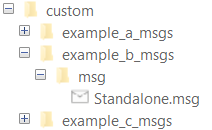
The package contains the custom message type Standalone.msg. MATLAB uses these files to generate the necessary files for using the custom messages contained in the package.
In this example, you create ROS 2 custom messages in MATLAB. You must have a ROS 2 package that contains the required msg file.
After ensuring that your custom message package is correct, you specify the path to the parent folder and call ros2genmsg with the specified path. The following example provided three messages example_package_a, example_package_b, and example_package_c that have dependencies. This example also illustrates that you can use a folder containing multiple messages and generate them all at the same time.
Open a new MATLAB session and create a custom message folder in a local folder.
folderPath = fullfile(pwd,"custom");
copyfile("example_*_msgs",folderPath);
Specify the folder path for custom message files and use ros2genmsg to create custom messages.
ros2genmsg(folderPath)
Identifying message files in folder 'C:/Work/custom'.Done.
Removing previous version of Python virtual environment.Done.
Creating a Python virtual environment.Done.
Adding required Python packages to virtual environment.Done.
Copying include folders.Done.
Copying libraries.Done.
Validating message files in folder 'C:/Work/custom'.Done.
[3/3] Generating MATLAB interfaces for custom message packages... Done.
Running colcon build in folder 'C:/Work/custom/matlab_msg_gen/win64'.
Build in progress. This may take several minutes...
Build succeeded.build log
Call ros2 msg list to verify creation of new custom messages.
ros2 msg list
action_msgs/CancelGoalRequest
action_msgs/GoalInfo
action_msgs/GoalStatusArray
actionlib_msgs/GoalID
actionlib_msgs/GoalStatus
builtin_interfaces/Duration
builtin_interfaces/Time composition_interfaces/ListNodesRequest
composition_interfaces/ListNodesResponse
diagnostic_msgs/AddDiagnosticsRequest
diagnostic_msgs/AddDiagnosticsResponse
example_a_msgs/DependsOnB
example_b_msgs/Standalone
example_interfaces/AddTwoIntsRequest
example_interfaces/AddTwoIntsResponse
example_interfaces/Bool
example_interfaces/Byte...
You can now use the above created custom message as the standard messages. For more information on sending and receiving messages, see Exchange Data with ROS 2 Publishers and Subscribers.
Create a publisher to use example_b_msgs/Standalone message.
node = ros2node("/node_1");
pub = ros2publisher(node,"/example_topic","example_b_msgs/Standalone");
Create a subscriber on the same topic.
sub = ros2subscriber(node,"/example_topic");Create a message and send the message.
custom_msg = ros2message("example_b_msgs/Standalone");
custom_msg.int_property = uint32(12);
custom_msg.string_property='This is ROS 2 custom message example';
send(pub,custom_msg);
pause(3) % Allow a few seconds for the message to arrive
Use LatestMessage field to know the recent message received by the subscriber.
sub.LatestMessage
ans = struct with fields:
        MessageType: 'example_b_msgs/Standalone'
       int_property: 12
    string_property: 'This is ROS 2 custom message example'
Remove the created ROS objects.
clear node pub sub
Replacing Definitions of Built-In Messages with Custom Definitions
MATLAB provides a lot of built-in ROS 2 message types. You can replace the definitions of those message types with new definitions using the same custom message creation workflow detailed above. When you are replacing the definitions of a built-in message package, you must ensure that the custom message package folder contains new definitions (.msg files) for all the message types in the corresponding built-in message package.
In this example, you create a shareable ROS 2 custom message package in MATLAB®. You must have a ROS 2 package that contains the required msg file. This figure shows an example of an appropriate folder structure.
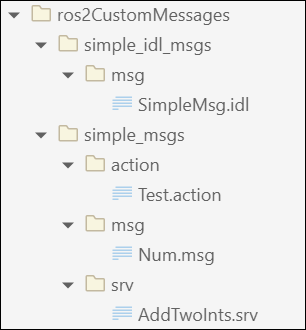
After you prepare your custom message package folder, you specify the path to the parent folder and call ros2genmsg with the specified path.
When generating custom messages on a Windows® machine, the build can fail if the folder path exceeds the Windows MAX_PATH limit. To avoid build failure, you choose one of these options:
Use a shorter folder path or map the longer path to a shorter network drive.
Use the
BuildRootname-value argument to specify an alternate short build path, such as
ros2genmsg(genDir, BuildRoot='C:/shortBuildPath')
This example shows how to generate custom messages at an alternate location with a shorter path.
Create a custom message package folder in a local directory.
genDir = fullfile(pwd, 'ros2CustomMessages');
packagePath = fullfile(genDir, 'simple_msgs');
mkdir(packagePath)
Create a folder named msg inside the custom message package folder.
mkdir(packagePath,'msg')Create a file named .msg inside the msg folder.
messageDefinition = {'int64 num'}messageDefinition = 1×1 cell array
{'int64 num'}
fileID = fopen(fullfile(packagePath,'msg', ...
               'Num.msg'),'w');
fprintf(fileID,'%s\n',messageDefinition{:});
fclose(fileID);
You can also generate custom ROS 2 message, service, and action types directly from ROS 2 IDL (.idl) files.
To create a custom ROS 2 message from .idl file, create another custom message package folder for the .idl files in the directory.
folderPath = fullfile(pwd,"ros2CustomMessages");
packagePath = fullfile(folderPath,"simple_idl_msgs");
mkdir(packagePath)
Create a folder msg inside the custom message package folder.
mkdir(packagePath, "msg")Create an .idl file inside the msg folder.
idlMsgDefinition = {
'module simple_idl_msgs {'
 'module msg {'
    'struct SimpleMsg {'
        'uint8 uint8_type;'
        'string string_type;'
    '};'
 '};'
'};'
}
idlMsgDefinition = 8×1 cell array
"'module simple_idl_msgs {'"
"'module msg {'"
"'struct SimpleMsg {'"
"'uint8 uint8_type;'"
"'string string_type;'"
"'};'"
"'};'"
"'};'"
fileID = fopen(fullfile(packagePath,'msg','SimpleMsg.idl'),'w');
fprintf(fileID,'%s\n',idlMsgDefinition{:});
fclose(fileID);
Now revert the custom message package folder path to simple_msgs and create a folder named srv inside it.
packagePath = fullfile(genDir, 'simple_msgs');
mkdir(packagePath,'srv')
Create a file named .srv inside the srv folder.
serviceDefinition = {'int64 a'
                     'int64 b'
                     '---'
                     'int64 sum'}
serviceDefinition = 4×1 cell array
"'int64 a'"
"'int64 b'"
"'---'"
"'int64 sum'"
fileID = fopen(fullfile(packagePath,'srv', ...
               'AddTwoInts.srv'),'w');
fprintf(fileID,'%s\n',serviceDefinition{:});
fclose(fileID);
Also, create a folder named action inside the custom message package folder.
mkdir(packagePath,'action')Create a file named .action inside the action folder.
actionDefinition = {'int64 goal'
                    '---'
                    'int64 result'
                    '---'
                    'int64 feedback'}
actionDefinition = 5×1 cell array
"'int64 goal'"
"'---'"
"'int64 result'"
"'---'"
"'int64 feedback'"
fileID = fopen(fullfile(packagePath,'action', ...
               'Test.action'),'w');
fprintf(fileID,'%s\n',actionDefinition{:});
fclose(fileID);
Generate custom messages from ROS 2 definitions in .msg, .srv and .action files. Use the CreateShareableFile name-value argument to create a shareable ZIP archive of the generated custom messages and BuildRoot name-value argument to specify an alternate shorter build path.
For information about how to use this ZIP archive to register the custom messages in another machine, see ros2RegisterMessages.
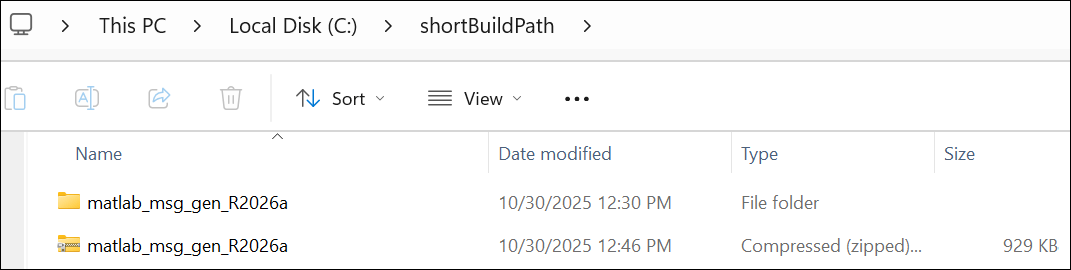
ros2genmsg(genDir, CreateShareableFile=true, BuildRoot='C:/shortBuildPath');Creating Python virtual environment for ros2.Done. Adding required Python packages to virtual environment.Done. Copying include folders.Done. Copying libraries.Done. Done. [2/2] Generating MATLAB interfaces for custom message packages... Done. Running colcon build in folder 'C:/shortBuildPath/matlab_msg_gen_R2026a/win64'. Build in progress. This may take several minutes... Build succeeded.build_log.Generating zip file in the folder 'C:/shortBuildPath'.Done.
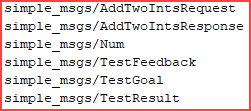
Verify creation of the new custom messages by entering ros2 msg list in the Command Window.
Input Arguments
Name-Value Arguments
Limitations
Restart Nodes
After you generate custom messages, restart any existing ROS 2 nodes.
Code Generation with Custom Messages
You can use custom message and service types with ROS 2 functionality for generating C++ code for a standalone ROS 2 node. The generated code (TGZ archive) includes the custom message definitions and the ROS 2 custom message packages. When you build the generated code in the destination Linux® system, the custom message packages are automatically available in the
colconworkspace. Set this workspace as your current working directory. Install or copy the custom message package to your system before building the generated code.
MATLAB Compiler
MATLAB Compiler™ software does not support ROS custom messages and the
ros2genmsgfunction.
Build Path Length Limitation
On Windows®, long build paths may cause custom message generation to fail. Move the custom message folder to a location with a shorter path or use the
BuildRootname-value argument to specify an alternate build path.When the custom message folder is in a directory without write access, message generation fails. Relocate the folder to a writable directory or specify a different build path using the
BuildRootargument.
Tips
During the Microsoft® Visual Studio® installation, ensure that you select Desktop development with C++ workload. This installs the MSVC compiler and all necessary dependencies required to generate custom messages.
Ensure that the path to the custom message folder does not exceed 260 characters.
Verify that the python environment configuration is correct. For more information, see ROS Toolbox System Requirements.
The custom message libraries generated for ROS 2 are user-created files that integrate into the internal ROS workflow. To safeguard these files from unauthorized access and maintain system integrity, set appropriate directory permissions to restrict access to only intended user accounts.

