getTFMap
Description
Examples
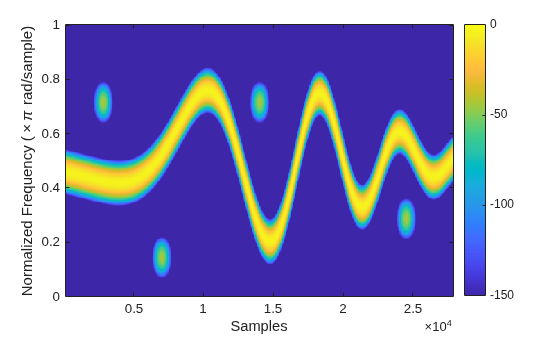
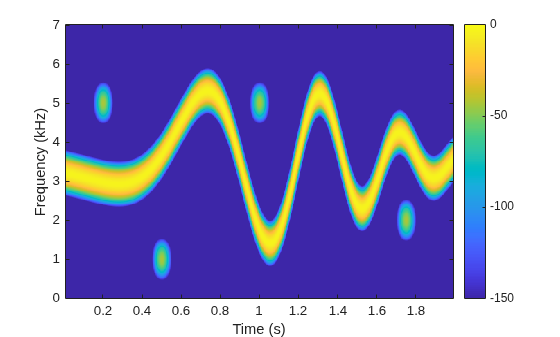
Generate a signal that consists of a voltage-controlled oscillator and four Gaussian atoms. The signal is sampled at 14 kHz for 2 seconds. Plot the spectrogram of the signal.
Fs = 14000; t = (0:1/Fs:2)'; gaussFun = @(A,x,mu,f) exp(-(x-mu).^2/(2*0.01^2)).*sin(2*pi*f.*x)*A'; atoms = gaussFun([1 1 1 1]/10,t,[0.2 0.5 1 1.75],1e3*[2 6 2 5]); vcoIn = vco(chirp(t+.1,0,t(end),3).*exp(-2*(t-1).^2),[0.1 0.4]*Fs,Fs); vcoOut = vcoIn + 0.1*atoms;
Create a set of spectrogram options for time-frequency labeling. Control the spectrogram resolution by leakage. Specify a leakage and an overlap of 99%.
beta = 0.2; opts = labelSpectrogramOptions("leakage", ... Leakage=40*(1-beta),Overlap=99);
Get the STFT map to be used in time-frequency labeling.
[s,w,n] = getTFMap(opts,vcoOut);
Plot the STFT along normalized frequencies and samples.
function tfImage(s,f,t,xlbl,ylbl) imagesc(t,f,s) axis xy xlabel(xlbl) ylabel(ylbl) colorbar clim([-150 0]) end wn = w/pi; tfImage(s,wn,n,"Samples","Normalized Frequency (\times\pi rad/sample)")
Get the STFT map to be used in time-frequency labeling. Plot the STFT along cyclical frequencies and midpoint-segment times.
[s,f,t] = getTFMap(opts,vcoOut,Fs); fn = f/1e3; tfImage(s,fn,t,"Time (s)","Frequency (kHz)")
Input Arguments
Spectrogram options, specified as a labelSpectrogramOptions object.
Example: opts =
labelSpectrogramOptions("windowlength",Window="chebyshev") specifies a
labelSpectrogramOptions object that stores spectrogram options for
time-frequency labeling.
Input signal, specified as a vector or MATLAB® timetable with uniformly sampled times and one variable comprising a column vector.
Example: x = chirp(0:1e-3:1,0,0.5,100,"quadratic") specifies a
quadratic swept-frequency signal.
Example: x =
timetable(seconds(0:1e-3:1)',chirp(0:1e-3:1,0,0.5,100,"quadratic")')
specifies a timetable containing a quadratic swept-frequency signal.
Data Types: single | double
Complex Number Support: Yes
Sample rate, specified as a positive scalar.
If you specify
Fs, thengetTFMapassumes that the input signalxhas a sample rate ofFsHz.If you do not specify
Fsor set it to empty[], thengetTFMapuses a normalized sample rate.
Do not specify Fs if you specify
x as a timetable. The getTFMap function
infers the sample rate from the time values specified in x.
Output Arguments
Size of STFT of input signal, returned as a matrix. Time increases across the
columns of s and frequency increases down the rows.
Frequencies associated with STFT output, returned as a vector.
If you specify
Fs, thenfcontains cyclical frequencies in Hz.If you do not specify
Fs, thenfcontains normalized frequencies in radians/sample.
The frequencies that the getTFMap function
returns in f depends on the resolution type of the spectrogram
(), on whether
opts.ResolutionTypex is real-valued or complex-valued, and on whether you specify
the sample rate, Fs.
| x | Frequency Range for
| |
|---|---|---|---|
|
| ||
"leakage" | Real-valued | [0,π] rad/sample | [0,Fs/2] Hz |
| Complex-valued | [–π,π] rad/sample | [–Fs/2,Fs/2] Hz | |
"rbw" or
"windowlength" | Real-valued | [0,π] rad/sample | [0,Fs/2] Hz |
| Complex-valued | (–π,π] rad/sample | (–Fs/2,Fs/2] Hz | |
Times associated with STFT output, returned as a vector.
If you specify
Fs, thentcontains time instants in seconds.If you do not specify
Fs, thentcontains sample indices in sample numbers.
The values in t correspond to the midpoint of each
segment.
Version History
Introduced in R2026a
MATLAB Command
You clicked a link that corresponds to this MATLAB command:
Run the command by entering it in the MATLAB Command Window. Web browsers do not support MATLAB commands.
Seleccione un país/idioma
Seleccione un país/idioma para obtener contenido traducido, si está disponible, y ver eventos y ofertas de productos y servicios locales. Según su ubicación geográfica, recomendamos que seleccione: .
También puede seleccionar uno de estos países/idiomas:
Cómo obtener el mejor rendimiento
Seleccione China (en idioma chino o inglés) para obtener el mejor rendimiento. Los sitios web de otros países no están optimizados para ser accedidos desde su ubicación geográfica.
América
- América Latina (Español)
- Canada (English)
- United States (English)
Europa
- Belgium (English)
- Denmark (English)
- Deutschland (Deutsch)
- España (Español)
- Finland (English)
- France (Français)
- Ireland (English)
- Italia (Italiano)
- Luxembourg (English)
- Netherlands (English)
- Norway (English)
- Österreich (Deutsch)
- Portugal (English)
- Sweden (English)
- Switzerland
- United Kingdom (English)