SimBiology.RuntimeOptions
R2026bOptions for logged SimBiology quantity components
Description
A SimBiology.RuntimeOptions object contains information on
which species, parameters, or compartments are logged during simulation.
Creation
This object is a property of a Configset object. Use dot notation or get or set to access and modify this object from a
configset object.
Properties
Examples
Load the Lotka-Volterra model.
sbioloadproject lotka;Get the configset object of the lotka model m1.
configset = getconfigset(m1);
Display the list of species whose data are logged by default during the simulation.
configset.RuntimeOptions.StatesToLog
ans =
   SimBiology Species Array

   Index:    Compartment:    Name:    Value:    Units:    ParentModel:
   1         unnamed         x        1                   lotka
   2         unnamed         y1       900                 lotka
   3         unnamed         y2       900                 lotka
   4         unnamed         z        0                   lotka
Suppose you want to log just species y1 and y2 data. You can specify their names as a cell array of strings and set it to StatesToLog property.
configset.RuntimeOptions.StatesToLog = {'y1','y2'};Confirm the setting.
configset.RuntimeOptions.StatesToLog
ans =
   SimBiology Species Array

   Index:    Compartment:    Name:    Value:    Units:    ParentModel:
   1         unnamed         y1       900                 lotka
   2         unnamed         y2       900                 lotka
Alternatively, you can specify an array of species objects (instead of strings) to StatesToLog property.
y1 = m1.Species(2);
y2 = m1.Species(3);
configset.RuntimeOptions.StatesToLog = [y1, y2];
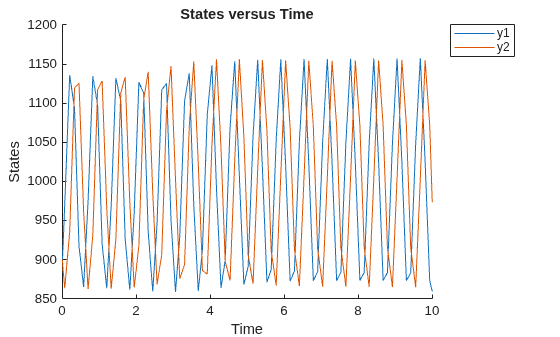
Simulate and plot the results. Notice that simulation results of only y1 and y2 are plotted.
sbioplot(sbiosimulate(m1));
To reset to the default list, set StatesToLog to a string 'all', which means all species objects, all nonconstant compartment objects and all nonconstant parameter objects are logged by default. A nonconstant compartment or parameter means that its Constant property is set to false.
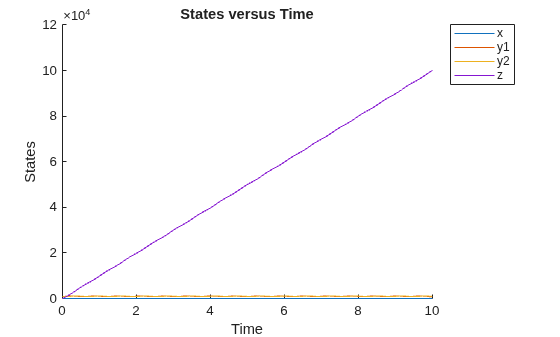
configset.RuntimeOptions.StatesToLog = 'all';Simulate again. Notice all the species data are plotted.
sbioplot(sbiosimulate(m1));
Do not specify 'all' as a cell string such as {'all'}. If so, SimBiology interprets it as a species named all.
Version History
Introduced in R2006b

