Contenido principal

Backlash

R2026b

Model behavior of system with play

  • Backlash block

Libraries:
Simulink / Discontinuities
HDL Coder / Discontinuities

Description

The Backlash block implements a system in which a change in input causes an equal change in output, except when the input changes direction. When the input changes direction, the initial change in input has no effect on the output. The amount of side-to-side play in the system is referred to as the deadband. The deadband is centered about the output. This figure shows an initial state, with the default deadband width of 1 and initial output of 0.

A number line shows the deadband.

A system with play can be in one of three modes.

ModeInputOutput
DisengagedInside deadband zone.Remains constant.
Engaged-positive directionOutside deadband zone and increasing.Equals input minus half of deadband width.
Engaged-negative directionOutside deadband zone and decreasing.Equals input plus half of deadband width.

The Initial output parameter value defines the initial center of the deadband zone.

This table shows output values when initial conditions are: Deadband width = 2 and Initial output = 5.

Output ValueCondition
5

4 <= input <= 6

input + 1input < 4
input - 1input > 6

For example, you can use the Backlash block to model the meshing of two gears. The input and output are both shafts with a gear on one end, and the input shaft drives the output shaft. Extra space between the gear teeth introduces play. The width of this spacing is the Deadband width parameter. If the system is disengaged initially, the Initial output parameter defines the output.

These figures illustrate operation when the initial input is within the deadband and the system begins in disengaged mode.

A number line shows the input in the middle of the deadband.

When the input increases and reaches the end of the deadband, it engages the output. The output remains at its previous value.

A number line shows the input on the edge of the deadband.

After the input engages the output, the output changes by the same amount as the input.

A number line shows the input on the edge of the deadband.

If the input reverses direction, it disengages from the output. The output remains constant until the input reaches the end of the deadband and engages again.

Examples

expand all

This example shows the effect of the Backlash block on a sine wave using default parameters. The initial Deadband width is 1 and the Initial output is 0.
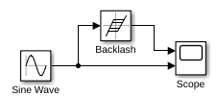
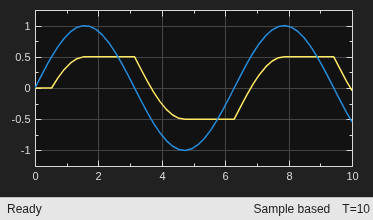
The initial deadband is centered around 0 and has a width of 1, which extends .5 in each direction. The output from the Backlash block begins at 0 and does not change until the input reaches the edge of the dead zone at .5. Then the output engages in a positive direction and changes an equal amount as the input. After the input reaches a value of 1, it starts moving in a negative direction. At this point the output disengages and stays flat until the input passes through the deadband width of 1. Once the input reaches the end of the deadband zone at 0, then the output engages and starts moving in a negative direction with the input.

Ports

Input

expand all

Input signal to the backlash algorithm. The value of this signal is either in the deadband or engaging the output in a positive or negative direction.

Data Types: double | single | int8 | int16 | int32 | uint8 | uint16 | uint32

Output

expand all

Output signal after the backlash algorithm is applied to the input signal. When the input is in the deadband, then the output remains unchanged. If the input is engaged with the output, then the output changes an equal amount as the input.

Data Types: double | single | int8 | int16 | int32 | uint8 | uint16 | uint32

Parameters

expand all

Specify the size of the deadband zone centered on the output value. When the input signal is inside the deadband, then a change in input does not cause a change in output. When the input signal is outside of the deadband, then the output changes an equal amount as the input.

Programmatic Use

To set the block parameter value programmatically, use the set_param function.

Parameter: BacklashWidth
Values: '1' (default) | real scalar or vector
Data Types: char | string

Example: set_param("myModel/Backlash",BacklashWidth="2") configures the Backlash block named Backlash in the model myModel to use a deadband width of 2.

Specify the initial center of the deadband zone. If the initial input value is in the deadband zone, then the output value is equal to Initial output. If the initial input value is outside of the deadband zone, then the output value is Initial output plus or minus half of the deadzone width.

Programmatic Use

To set the block parameter value programmatically, use the set_param function.

Parameter: InitialOutput
Values: '0' (default) | real scalar or vector
Data Types: char | string

Example: set_param("myModel/Backlash",InitialOutput="5") configures the Backlash block named Backlash in the model myModel to use an initial output of 5.

Specify whether the block performs sample- or frame-based processing:

  • Columns as channels (frame based) — Treat each column of the input as a separate channel (frame-based processing).

    Note

    Frame-based processing requires a DSP System Toolbox™ license.

    For more information, see Sample- and Frame-Based Concepts (DSP System Toolbox).

  • Elements as channels (sample based) — Treat each element of the input as a separate channel (sample-based processing).

Use Input processing to specify whether the block performs sample- or frame-based processing. For more information about these two processing modes, see Sample- and Frame-Based Concepts (DSP System Toolbox).

Programmatic Use

Block Parameter: InputProcessing
Type: character vector
Values: 'Columns as channels (frame based)' | 'Elements as channels (sample based)'
Default: 'Elements as channels (sample based)'

Select to enable zero-crossing detection. For more information, see Zero-Crossing Detection.

This block supports zero-crossing detection only in simulations that use a variable-step solver. When you use a fixed-step solver for simulation, the software does not detect or locate zero crossings for this block.

Programmatic Use

To set the block parameter value programmatically, use the set_param function.

Parameter: ZeroCross
Values: 'on' (default) | "off"
Data Types: char | string

Example: set_param("myModel/Backlash",ZeroCross="off") disables zero-crossing detection for the Backlash block named Backlash in the model myModel.

Block Characteristics

Data Types

double | integer | single

Direct Feedthrough

yes

Multidimensional Signals

no

Variable-Size Signals

no

Zero-Crossing Detection

yes

Extended Capabilities

expand all

Version History

Introduced before R2006a

expand all

See Also