fprintf
R2026bMuestra texto variable centrado en el icono del subsistema enmascarado
Descripción
fprintf( da formato a formatspec,var)var como se especifica en formatspec.
Ejemplos
Muestre el texto Hello en el icono.
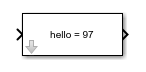
fprintf('Hello');Convierta el carácter a en un número entero 97 y muéstrelo en el icono de bloque.
myvar = 'a'
fprintf('hello = %d',myvar);
Argumentos de entrada
El texto que aparece en el bloque se especifica como cadena o vector de caracteres.
Tipos de datos: char | string
Se especifica el carácter de conversión para la variable.
Operador de formato
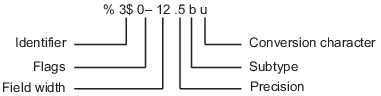
Un operador de formato comienza con un signo de porcentaje, %, y termina con un carácter de conversión. Es obligatorio especificar el carácter de conversión. Opcionalmente, puede especificar operadores de identificador, indicadores, ancho de campo, precisión y subtipo entre % y el carácter de conversión. Los espacios entre operadores no son válidos y se muestran aquí solo para facilitar la lectura.
Carácter de conversión
Esta tabla muestra los caracteres de conversión para formatear datos numéricos y de caracteres como texto.
| Tipo de valor | Conversión | Detalles |
|---|---|---|
Entero, con signo |
| Base 10 |
Entero, sin signo |
| Base 10 |
| Base 8 (octal) | |
| Base 16 (hexadecimal), letras minúsculas | |
| Igual que | |
Número de punto flotante |
| Notación de puntos fijos (use un operador de precisión para especificar el número de dígitos después del punto decimal). |
| Notación exponencial, como | |
| Igual que | |
| El más compacto de | |
| El más compacto de | |
Caracteres o cadenas |
| Carácter único |
| Vector de caracteres o arreglo de cadenas. El tipo del texto de salida es el mismo que el tipo de |
Tipos de datos: char | string
La variable se formatea según el carácter de formato especificado en formatspec.
Nota
Si bien esta función fprintf es idéntica en nombre a su función MATLAB® correspondiente, solo proporciona la funcionalidad descrita en esta página.
Historial de versiones
Introducido antes de R2006a
Consulte también
disp | port_label | text | Mask Display and Initialization Commands

