Contenido principal

getThresholdRule

R2026b

Get threshold rule from configuration

Since R2026b

    Description

    val = getThresholdRule(config,Name=Value) returns the threshold rule matching the specified identifiers from the configuration config. Use this function to get a specific threshold rule so you can inspect or modify its classifications, as shown in Adjust Dashboard Thresholds to Match Your Testing Criteria.
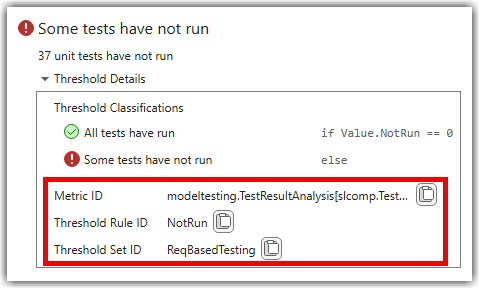
    Threshold rules for the "Not Run" widget

    example

    Examples

    collapse all

    Copy a shipping threshold set, then get a specific threshold rule to view its compliance criteria.

    Copy the "ReqBasedTesting" shipping threshold set.

    config = metric.config.Configuration.copyThresholdSet( ...
        SourceThresholdSetId="ReqBasedTesting", ...
        TargetThresholdSetId="MyTestingThresholds");

    Get the threshold rule for the Not Run widget. To find the threshold rule ID and metric ID for a widget, point to the compliance overlay in the dashboard and expand the Threshold Details.

    rule = getThresholdRule(config, ...
        ThresholdSetId="MyTestingThresholds", ...
        MetricId="modeltesting.TestResultAnalysis[slcomp.TestStatusDistribution]", ...
        ThresholdRuleId="NotRun")
    rule =
    
      ThresholdRule with properties:
    
                     Id: "NotRun"
         ThresholdSetId: "MyTestingThresholds"
               MetricId: "modeltesting.TestResultAnalysis[slcomp.TestStatusDistribution]"
            Description: [1x1 metric.threshold.Description]
        Classifications: [1x2 metric.threshold.Classification]

    Inspect the classifications to see the compliance criteria.

    rule.Classifications(1)
    rule.Classifications(2)
    ans =
    
      Classification with properties:
    
         Category: Compliant
        Statement: "Value.NotRun == 0"
          Summary: "All tests have run"
    
    
    ans =
    
      Classification with properties:
    
         Category: NonCompliant
        Statement: ""
          Summary: "Some tests have not run"

    Input Arguments

    collapse all

    Configuration, specified as a metric.config.Configuration object.

    Name-Value Arguments

    collapse all

    Specify optional pairs of arguments as Name1=Value1,...,NameN=ValueN, where Name is the argument name and Value is the corresponding value. Name-value arguments must appear after other arguments, but the order of the pairs does not matter.

    Example: getThresholdRule(config,ThresholdSetId="MyTestingThresholds",MetricId="modeltesting.TestResultAnalysis[slcomp.TestStatusDistribution]",ThresholdRuleId="NotRun")

    Identifier of the threshold set containing the rule, specified as a string scalar.

    Data Types: string

    Identifier of the metric associated with the threshold rule, specified as a string scalar.

    Data Types: string

    Unique identifier of the threshold rule to get, specified as a string scalar.

    Data Types: string

    Output Arguments

    collapse all

    Threshold rule, returned as a metric.threshold.ThresholdRule object. If no rule matches the specified identifiers, the function returns an empty metric.threshold.ThresholdRule object.

    Version History

    Introduced in R2026b