Dynamics Analysis of a Robotic Arm in MATLAB
R2026bThis example demonstrates a workflow for dynamics analysis of a serial link robotic arm in MATLAB® using Simscape™ Multibody™. It demonstrates various classes under simscape.multibody.* namespace to build and analyze a multibody system in MATLAB.
The example shows how to:
Build a serial link robotic system programmatically.
Generate a user-defined end-effector path.
Solve inverse kinematics involving joint limits via optimization to find joint positions.
Generate joint trajectories subject to kinematic constraints.
Use a root-finding approach to compute the maximum lifting force such that at least one joint actuator reaches its torque limit.
Build a Robotic Arm
Build a serial link robotic arm. The buildSerialLinkManipulator function constructs a Multibody model in the workspace, which is then compiled to obtain a CompiledMultibody (cmb):
% To simplify the process and avoid repeatedly typing the namespace name
% for the classes, you can use the import function.
import simscape.Value simscape.op.* simscape.multibody.*;
addpath(fullfile('DynamicsAnalysisOfARoboticArmInMATLABSupport','Scripts'));

mb = buildSerialLinkManipulator;
cmb = compile(mb);
Generate an End-Effector Path
Define a smooth arc from a start position to an end position for the end-effector of the robotic arm. The arc should reach its maximum height in the z-axis at the midpoint:
numIterations = 25;                % Number of discrete points along the trajectory
startPos = [0.5, 0,   0];          % [x, y, z] start
endPos   = [0,   0.5, 0];          % [x, y, z] end
zPeak    = 0.5;                    % Maximum z-height at the arc midpoint

s = linspace(0, 1, numIterations); % Parameter s in [0..1], for numIterations points
tVals = 3*s.^2 - 2*s.^3;           % Smooth step function t(s) = 3s^2 - 2s^3

% Compute X & Y via linear interpolation between start and end
x = startPos(1) + (endPos(1) - startPos(1)).*tVals;
y = startPos(2) + (endPos(2) - startPos(2)).*tVals;

% Sine bump in Z from 0 up to zPeak, back to 0
z = zPeak .* sin(pi .* tVals);
Generate Joint Angles via Inverse Kinematics
To analyze the robot's dynamics at each point along the trajectory, we need the specific joint angles that place the end-effector along the path defined by x, y and z coordinates. To solve for the joint angles, use the fmincon function imposing joint angle limits. The four key joints under consideration are:
"Arm_Subsys/Rev_1/Rz"
"Arm_Subsys/Rev_2/Rz"
"Arm_Subsys/Rev_3/Rz"
"Arm_Subsys/Rev_4/Rz"
jointAngles = zeros(numIterations,4);   % Preallocate a matrix of joint positions for each orientation of interest

initial_guess = [0; 0; 0; 0];           % Starting guess for the optimization

% Loop over end-effector orientations
for i = 1:numIterations
    target_translation = [x(i); y(i); z(i)]; % Target end-effector position

    % Optimization objective: minimize the transformation error between the
    % actual end-effector position and target_translation.
    objective_function = @(q) computeTargetEndEffectorPosError(cmb,q,target_translation);

    % Perform optimization to find the joint angles. Here, "sqp" is selected for its robustness in handling nonlinear
    % constraints and for typically converging quickly on smaller problems.
    options = optimoptions("fmincon","Display","none","Algorithm","sqp");

    % Joint limits justification:
    %  - The bottom swivel (joint 1) can rotate a full 360°, so it is set to (-inf, inf).
    %  - The next joint (joint 2) pivots from 0° (horizontal) to 90° (vertical).
    %  - The final two joints (3 and 4) can each rotate from -90° to +90° near the tip.
    q_opt = fmincon(objective_function, ...
                    initial_guess, ...
                    [],[],[],[], ...
                    [-inf;  0; -90; -90], ... % lower bounds (deg)
                    [ inf; 90;  90;  90], ... % upper bounds (deg)
                    [],options);

    % Update the guess for the next iteration, to have smooth transition
    % between two steps.
    initial_guess = q_opt;
    jointAngles(i,:) = q_opt;
end
Generate Joint Trajectory
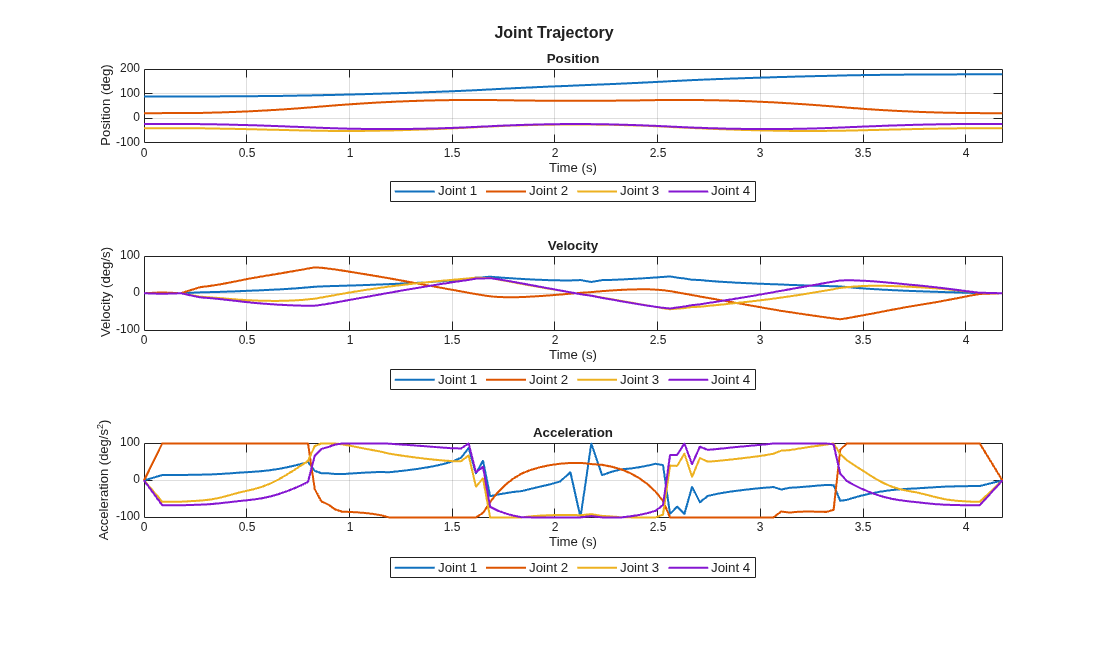
Generate the position, velocity, acceleration, and time vector of the joint trajectory subject to kinematic constraints using the contopptraj function. The function returns a time-optimal trajectory along the path defined by a set of waypoints, constrained by velocity and acceleration limits.
% Define the waypoints to generate trajectory in joint space.
waypoints = jointAngles';

% Define the joint velocity and acceleration constraints on the trajectory.
% Joint velocity and acceleration constraint justification:
%   - Joint acceleration and velocity limits are set based on the joint
%   torque limits, typical values for similar robots, and a safety margin
%   to account for uncertainties and ensure reliable operation.
velLimits = [-180 180; -180 180;-180 180;-180 180]; % deg/s
accelLimits = [-100 100; -100 100;-100 100;-100 100]; % deg/s^2

% Generate the trajectory for each joint of the robot.
[jointPositions,jointVelocities,jointAccelerations,t] = contopptraj(waypoints,velLimits,accelLimits,NumSamples=100);

% Plot the joint trajectory of the robot.
plotJointTrajectory(jointPositions,jointVelocities,jointAccelerations,t);
Generate States
% Create an operating point to define joint position and velocity and
% compute system states.
states = repmat(State,1,length(t)); % Preallocate a vector of state objects

for i = 1:length(t)
    % Create an OperatingPoint to define joint positions and velocities.
    op = simscape.op.OperatingPoint;
    op("Arm_Subsys/Rev_1/Rz/q") = Target(jointPositions(1, i),"deg","High");
    op("Arm_Subsys/Rev_2/Rz/q") = Target(jointPositions(2, i),"deg","High");
    op("Arm_Subsys/Rev_3/Rz/q") = Target(jointPositions(3, i),"deg","High");
    op("Arm_Subsys/Rev_4/Rz/q") = Target(jointPositions(4, i),"deg","High");

    op("Arm_Subsys/Rev_1/Rz/w") = Target(jointVelocities(1, i),"deg/s","High");
    op("Arm_Subsys/Rev_2/Rz/w") = Target(jointVelocities(2, i),"deg/s","High");
    op("Arm_Subsys/Rev_3/Rz/w") = Target(jointVelocities(3, i),"deg/s","High");
    op("Arm_Subsys/Rev_4/Rz/w") = Target(jointVelocities(4, i),"deg/s","High");

    % Compute and store the system state.
    states(i) = computeState(cmb,op);

    % Visualize the manipulator for each iteration
    visualize(cmb,states(i),"robotTrajectory");
end
Perform Dynamics Analysis
Next, determine the maximum lifting force in the -Z direction such that at least one joint reaches its torque limit:
% The motor at each revolute primitive would have a maximum torque capacity.
torqueLimits = [20, 15, 10, 5]; % The torque limit (in N*m) decreases moving from base to tip

% Set up Computed Torque.
actDict = JointActuationDictionary;
compT = RevolutePrimitiveActuationTorque("Computed");
actDict("Arm_Subsys/Rev_1/Rz") = compT;
actDict("Arm_Subsys/Rev_2/Rz") = compT;
actDict("Arm_Subsys/Rev_3/Rz") = compT;
actDict("Arm_Subsys/Rev_4/Rz") = compT;

% Define a handle for the root finder: ratioGuess(f) = maxRatio - 1, where
% ratio is torque/torqueLimit.
% getMaxTorqueRatioForAllStates applies the specified force at the end effector and
% compute the resulting torques for each joint/state, using computeDynamics.
% It returns the maximum absolute torque and the complete torque matrix.
ratioGuess = @(testF) (getMaxTorqueRatioForAllStates(testF, cmb, states, actDict,...
                        jointAccelerations, torqueLimits)) - 1;

% Bracket the guess between lowF and highF, so fzero can locate a root where
% ratioGuess(f) = 0 (i.e., the joint torque ratio hits 1).
% The function must have opposite signs at these endpoints.
lowF = 0;
highF = 500;

valLow = ratioGuess(lowF);   % if <0 => under limit
valHigh = ratioGuess(highF); % if >0 => over limit

% Solve ratioGuess(f)=0 => means maxRatio=1 => at least one joint is
% exactly at limit.
f_solution = fzero(ratioGuess,[lowF, highF]);

% Retrieve the torque distribution at that force.
[finalRatio, torqueMatrix] = getMaxTorqueRatioForAllStates(f_solution, cmb, states,...
                                                            actDict,jointAccelerations, torqueLimits);

% Now find max force for each orientation, the overall maximum lifting
% capacity will be minimum of all.
maxForces = getMaxForceForEachOrientation(cmb, states, actDict, jointAccelerations, torqueLimits, lowF, highF);
Plot the Results
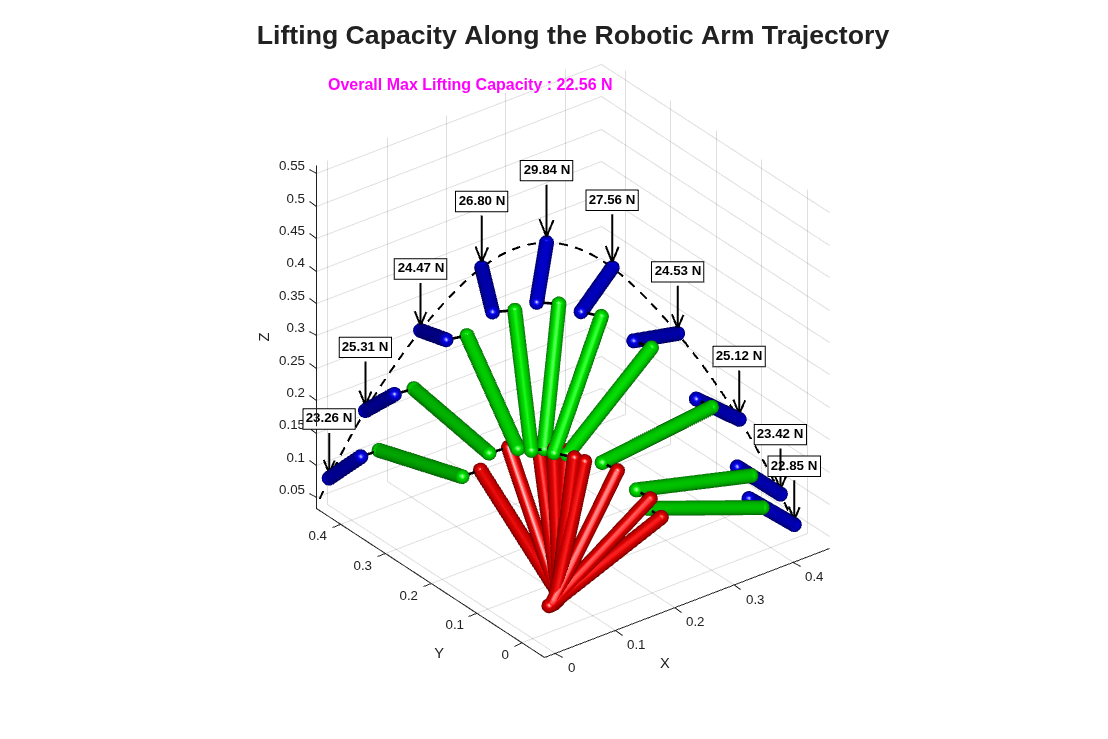
Retrieve the final poses of each link in 3-D and overlay the manipulator's geometry at key frames along the trajectory, plus the path of the end-effector. We also produce a 2-D plot of the four joint torque history:
trajectory = zeros(numel(states),3);  % Store end-effector positions for plotting

figure('Color','w','Units','pixels','Position',[100 100 1200 800]);
title('Lifting Capacity Along the Robotic Arm Trajectory','FontSize',20);
hold on; grid on;
view(3); axis equal;
xlabel('X'); ylabel('Y'); zlabel('Z');

% Some basic lighting
camlight headlight;
lighting gouraud;
material dull;

% Choose certain key frames to display the arm.
keyFrames = 1:(numel(states)/10):numel(states);
for iter = 1:numel(states)
    % Plot in MATLAB
    link_1_neg = transformation(cmb,"World/W","Arm_Subsys/arm_link_1/NegEnd",states(iter)).cartesianOffset.value;
    link_1_pos = transformation(cmb,"World/W","Arm_Subsys/arm_link_1/PosEnd",states(iter)).cartesianOffset.value;
    link_2_neg = transformation(cmb,"World/W","Arm_Subsys/arm_link_2/NegEnd",states(iter)).cartesianOffset.value;
    link_2_pos = transformation(cmb,"World/W","Arm_Subsys/arm_link_2/PosEnd",states(iter)).cartesianOffset.value;
    link_3_neg = transformation(cmb,"World/W","Arm_Subsys/arm_link_3/NegEnd",states(iter)).cartesianOffset.value;
    link_3_pos = transformation(cmb,"World/W","Arm_Subsys/arm_link_3/PosEnd",states(iter)).cartesianOffset.value;

    % Plot only certain frames to reduce clutter
    if (ismember(iter, keyFrames))
        plotRoboticArm(link_1_neg,link_1_pos, ...
                       link_2_neg,link_2_pos, ...
                       link_3_neg,link_3_pos, ...
                       maxForces(iter));

    end

    % Store the end-effector position
    trajectory(iter, :) = link_3_pos';
end

% Highlight the Max Lifting Force on the Plot.
text(0.02, 0.95, 0.02, ...
    sprintf('Overall Max Lifting Capacity : %.2f N',f_solution), ...
    'Units','normalized', ...
    'FontSize',12, ...
    'FontWeight','bold', ...
    'Color','magenta');

% Plot the path of the end-effector.
plot3(trajectory(:, 1),trajectory(:, 2),trajectory(:, 3),'k--','LineWidth',1.5);
hold off;
% Finally, plot the torque profiles for each of the 4 joint primitives.
plotTorques(torqueMatrix,t);
[Joint 1] Max torque = 0.10 Nm [Joint 2] Max torque = 15.00 Nm [Joint 3] Max torque = 9.37 Nm [Joint 4] Max torque = 4.25 Nm
![Figure contains an axes object. The axes object with title Joint Torque History, xlabel Time (s), ylabel Torque [N·m] contains 12 objects of type line, text. One or more of the lines displays its values using only markers These objects represent Joint 1, Joint 2, Joint 3, Joint 4, Max Torque Joint 1, Max Torque Joint 2, Max Torque Joint 3, Max Torque Joint 4.](../../examples/sm/DynamicsAnalysisOfARoboticArmInMATLABExample_03.png)
rmpath(fullfile('DynamicsAnalysisOfARoboticArmInMATLABSupport','Scripts'));

