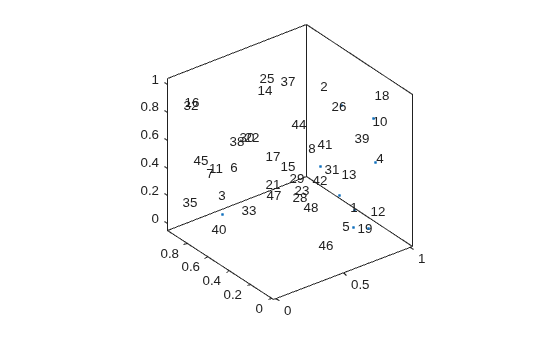
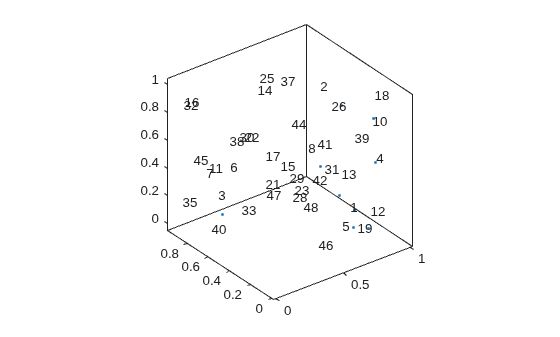
ts = textscatter3(xyz,str)
creates a 3-D text scatter plot with elements of str at the
locations specified by the rows of xyz. This syntax is
equivalent to textscatter(xyz(:,1),xyz(:,2),xyz(:,3),str).
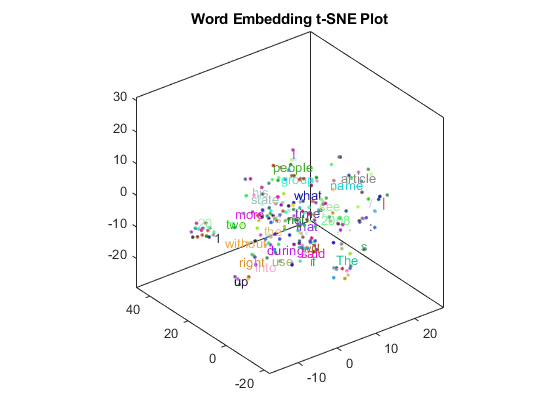
Create text scatter plot of a word embedding and specify word colors.
Load a pretrained word embedding using fastTextWordEmbedding. This function requires Text Analytics Toolbox™ Model for fastText English 16 Billion Token Word Embedding support package. If this support package is not installed, then the function provides a download link.
emb = fastTextWordEmbedding;
Convert the first 250 words to vectors using word2vec. V is a matrix of word vectors of length 300.
words = emb.Vocabulary(1:250);
V = word2vec(emb,words);
size(V)
Embed the word vectors in a 3-D space using tsne.
XYZ = tsne(V,'NumDimensions',3);
Plot the words at the coordinates specified by XYZ in a 3-D text scatter plot. Specify the word colors to be random.
Specify optional pairs of arguments as
Name1=Value1,...,NameN=ValueN, where Name is
the argument name and Value is the corresponding value.
Name-value arguments must appear after other arguments, but the order of the
pairs does not matter.
Before R2021a, use commas to separate each name and value, and encloseNamein quotes.
Example: 'Marker','*' specifies the markers to be
asterisks.
The TextScatter object properties listed here are only a subset.
For a complete list, see TextScatter Properties.
Percentage of text data to show, specified as a scalar from 0 through 100. To show all text,
set TextDensityPercentage to 100. To show no text, set
TextDensityPercentage to 0.
If you set TextDensityPercentage to 100, then the software does not plot markers.
Example: 70
Maximum length of text labels, specified as a positive integer. The software truncates the text labels to this length and adds ellipses at the point of truncation.
Example: 10
Marker colors, specified as one of these values:
'auto' — For each marker, use the same color as the
corresponding text labels.
'none' — Do not show markers.
RGB triplet — Use the same color for all the markers in the plot. An RGB triplet is a
three-element row vector whose elements specify the intensities of the red,
green, and blue components of the color. The intensities must be in the
range [0,1]; for example, [0.5 0.6
0.7].
Example: [1 0 0]
Text colors, specified as one of these values:
RGB triplet — Use the same color for all the text in the plot. An RGB triplet is a
three-element row vector whose elements specify the intensities of the red, green, and
blue components of the color. The intensities must be in the range
[0,1]; for example, [0.5 0.6 0.7].
Three-column matrix of RGB triplets — Use a different color for each text label in
the plot. Each row of the matrix defines one color. The number of rows must equal the
number of text labels.
Categorical vector — Use a different color for each category in the vector. Specify
ColorData as a vector the same length as XData.
Specify the colors for each category using the Colors
property
Example: [1 0 0; 0 1 0; 0 0 1]
Category colors, specified as a matrix of RGB triplets. An RGB triplet is a three-element row
vector whose elements specify the intensities of the red, green, and blue components of
the color. The intensities must be in the range [0,1]; for example,
[0.5 0.6 0.7].
By default, Colors is equal to the ColorOrder
property of the axes object.
TextScatter object. Use ts to access and
modify properties of the text scatter chart after it has been created. For more
information, see TextScatter Properties.
You clicked a link that corresponds to this MATLAB command:
Run the command by entering it in the MATLAB Command Window.
Web browsers do not support MATLAB commands.
Seleccione un país/idioma
Seleccione un país/idioma para obtener contenido traducido, si está disponible, y ver eventos y ofertas de productos y servicios locales. Según su ubicación geográfica, recomendamos que seleccione: .
También puede seleccionar uno de estos países/idiomas:
Cómo obtener el mejor rendimiento
Seleccione China (en idioma chino o inglés) para obtener el mejor rendimiento. Los sitios web de otros países no están optimizados para ser accedidos desde su ubicación geográfica.