Contenido principal

extractImageEmbeddings

Extract feature embeddings from image using CLIP network image encoder

Since R2026a

    Description

    Add-On Required: This feature requires the Computer Vision Toolbox Model for OpenAI CLIP Network add-on.

    imageEmbeddings = extractImageEmbeddings(clip,I) extracts the feature embeddings from the image data I using the image encoder of a Contrastive Language-Image Pre-Training (CLIP) network, clip, by running a forward pass on the neural network.

    Note

    This functionality requires Deep Learning Toolbox™.

    example

    imageEmbeddings = extractImageEmbeddings(clip,I,Name=Value) specifies options using one or more name-value arguments. For example, MiniBatchSize=32 limits the batch size to 32 images.

    Examples

    collapse all

    Create a pretrained CLIP network with a ViT-B/16 backbone.

    clip = clipNetwork("vit-b-16");

    Create a datastore of images, imds, and display a montage of the images.

    pathToImages = fullfile(toolboxdir("vision"),"visiondata","imageSets");
    imds = imageDatastore(pathToImages,IncludeSubfolders=true);
    montage(imds)
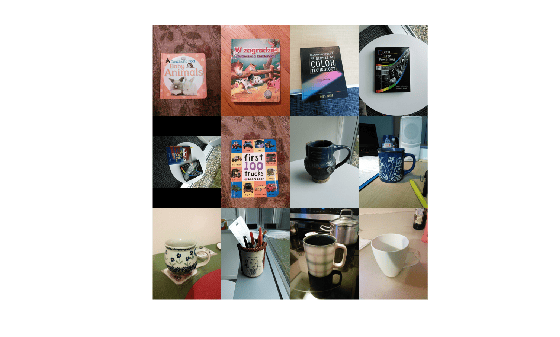
    Figure contains an axes object. The hidden axes object contains an object of type image.

    Extract the feature embeddings for each image in the datastore.

    imageEmbeddings = extractImageEmbeddings(clip,imds);

    Display the size of the feature embeddings.

    size(imageEmbeddings)
    ans = 1×2
    
       512    12


    Input Arguments

    collapse all

    CLIP network, specified as a clipNetwork object.

    Input image data, specified in one of these formats:

    • H-by-W-by-3-by-B numeric array representing a batch of B truecolor images.

    • H-by-W-by-1-by-B numeric array representing a batch of B grayscale images.

    • Datastore that reads and returns truecolor images.

    • Formatted dlarray (Deep Learning Toolbox) object with two spatial dimensions of the format "SSCB". You can specify multiple test images by including a batch dimension.

    Name-Value Arguments

    collapse all

    Specify optional pairs of arguments as Name1=Value1,...,NameN=ValueN, where Name is the argument name and Value is the corresponding value. Name-value arguments must appear after other arguments, but the order of the pairs does not matter.

    Example: extractImageEmbeddings(clip,I,MiniBatchSize=32) limits the batch size to 32 images.

    Size of batches for processing large collections of images, specified as a positive integer. Larger batch sizes reduce processing time, but require more memory.

    Hardware resource on which to run the detector, specified as "auto", "gpu", or "cpu". The table shows the valid hardware resource values.

    Resource Action
    "auto" Use a GPU if it is available. Otherwise, use the CPU.
    "gpu" Use the GPU. To use a GPU, you must have Parallel Computing Toolbox™ and a CUDA® enabled NVIDIA® GPU. If a suitable GPU is not available, the function returns an error. For information about the supported compute capabilities, see GPU Computing Requirements (Parallel Computing Toolbox).
    "cpu" Use the CPU.

    Output Arguments

    collapse all

    Feature embeddings extracted from the CLIP model encoder, returned as a 512-by-B or 768-by-B matrix, depending on the value of the backbone argument of the clipNetwork object.

    Image Encoder backbone ValueImage Embeddings Format
    "vit-b-16"

    512-by-B matrix

    "vit-l-14" or "resnet50"

    768-by-B matrix

    The extractImageEmbeddings function resizes the input images to 224-by-224 pixels for the ViT-L/14 and ViT-B/16 backbones, or to 384-by-384 pixels for the ResNet-50 backbone.

    Version History

    Introduced in R2026a