groundingDinoObjectDetector
R2026bDescription
Add-On Required: This feature requires the Computer Vision Toolbox Model for Grounding DINO Object Detection add-on.
The groundingDinoObjectDetector object creates a Grounding DINO vision-language
object detector for zero-shot object detection. This detector identifies and localizes
arbitrary objects in an image using natural language descriptions (text prompts). Use the
groundingDinoObjectDetector object to create a pretrained Grounding DINO object detector
with either a Swin-Tiny or Swin-Base backbone network. You can then use the
detect function of the groundingDinoObjectDetector object to detect
objects in an unknown image. This feature also requires the Deep Learning Toolbox™ license.
Creation
Syntax
Description
detector = groundingDinoObjectDetector
detector = groundingDinoObjectDetector(name)name.
detector = groundingDinoObjectDetector(___,Name=Value)ClassNames and ClassDescriptions properties
of the object detector.
You can use the ClassDescriptions property to provide natural
language queries for detection and the ClassNames property to assign
output labels for annotation. The ClassNames property is required. If
you specify only ClassNames, the object uses its value for both
detection and annotation. You can specify ClassDescriptions in
addition to ClassNames if you want to provide more details about the
objects to detect.
You can specify these properties either when creating the object or as name-value
arguments when calling the detect function.
If you do not specify these properties at the time of object creation, you must specify at least the
ClassNamesname-value argument when you call thedetectfunction.If you specify these properties at object creation and when calling the
detectfunction, the values specified in thedetectfunction override the values set in the detector object.
Input Arguments
Name-Value Arguments
Properties
Object Functions
detect | Detect objects using Grounding DINO object detector |
releaseGPUMemory | Release GPU memory allocated for Grounding DINO object detector |
Examples
Read an input image into the workspace.
I = imread("visionteam.jpg");Display the input image.
figure
imshow(I)
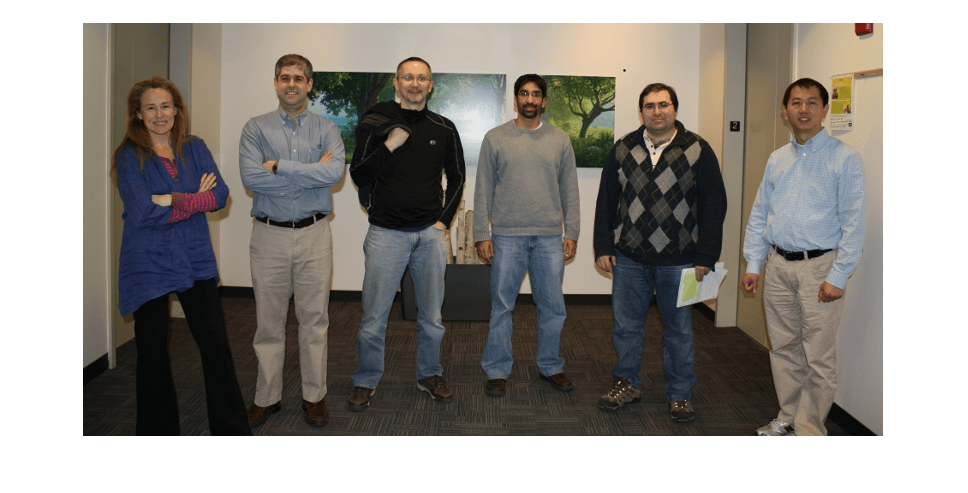
Create a Grounding DINO object detector using the Swin-Base network as the backbone network.
name = "swin-base";
detector = groundingDinoObjectDetector(name);
Specify the class names for the detector to use as output labels for the detection results.
labels = {'Holding paper','Holding jacket'};Specify the class descriptions for the detector to use as text queries for performing object detection.
descriptions = {'Person holding paper','Person holding jacket'};Detect objects in the image using the specified class names and descriptions.
[bboxes,scores,labels] = detect(detector,I,ClassNames=labels,ClassDescriptions=descriptions);
Format the detected labels and scores for image annotation.
outputLabels = compose("%s: %.2f",string(labels),scores);Annotate the detected objects in the image.
detections = insertObjectAnnotation(I,"rectangle",bboxes,outputLabels);Display the image, annotated with the detection results.
imshow(detections)
title("Objects Detected Using Text Queries with Grounding DINO")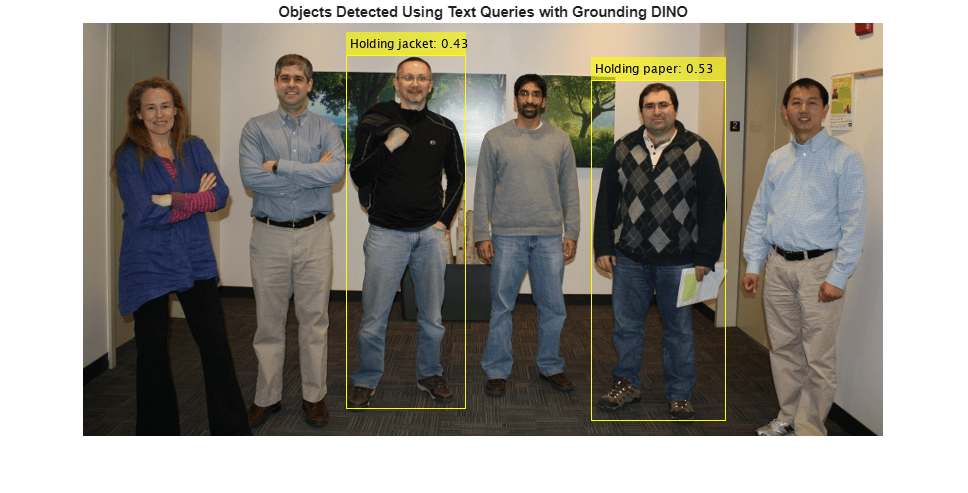
This example uses a small vehicle dataset that contains 295 images. Many of these images come from the Caltech Cars 1999 and 2001 datasets, available at the Caltech Computational Vision website created by Pietro Perona and used with permission.
Unzip the vehicle images to the working folder.
fileNames = unzip("vehicleDatasetImages.zip");Create an imageDatastore object to read the images for object detection.
imds = imageDatastore(fileNames);
Load a pretrained Grounding DINO object detector with a Swin‑Base backbone network. Use the classNames name‑value argument to specify text prompts for detecting the car and the license plate.
To improve detection accuracy and establish semantic context, specify both license plate and car as text prompts. This ensures that language-guided query selection correctly assigns the vehicle's large-scale features to car, preventing them from being falsely localized as the license plate.
detector = groundingDinoObjectDetector("swin-base",classNames=["License plate","car"]);
Read images from the image datastore using the read function. Detect cars and license plates in each image using the detect function of the groundingDINOObjectDetector object.
detectionResults = detect(detector,imds);
Visualize Detection Results
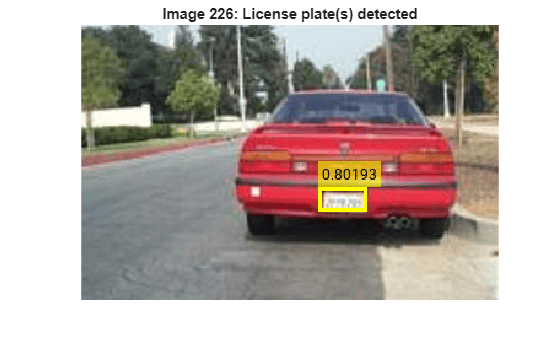
Extract the bounding boxes, detection scores, and labels from the results table. Iterate over the images in the datastore and filter detections to include only license plates. For each image, display the image and overlay bounding boxes with the corresponding attention scores when license plates are detected.
figure
allBoxes  = detectionResults.Boxes;
allScores = detectionResults.Scores;
allLabels = detectionResults.Labels;
for i = 1:length(imds.Files)
    img = readimage(imds,i);
    idx = (allLabels{i} == "License plate");
    plateBoxes = allBoxes{i}(idx,:);
    plateScores = cellstr(string(allScores{i}(idx)));

    imshow(img);

    if isempty(plateBoxes)
        title(sprintf("Image %d: No license plate detections",i));
    else
        annotatedImg = insertObjectAnnotation(img,'rectangle',plateBoxes,plateScores,...
            'LineWidth',3);
        imshow(annotatedImg);
        title(sprintf("Image %d: License plate(s) detected",i));
    end
    pause(0.1)
end
References
[1] Liu, Shilong, Zhaoyang Zeng, Tianhe Ren, et al. “Grounding DINO: Marrying DINO with Grounded Pre-Training for Open-Set Object Detection.” In Computer Vision – ECCV 2024, vol. 15105, edited by Aleš Leonardis, Elisa Ricci, Stefan Roth, Olga Russakovsky, Torsten Sattler, and Gül Varol. Springer Nature Switzerland, 2025. https://doi.org/10.1007/978-3-031-72970-6_3.
Version History
Introduced in R2026aSee Also
rtmdetObjectDetector | yolov4ObjectDetector | yoloxObjectDetector (Visual Inspection Toolbox)

