Contenido principal

Resultados de

The Cody Contest 2025 has officially wrapped up! Over the past 4 weeks, more than 700 players submitted over 20,000 solutions. In addition, participants shared 20+ high-quality Tips & Tricksarticles—resources that will benefit Cody users for years to come.
Now it’s time to announce the winners.
🎉 Week 4 winners:
Weekly Prizes for Contest Problem Group Finishers:
Weekly Prizes for Contest Problem Group Solvers:
Weekly Prizes for Tips & Tricks Articles:
This week’s prize goes to @WANG Zi-Xiang. See the comments from our judge and problem group author @Matt Tearle:
‘We had a lot of great tips for solving Cody problems in general and the contest problems specifically. But we all know there are those among us who, having solved the problem, still want to tinker and make their code better. There are different definitions of "better", but code size remains the base metric in Cody. Enter Wang Zi-Xiang who compiled a list of many tips for reducing Cody size. This post also generated some great discussion (even prompting our insane autocrat, Lord Ned himself, to chime in). I particularly like the way that, while reducing Cody size often requires some arcane tricks that would normally be considered bad coding practice, the intellectual activity of trying to "game the system" makes you consider different programming approaches, and sometimes leads you to learn corners of MATLAB that you didn't know.’
🏆 Grand Prizes for the Main Round
Team Relentless Coders:
1st Place: @Boldizsar
2nd Place: @Roberto
Team Creative Coders:
1st Place: @Mehdi Dehghan
2nd Place: @Vasilis Bellos
3rd Place: @Alaa
Team Cool Coders
1st Place: @Hong Son
2nd Place: @Norberto
3rd Place: @Maxi
Congratulations to all! Securing a top position on the leaderboard requires not only advanced MATLAB skills but also determination and consistency throughout the four-week contest. You will receive Amazon gift cards.
🥇 Winning Team
The competition was incredibly tight—we even had to use the tie-breaker rule.
Both Team Cool Coders and Team Relentless Coders achieved 16 contest group finishers. However, the last finisher on Cool Coders completed the problem group at 1:02 PM on Dec 7, while the last finisher on Relentless Coders finished at 9:47 PM the same day.
Such a close finish! Congratulations to Team Cool Coders, who have earned the Winning Team Finishers badge.
🎬 Bonus Round
Invitations have been sent to the 6 players who qualified for the Bonus Round. Stay tuned for updates—including the Big Watch Party afterward!
Congratulations again to all winners! We’ll be reaching out after the contest ends. It has been an exciting, rewarding, and knowledge-packed journey.
See you next year!
Chen Lin
Chen Lin
Última actividad el 4 de Dic. de 2025 a las 17:49

Over the past three weeks, players have been having great fun solving problems, sharing knowledge, and connecting with each other. Did you know over 15,000 solutions have already been submitted?
This is the final week to solve Cody problems and climb the leaderboard in the main round. Remember: solving just one problem in the contest problem group gives you a chance to win MathWorks T-shirts or socks.
🎉 Week 3 Winners:
Weekly Prizes for Contest Problem Group Finishers:
Weekly Prizes for Contest Problem Group Solvers:
@森緒, @R, @Javier, @Shubham Shubham, @Jiawei Gong
Weekly Prizes for Tips & Tricks Articles:
This week’s prize goes to @Cephas. See the comments from our judge and problem group author @Matt Tearle:
'Some folks have posted deep dives into how to tackle specific problems in the contest set. But others have shared multiple smaller, generally useful tips. This week, I want to congratulate the cumulative contribution of Cool Coder Cephas, who has shared several of my favorite MATLAB techniques, including logical indexing, preallocation, modular arithmetic, and more. Cephas has also given some tips applying these MATLAB techniques to specific contest problems, such as using a convenient MATLAB function to vectorize the Leaderboard problem. Tip for Problem 61059 – Leaderboard for the Nedball World Cup:'
Congratulations to all Week 3 winners! Let’s carry this momentum into the final week!
In just one week, we have hit an amazing milestone: 500+ players registered and 5000+ solutions submitted! We’ve also seen fantastic Tips & Tricks articles rolling in, making this contest a true community learning experience.
And here’s the best part: you don’t need to be a top-ranked player to win. To encourage more casual and first-time players to jump in, we’re introducing new weekly prizes starting Week 2!
New Casual Player Prizes:
  • 5 extra MathWorks T-shirts or socks will be awarded every week.
  • All you need to qualify is to register and solve one problem in the Contest Problem Group.
Jump in, try a few problems, and don’t be shy to ask questions in your team’s channel. You might walk away with a prize!
Week 1 Winners:
Weekly Prizes for Contest Problem Group Finishers:
Weekly Prizes for Tips & Tricks Articles:
Week 1 winner for best Tips & Tricks Articles is @Vasilis Bellos.
Contest problems author @Matt Tearle commented:
We had a lot of people share useful tips (including some personal favorite MATLAB tricks). But Vasilis Bellos went *deep* into the Bridges of Nedsburg problem. Fittingly for a Creative Coder, his post was innovative and entertaining, while also cleverly sneaking in some hints on a neat solution method that wasn't advertised in the problem description.
Congratulations to all Week 1 winners! Prizes will be awarded after the contest ends. Let’s keep the momentum going!
We are thrilled to announce the grand prize winners of our MATLAB Shorts Mini Hack contest! This year, we invited the MATLAB Graphics and Charting team, the authors of the MATLAB functions used in every entry, to be our judges. After careful consideration, they have selected the top three winners:
1st place - Tim
Judge comments: Realism & detailed comments; wowed us with Manta Ray
2nd place – Jenny Bosten
Judge comments: Topical hacks : Auroras & Wind turbine; beautiful landscapes & nightscapes
3rd place - Vasilis Bellos
Judge comments: Nice algorithms & extra comments; can’t go wrong with Pumpkins
There is also an Honorable Mention - William Dean
Judge comments: Impressive spring & cubes!
In addition, after validating the votes, we are pleased to announce the top 10 participants on the leaderboard:
Congratulations to all! Your creativity and skills have inspired many of us to explore and learn new skills, and make this contest a big success!
Chen Lin
Chen Lin
Última actividad el 6 de Nov. de 2024

Dear MATLAB contest enthusiasts,
Welcome to the third installment of our interview series with top contest participants! This time we had the pleasure of talking to our all-time rock star – @Jenny Bosten. Every one of her entries is a masterpiece, demonstrating a deep understanding of the relationship between mathematics and aesthetics. Even Cleve Moler, the original author of MATLAB, is impressed and wrote in his blog: "Her code for Time Lapse of Lake View to the West shows she is also a wizard of coordinate systems and color maps."
The interview has been published on the MATLAB Community Blog. We highly encourage
you to read it to learn more about Jenny’s journey, her creative process, and her favorite entries.
Question: Who would you like to see featured in our next interview? Let us know your thoughts in the comments!
Over the past week, we have seen many creative and compelling short movies! Now, let the voting begin! Cast your votes for the short movies you love. Authors, share your creations with friends, classmates, and colleagues. Let's showcase the beauty of mathematics to the world!
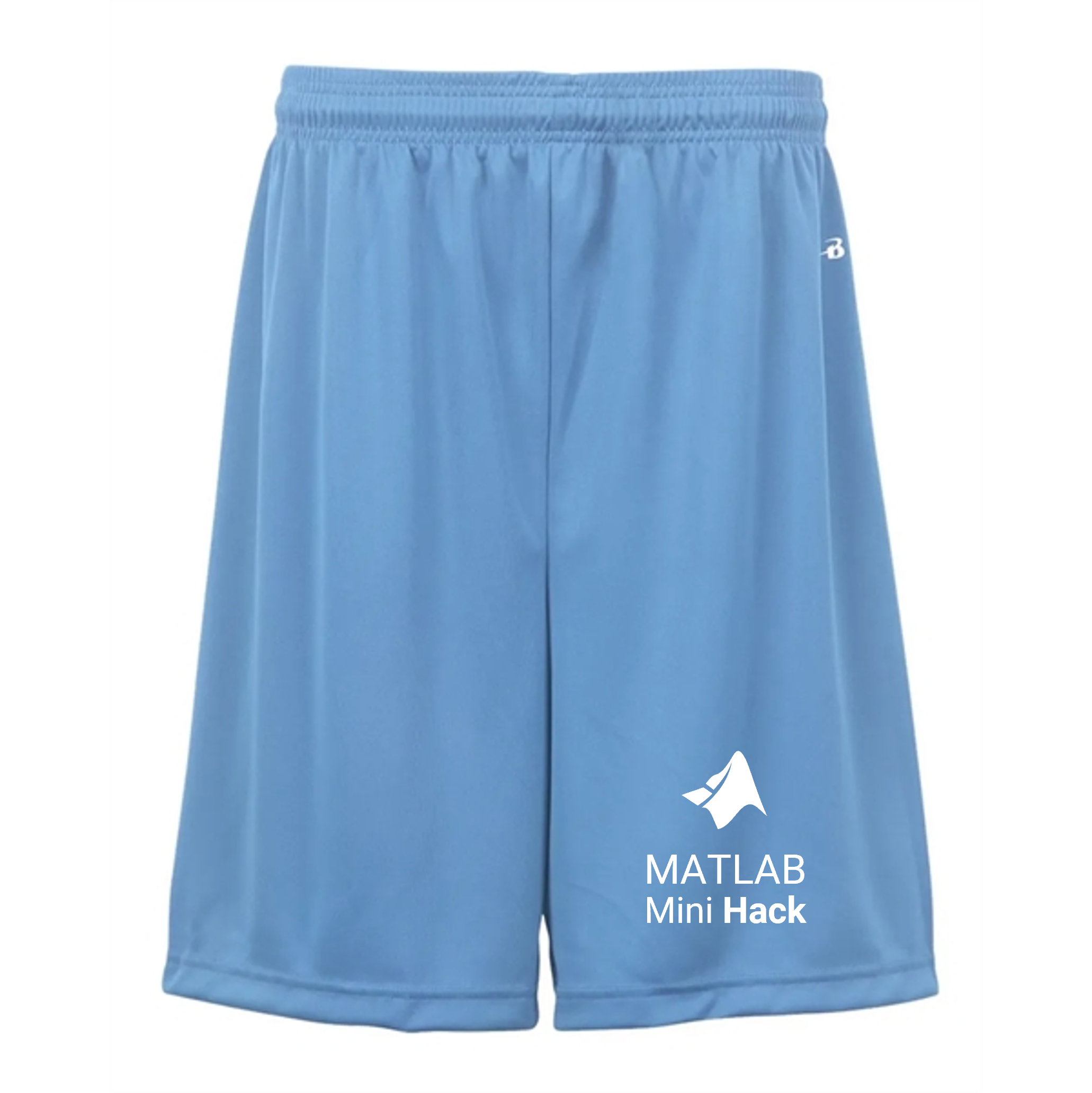
We know that one of the key goals for joining the Mini Hack contest is to LEARN! To celebrate knowledge sharing, we have special prizes—limited-edition MATLAB Shorts—up for grabs!
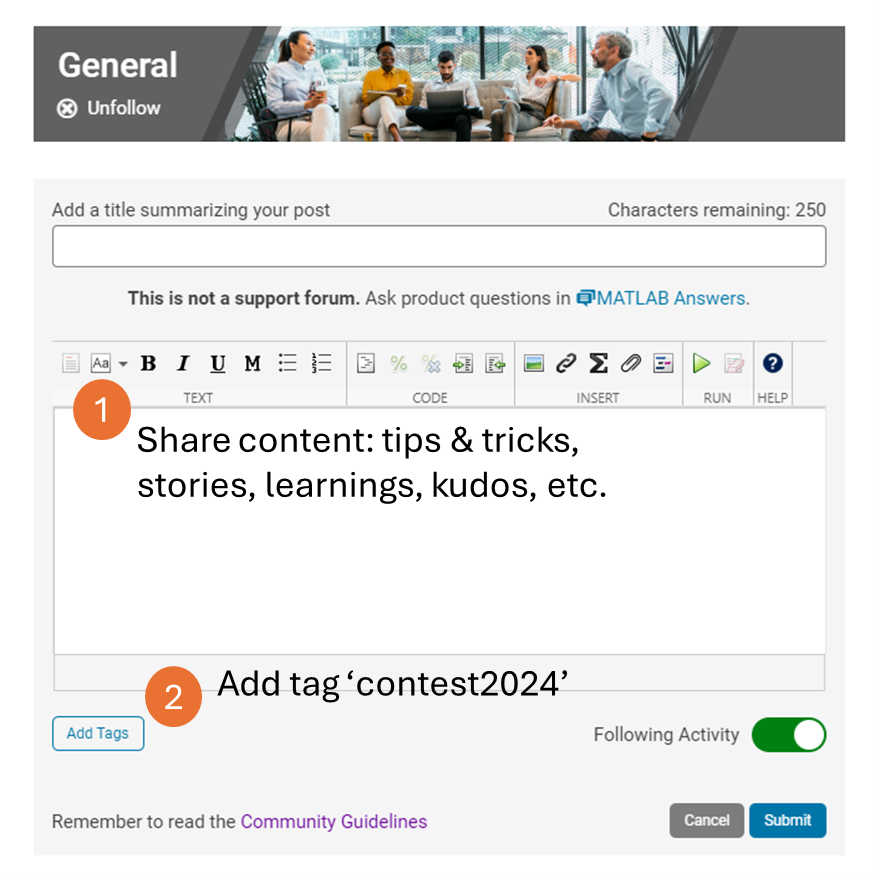
These exclusive prizes can only be earned through the MATLAB Shorts Mini Hack contest. Interested? Share your knowledge in the Discussions' general channel (be sure to add the tag 'contest2024') to earn opportunities to win the coveted MATLAB Shorts. You can share various types of content, such as tips and tricks for creating animations, background stories of your entry, or learnings you've gained from the contest. We will select different types of winners each week.
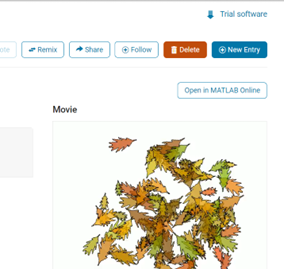
We also have an exciting feature announcement: you can now experiment with code in MATLAB Online. Simply click the 'Open in MATLAB Online' button above the movie preview section. Even better! ‘Open in MATLAB Online’ is also available in previous Mini Hack contests!
We look forward to seeing more amazing short movies in Week 2!
Emma Farnan
Emma Farnan
Última actividad el 19 de Jul. de 2024

Several of the colormaps are great for a 256 color surface plot, but aren't well optimized for extracting m colors for plotting several independent lines. The issue is that many colormaps have start/end colors that are too similar or are suboptimal colors for lines. There are certainly many workarounds for this, but it would be a great quality of life to adjust that directly when calling this.
Example:
x = linspace(0,2*pi,101)';
y = [1:6].*cos(x);
figure; plot(x,y,'LineWidth',2); grid on; axis tight;
And now if I wanted to color these lines, I could use something like turbo(6) or gray(6) and then apply it using colororder.
colororder(turbo(6))
But my issue is that the ends of the colormap are too similar. For other colormaps, you may get lines that are too light to be visible against the white background. There are plenty of workarounds, with my preference being to create extra colors and truncate that before using colororder.
cmap = turbo(8); cmap = cmap(2:end-1,:); % Truncate the end colors
figure; plot(x,y,'LineWidth',2); grid on; axis tight;
colororder(cmap)
I think it would be really awesome to add some name-argument input pair to these colormaps that can specify the range you want so this could even be done inside the colororder calling if desired. An example of my proposed solution would look something like this:
cmap = turbo(6,'Range',[0.1 0.8]); % Proposed idea to add functionality
Where in this scenario, the resulting colormap would be 6 equally spaced colors that range from 10% to 80% of the total color range. This would be especially nice because you could more quickly modify the range of colors, or you could set the limits regardless of whether you need to plot 3, 6, or 20 lines.
The 2022 community contests have concluded! During the 4 weeks, we hope you had a lot of fun and learned some MATLAB skills. Together, we've achieved amazing milestones:
  • 500+ entries and 5,000+ votes created in the Mini Hack 2022 contest.
  • 100,000+ solutions submitted in Cody 10th Anniversary contest
  • 2,000+ participants in both contests
Now, it's time to announce weekly winners and grand prize winners!
Mini Hack - Pick of the MATLAB Graphics Team
We invited the MATLAB Graphics team, the authors of the MATLAB functions used in every entry, to be our Mini Hack judges. Here are their picks in 3 categories:
  • Our Top 3:
Rising Hand by Augusto Mazzei
Object used: fill; Judge comments: Clever code, nice metaphor, kind comments
Object used: patch (via VOXview); Judge comments: Very pretty, looks like it could be in a video game
Monocular rivalry by Jenny Bosten
Object used: Image; Judge comments: We spent a too much time trying to figure out what this illusion was doing to our brains
  • Clever use of Charts:
Object used: Bar3; Judge comments: Cute! Nice fireworks!
Ship by Shanshan Wang
Object used: histogram2; Judge comments: We didn't realize there was a ship in the flow data set
A fish for fun by Shanshan Wang
Object used: plot; Judge comments: Nifty and very different from other entries.
Colorful Fibonacci Spiral #3 by Basil Imoberdorf
Object used: scatter; Judge comments: Overlapping markers make for a very cool tunnel-like effect
  • Things we still loved:
Sandstone by Tim
Object used: image; Judge comments: Domain Warping FTW
Jellyfish by Tim
Object used: surface; Judge comments: Clever use of transparency
Congratulations and you should be very proud of yourself! It's a huge achievement that your entry is recognized by the MATLAB Graphics team!
Mini Hack - special category for Week 4
Our Week 4 special category is ‘Holiday’. The winner is Christmas snowman by Simon Thor
Mini Hack - grand prize winners
After an intensive (and very time-consuming) review of votes on winning entries, we have finalized the list of grand prize winners. Huge congratulations! We appreciate the time and effort you spent and the awesome entries you created. Each of you won an Amazon gift card.
Anton Kogios, Brandon Caasenbrood, KARUPPASAMYPANDIYAN M, Teodo, Jenny Bosten, MvLevi, Abdullah Caliskan, Stewart Thomas, Jonas Schlatter, and Tim Davis
Cody 10th Anniversary - surprise prize for 28-day streak winners
We are thrilled to see that 37 players have built a streak of 28 days! Coming back every day to solve problems is an incredible achievement. We decided to show our appreciation by awarding a surprise prize to those 37 players. Congratulations! Each of you will get a MathWorks T-shirt.
Christian Schröder, Stefan Abendroth, Mohammed, Victoria, Vasileios Pasialis, Gerardo Domínguez Ramírez, HH, Anton Kogios, Lizhi Zhu, Marco Fuscà, Armando Longobardi, Monica, Rithik KRT, Ayman, Teodo, Lincoln Poon, Elijah Keifert, siranjeevi gurumani, kazuyoshi kouno, Ryan Koh, Manuela Kaiser, Mehmet OZC, Dyuman Joshi, KOTHAPALLI SRI BRINDA, Gergely Patay, abyss, Takumi, Keita Abe, Petr Cerny, Shubham Shubham, Meredith, Andrew K, Atsushi Ueno, Peter Orthmann, Armando Longobardi, Chuang Tao, and David Romero
Cody 10th Anniversary winners – Week 4
The top 3 players for solving the most problems in week 4 are Christian Schröder, Gerardo Dominguez Ramirez, and Stefan Abendroth, Congratulations! Each of you won an Amazon gift card.
Week 4 lucky winners are Qingrui Liu and Basant Ale.
Cody 10th Anniversary winners – grand prize winners
We know how hard it is to be a top-10 leader in the contest leaderboard! It requires a huge time commitment and advanced MATLAB skills. Congratulations! Each of you will win an Amazon gift card.
Christian Schröder, Stefan Abendroth, Mohammed, Victoria, Vasileios Pasialis, Gerardo Domínguez Ramírez, HH, Anton Kogios, Lizhi Zhu, and Marco Fuscà
Lucky voters and participants
Thank you for your participation in our 2022 contests. You don’t need to be on the top of the leaderboards to win. As we announced, we would give out 20 MathWorks T-shirts to lucky voters and participants of the 2 contests.
Ismail Bera Altan, Robin Stolz, Michael Mellin, Kellan Smith, Neha Shaah, Siranjeevi gurumani, Paul Villain, Andrew Horchler, Meg Noah, Saurabh Chaudhary, Pakize erdogmus, Godfrey Ojerheghan, Selena Mastrodonato, Damir Rasic, Thomas Kjeldsen, Meredith, John Noah Ramiterre, Patience Oliveira, Panda, and Sujeet Kumar Choudhary
On behalf of the MATLAB Central community team, we thank you for joining our celebration of the MATLAB Central community 2022 contests. We hope you enjoyed these contests and look forward to seeing you in next year’s contests.
Two fun community contests: MATLAB Mini Hack 2022 and Cody 10th Anniversary start today on Oct. 3rd!
Participants across all skill levels are welcome to join! Even if you have limited time, you still have opportunities to win as long as you participate.
Want to challenge yourself and win Amazon gift Cards and limited-edition Badges?
1. MATLAB Mini Hack 2022: Create your best entry (either a new or a remixed entry).
2. Cody 10th Anniversary: Solve your 1st Cody problem today!
If you have any questions about the contest rules or prizes, let us know by replying to this thread.
We hope you enjoy the contests, improve your MATLAB skills, and win prizes! Now, let the party begin!

After 7 weeks of fun, the MATLAB Central community 20th anniversary contests have concluded! Together, we shared the art of MATLAB and contributed to the battle against the global pandemic. See the fantastic stats below.

MATLAB Mini Hack Winners - Week 4

In Week 4, we invited the MATLAB Graphics team to help judge the entries. As the authors of the MATLAB functions used in every entry, they made sure every entry selected used a unique graphics function or technique from the other winners. Here are their choices:

1. Umbrellas by Shanshan Wang

Comment: Cool use of 'swarmchart' to make art from distributions; Only use of one of our newest graphics functions

2. Happy Sheep by Victoria

Comment: Cute!

3. Alien Giant by Jenny Bosten

Comment: Original idea, well textured, and efficient code

4. 3D Ultrasound by Adam Danz

Comment: Replicate source material very well. Effective use of lighting and material. Overall, impressive to produce this image given the limitation

5. Sunset in the Savanna by Sebastian Kraemer

Comment: Looks cool! Nice mix of 'image', 'fill' and 'scatter' commands.

6. Night Flight by Ratul Das

Comment: original; clever use of 'rectangle'

7. Lantern #2 by Tim

Comment: Nice use of 'getframe' to create a texture for 'surf' for a compelling picture

8. Geometric Design (6) by Daniel Pereira

Comment: Looks like some walls at MathWorks

9. Rosette 1313 by Alex P

Comment: Looks cool! Nice use of 'pcolor'

10. Mandelbrot contour by Sumihiro

Comment: Best use of contour!

11. Aim High by Murty PLN

Comment: Largest number of unique graphics objects for the Mini Hack (plot, patch,stairs,stem,text)

In the spirit of Mini Hack, the MATLAB Graphics team also created several cool graphs about the contest. Facing a similar space limit, I have picked only 2.

Bonus Prize Winners - Week 4

Congratulations to our 5 winners for their dual participation in the Treasure Hunt and the MATLAB Mini Hack. Yogiraj Bhagavatula, Pramod Devireddy, Devika U, FruitsLord, and Augusto Mazzei.

Lucky voters - Week 4

Congratulations to the lucky voters who cast the 12000th vote (Gordg Garin), 12500th vote (Eder Esteban Reyes), 13000th vote (Peram Balakrishna), 13500th vote (Emerson Nithiyaraj), 14000th vote(Sekar Naai), 14500th vote (Arika Amasarao), 15000th vote (Nikita Yakovlev), 15500th vote (Kesava Rao), and 16000th vote (Kundi Chandra Sekhar).

Grant Prize Winners

Finally, after validating entries and votes, we have picked the grand prize winners. We appreciate the time and effort you spent and the awesome entries you created. Huge congratulations!

1. Top 10 Authors of most voted entries

Each author will receive 5 customized T-shirts with the winning image and your name on the back of the T-shirts. You can choose the sizes and share them with your family or friends.

2. Top 10 Authors with most total votes

Top 10 contestants on the leaderboard will each get an Amazon gift card. The top 3 winners on the leaderboard will also earn special virtual badges.

  • Ciro Bermudez
  • KSSV
  • Juan Villacrés
  • Murty PLN
  • Pink_panther
  • Jenny Bosten
  • KARUPPASAMYPANDIYAN M
  • Jr
  • Adam Danz
  • Victoria

On behalf of the MATLAB Central community team, we thank you for joining our celebration of the MATLAB Central community’s 20th anniversary with us in the past 7 weeks. We hope you enjoyed these contests and look forward to seeing you in next year’s contests. Question: “What contests would you like to see next?”


Andrew Janke
Andrew Janke
Última actividad el 14 de Nov. de 2025 a las 1:38

Let's say MathWorks decides to create a MATLAB X release, which takes a big one-time breaking change that abandons back-compatibility and creates a more modern MATLAB language, ditching the unfortunate stuff that's around for historical reasons. What would you like to see in it?
I'm thinking stuff like syntax and semantics tweaks, changes to function behavior and interfaces in the standard library and Toolboxes, and so on.
(The "X" is for major version 10, like in "OS X". Matlab is still on version 9.x even though we use "R20xxa" release names now.)
What should you post where?
Wishlist threads (#1 #2 #3 #4 #5): bugs and feature requests for Matlab Answers
Frustation threads (#1 #2): frustrations about usage and capabilities of Matlab itself
Missing feature threads (#1 #2): features that you whish Matlab would have had
Next Gen threads (#1): features that would break compatibility with previous versions, but would be nice to have
@anyone posting a new thread when the last one gets too large (about 50 answers seems a reasonable limit per thread), please update this list in all last threads. (if you don't have editing privileges, just post a comment asking someone to do the edit)
This is the 5th installment of the wish-list and bug report thread.
This topic is the follow on to the first Wish-list for MATLAB Answer sections and second MATLAB Answers Wish-list #2 (and bug reports). The third started out as New design of the forum - grey on white and the fourth MATLAB Answers Wish-list #4 (and bug reports) is also growing so large it is slow to load and navigate.
Same idea as the previous ones: one wish (or bug report) per answer, so that people can vote their wishes.
What should you post where?
Wishlist threads (#1 #2 #3 #4 #5 #6): bugs and feature requests for Matlab Answers
Frustation threads (#1 #2): frustations about usage and capabilities of Matlab itself
Missing feature threads (#1 #2): features that you whish Matlab would have had
Next Gen threads (#1): features that would break compatibility with previous versions, but would be nice to have
@anyone posting a new thread when the last one gets too large (about 50 answers seems a reasonable limit per thread), please update this list in all last threads. (if you don't have editing privileges, just post a comment asking someone to do the edit)
Edit: due to the increasing size of this thread, it is continued here.
What should you post where?
Wishlist threads (#1 #2 #3 #4 #5 #6): bugs and feature requests for Matlab Answers
Frustation threads (#1 #2): frustations about usage and capabilities of Matlab itself
Missing feature threads (#1 #2): features that you whish Matlab would have had
Next Gen threads (#1): features that would break compatibility with previous versions, but would be nice to have
@anyone posting a new thread when the last one gets too large (about 50 answers seems a reasonable limit per thread), please update this list in all last threads. (if you don't have editing privileges, just post a comment asking someone to do the edit)
This topic is for features you would like to see for the MATLAB Answers facility itself, and also for bug reports about the MATLAB Answers facility.
This topic is the follow on to the first Wish-list for MATLAB Answer sections and second MATLAB Answers Wish-list #2 (and bug reports). Those grew large enough to become unwieldy; and Mathworks has made enough changes to make a number of the past points no longer of relevance. More recently there was the limited purpose New design of the forum - grey on white which turned into a bug and wish list; I have renamed that for continuity.
I suggest one wish (or bug report) per answer, so that people can vote their wishes.
This topic (which was not started by Mathworks) is for features you would like to see for this MATLAB Answers facility.
I suggest one wish per answer, so that people can vote for individual wishes.
What should you post where?
Wishlist threads (#1 #2 #3 #4 #5 #6): bugs and feature requests for Matlab Answers
Frustation threads (#1 #2): frustations about usage and capabilities of Matlab itself
Missing feature threads (#1 #2): features that you whish Matlab would have had
Next Gen threads (#1): features that would break compatibility with previous versions, but would be nice to have
@anyone posting a new thread when the last one gets too large (about 50 answers seems a reasonable limit per thread), please update this list in all last threads. (if you don't have editing privileges, just post a comment asking someone to do the edit)