Import Tool
R2026bDescription
The Import Tool is an interactive tool to preview, select, and import data from saved files. Communications Toolbox™ adds capabilities to the Import Tool for loading data from TDMS files.
Using this tool, you can:
Preview data from TDMS file before you import it.
Select channels or channel groups to import.
Explore the TDMS file structure in a hierarchy view.
Generate reusable MATLAB® code that imports data from similar files.
For information about other capabilities of the Import Tool, see Import Tool.
Open the Import Tool
MATLAB Toolstrip: On the Home tab, in the Variable section, click Import Data.
MATLAB command prompt: Enter
uiimportoruiimport(filename), wherefilenameis a string scalar or character vector specifying the name of a TDMS file.
Examples
Interactively import the data from a TDMS file as a cell array of tables using the Import Tool. Each element of the cell array is a table corresponding to a channel group.
To import data from a TDMS file in the current directory, right-click the file from the Files panel in MATLAB and select Import Data.
You can also open the Import Tool for a specific file using the command line.
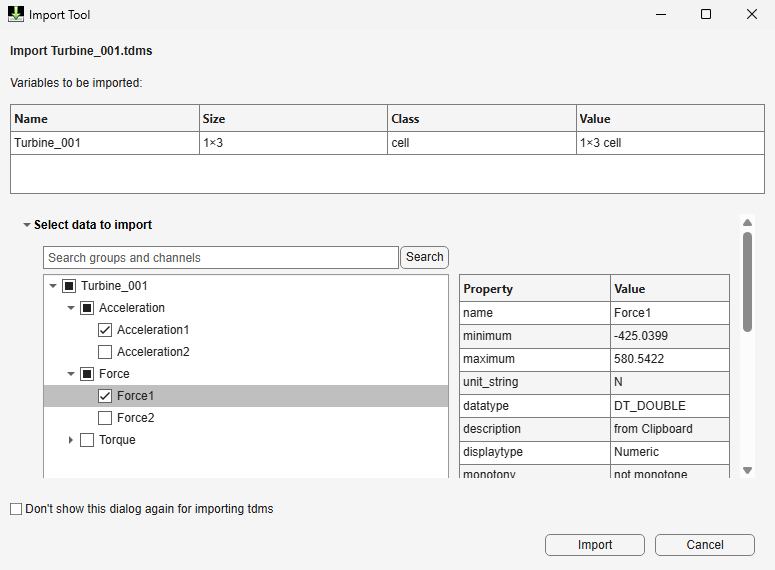
uiimport("turbine_001.tdms")The Import Tool displays the file name, file size, class, and value fields. The Select data to import section shows the TDMS file structure as a tree view. This tree view shows the file, the channel groups within the file, and the channels within each group. By default, the tree view is not expanded. When you select an item in the tree view, the properties panel updates to show the associated metadata. Use the search option to find a channel by name.
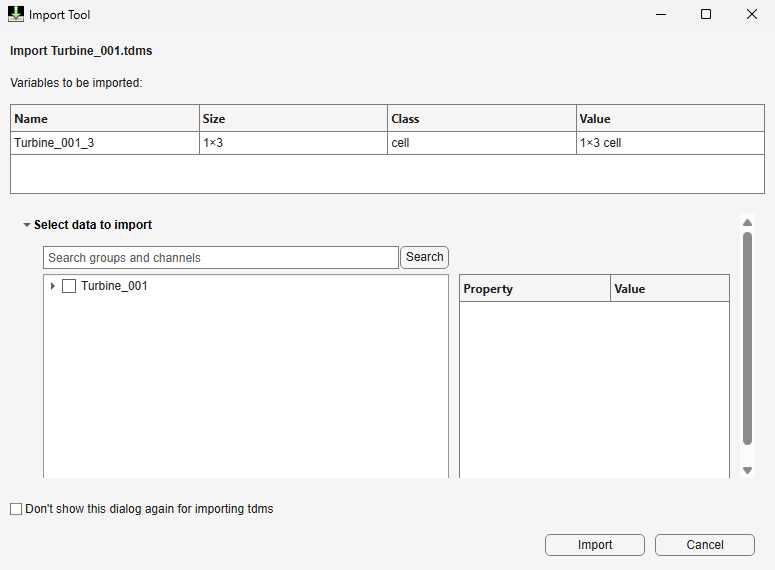
Expand the tree to view the TDMS hierarchy. Select the channels you want to load and clear other channels. To import selected channel data, click Import.
The command window shows the generated import code. MATLAB imports data to the workspace as cell arrays of tables and saves each cell array with a variable name that matches the channel group name.

Programmatic Use
Tips
To reduce memory use, select required channels using the Select data to import section before you click Import.
Version History
Introduced in R2026b

