ofdmPilotConfig
Description
The ofdmPilotConfig object specifies the pilot location and pilot
symbol configuration for OFDM systems. Use this object to construct pilot symbol patterns
for user-defined OFDM systems and provide pilot symbol information to the
ofdmChannelEstimate function.
Creation
Syntax
Description
creates an
pilotcfg = ofdmPilotConfigofdmPiltoConfig object that specifies the pilot locations and
the pilot symbol configuration for a MIMO-OFDM system.
sets one or more properties using name-value arguments. For example,
pilotcfg = ofdmPilotConfig(Name=Value)FFTLength=64 sets the total number of subcarriers to
64.
configures the output object by setting the:pilotcfg = ofdmPilotConfig(fftlen,numGuardBandCarriers,numSym,numTxStreams)
FFTLength property to the
fftleninput value.NumGuardBandCarriers property to the
numGuardBandCarriersinput value.NumSymbols property to the
numSyminput value.NumTransmitStreams property to the
numTxStreamsinput value.
The syntax also sets the StreamGroups, PilotLocations, and PilotSymbols property using the given input values. For this syntax, the number of transmit streams must be a nonnegative integer power of 2. For more information, see Computing Pilot Cluster Locations from FFT Length and Transmit Streams and Choosing Pilot Symbols for Pilot Locations.
Properties
FFT length for OFDM symbols, specified as a real positive integer scalar.
Data Types: double
Number of subcarriers allocated to left and right guard bands, specified as
2-by-1 integer vector. The sum of the two numbers must be less than the
FFTLength property.
The first element is the lower guard band and the second element is the upper guard band.
Data Types: double
Number of OFDM symbols in the OFDM grid, specified as a positive integer scalar.
The default value 14 means that the OFDM frame has 14 OFDM
symbols.
Data Types: double
Number of transmit streams, specified as a positive integer scalar. If the
value is equal to 2, the OFDM system has two transmit
streams.
Data Types: double
Streams that transmit at the same OFDM subcarriers and the same OFDM symbols, specified as a nonempty cell array of vectors. Each transmit stream must appear in exactly one group and you must include all streams.
Three transmit streams can be divided into two stream groups {[1 2],
[3]}. Streams 1 and 2 transmit on the same subcarriers and symbols.
These streams must be orthogonal to avoid interference with each other. Stream 3
is separate
Data Types: double
Pilot locations for each pilot cluster in each stream group, specified as a
nonempty cell array with each cell that contains a 3-D array defining pilot
clusters for one stream group. To specify pilot locations based on rectangular
patterns, use the ofdmPilotGrid function.
The number of elements in
PilotLocationsmust be equal to the number of elements inStreamGroups.For each stream group g, the
PilotLocations{g}is an M(g)-by-2-by-N(g) array where:M(g) is the number of pilot symbols per cluster for stream group g. This value must be greater than or equal to the number of streams groups.
2is the number of columns.Column 1 = subcarrier index
Column 2 = OFDM symbol index
N(g) is the number of cluster for group g.
For the g-th stream group:
PilotLocations{g}(:,1,:)— First column of the 3-D array stores the subcarrier indices of all pilots.PilotLocations{g}(:,2,:)— Second column of the 3-D array stores the symbol indices of all pilots.
Subcarrier indices are integers in the range
NumGuardBandCarriers(1)+1:FFTLength–NumGuardBandCarrier(2).Symbol indices are integers in the range 1:
NumSymbols.
By default, the PilotLocations property places pilot
symbols in two OFDM symbols and spreads them evenly across subcarriers.
7:4:59 sets the subcarrier indices. Pilot symbols are placed
at subcarriers 7,11,15,…,59, spaced by 4 subcarriers.
ones(1,14) are the pilot symbol indices for the first set.
All these pilot symbols are in OFDM symbol 1. 14*ones(1,14) are
the symbol indices for the second set. All these pilots symbols are in OFDM symbol
14. reshape(...,1,2,28) organizes the values into a 3-D array
of one cluster group, two columns (subcarrier index and symbol index), and 28
pilot positions
Data Types: cell
Pilot symbol values for each stream group, specified as a nonempty cell array of 3-D array of complex numbers.
The number of elements in the pilot symbols must be equal to the number of elements in the stream groups.
In the 3-D array:
size(PilotLocations{g},1) — The first dimension is the number of pilot symbols per cluster. This value must match the number of pilot positions inPilotLocations{g}.size(PilotSymbols{g},2) — The second dimension is the number of streams in the group. Each pilot position has only one value for each stream.size(PilotSymbols{g},3) — The third dimension is the number of clusters. This value must match the number of clusters inPilotLocations{g}.
For each cluster n, the matrix of pilot symbols (
PilotSymbols{g}(:,:,n)) must have full rank. Full rank means that pilots for all streams in that cluster must be orthogonal, so the receiver can separate them when estimating the channel.PilotSymbols{g}(m,:,n)—These values are the pilot symbol values for the m-th pilot position in the n-th cluster for all streams in the group g .
In the default value,
{reshape(pskmod(comm.PNSequence(SamplesPerFrame=56).step(),4,pi/4,'InputType','bit'),1,1,28)}
shows one stream group with 28 clusters and 1 pilot symbol per cluster. These 28
pilot symbols are derived from QPSK-modulated binary
inputs.
Output Arguments
Pilot configuration object for an OFDM system, returned as an
ofdmPilotConfig object.
Object Functions
validate | Validate contents of ofdmPilotConfig object |
pilotSignal | Returns pilot symbols and linear indices of pilot locations |
plot | Plot pilot locations in 3-D |
Examples
Specify an OFDM pilot configuration using default values.
pilotcfg = ofdmPilotConfig
pilotcfg = ofdmPilotConfig with properties: FFTLength: 64 NumGuardBandCarriers: [2×1 double] NumSymbols: 14 NumTransmitStreams: 1 StreamGroups: {[1]} PilotLocations: {[1×2×28 double]} PilotSymbols: {[1×1×28 double]}Plot the configuration.
plot(pilotcfg)

Create an OFDM system with 64-subcarriers and two transmit streams.
fftlen = 64; % FFT length (number of subcarriers) numGuardCarriers = [6; 5]; % Number of guard band carriers (lower; upper) numSym = 14; % Number of OFDM symbols numTxStreams = 2; % Number of transmit streams pilotcfg = ofdmPilotConfig(fftlen,numGuardCarriers,numSym,numTxStreams)
pilotcfg = ofdmPilotConfig with properties: FFTLength: 64 NumGuardBandCarriers: [2×1 double] NumSymbols: 14 NumTransmitStreams: 2 StreamGroups: {[1 2]} PilotLocations: {[2×2×52 double]} PilotSymbols: {[2×2×52 double]}StreamGroups: {[1 2]}value shows that both streams are grouped together. At each pilot location, both streams transmit pilot symbols at the same time and frequency, but with different orthogonal values.PilotLocations: {[2-by-2-by-52 double]}is a 3-D array showing the placement of pilot symbols. First dimension is the number pilot locations per cluster. Each location is a [subcarrier;symbol} pair. Second dimension is always 2 representing a two-element coordinate where one coordinate is the subcarrier index and the other coordinate is OFDM the symbol index. Third dimension is the number of clusters.PilotSymbols: 2-by-2-by-52 doubleis a 3-D array of the actual pilot values. First dimension is the number of pilot symbols per cluster. Second dimension is the number of streams per group. Third dimension is the number of clusters. Each cluster has a 2-by-2 matrix of complex pilot values. Each column corresponds to a stream, and each row to a pilot in the cluster. These are chosen so that, in each cluster, the pilots sent by the two streams are orthogonal.
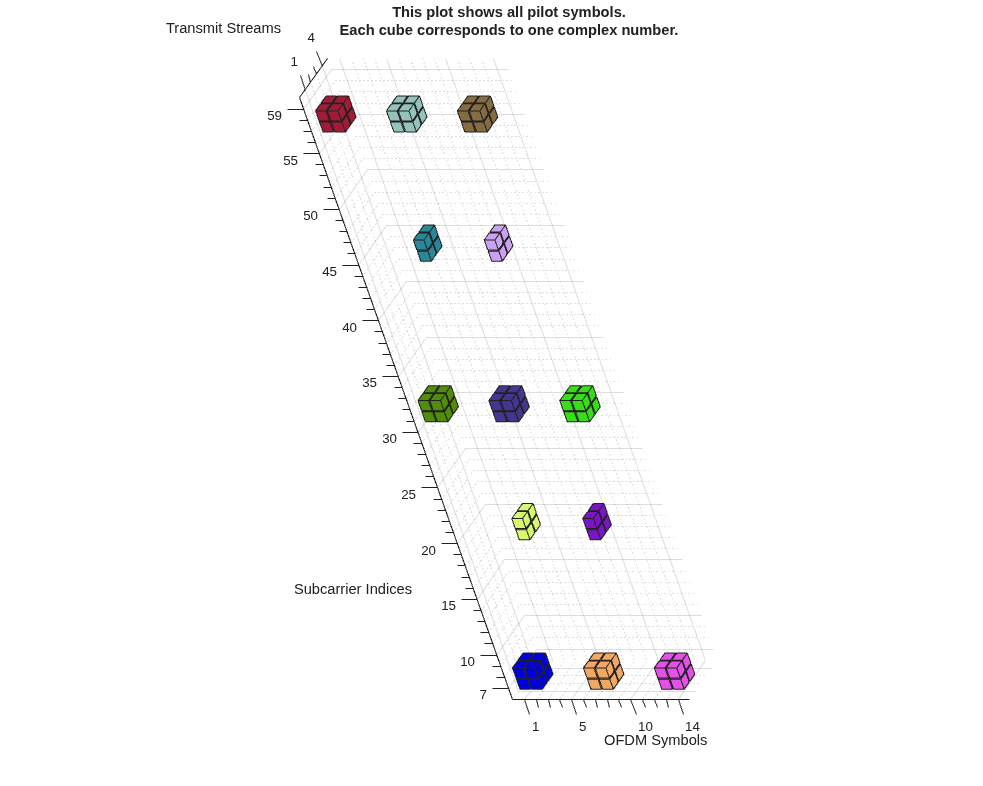
Plot the pilot symbol locations.
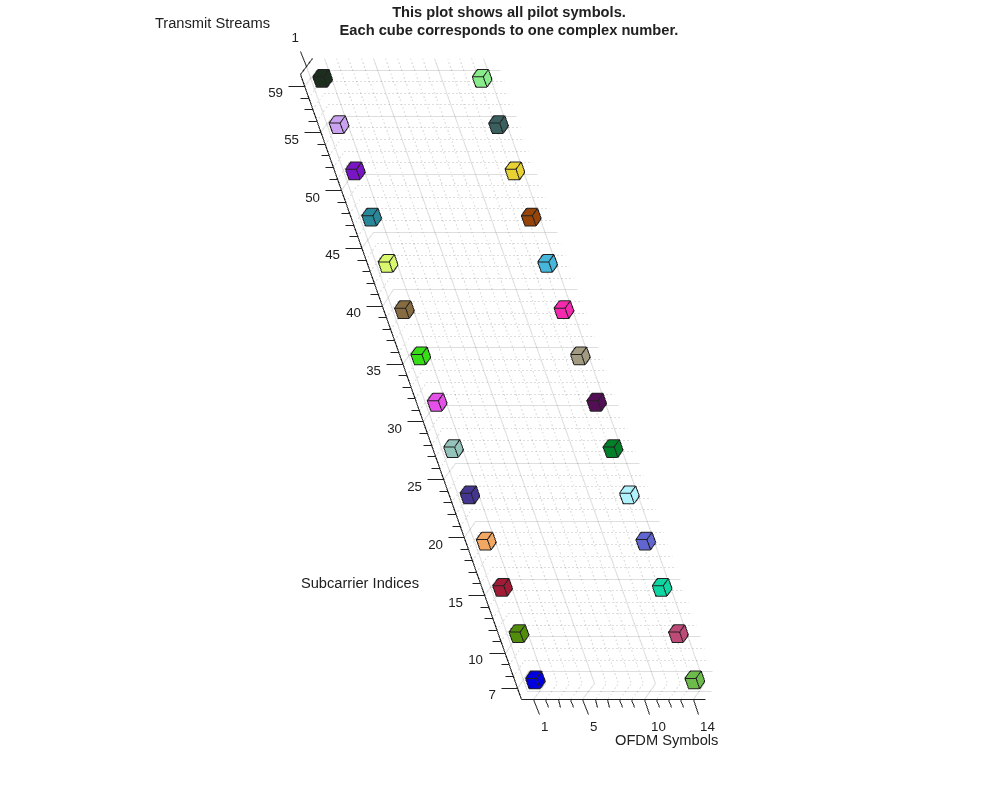
plot(pilotcfg)

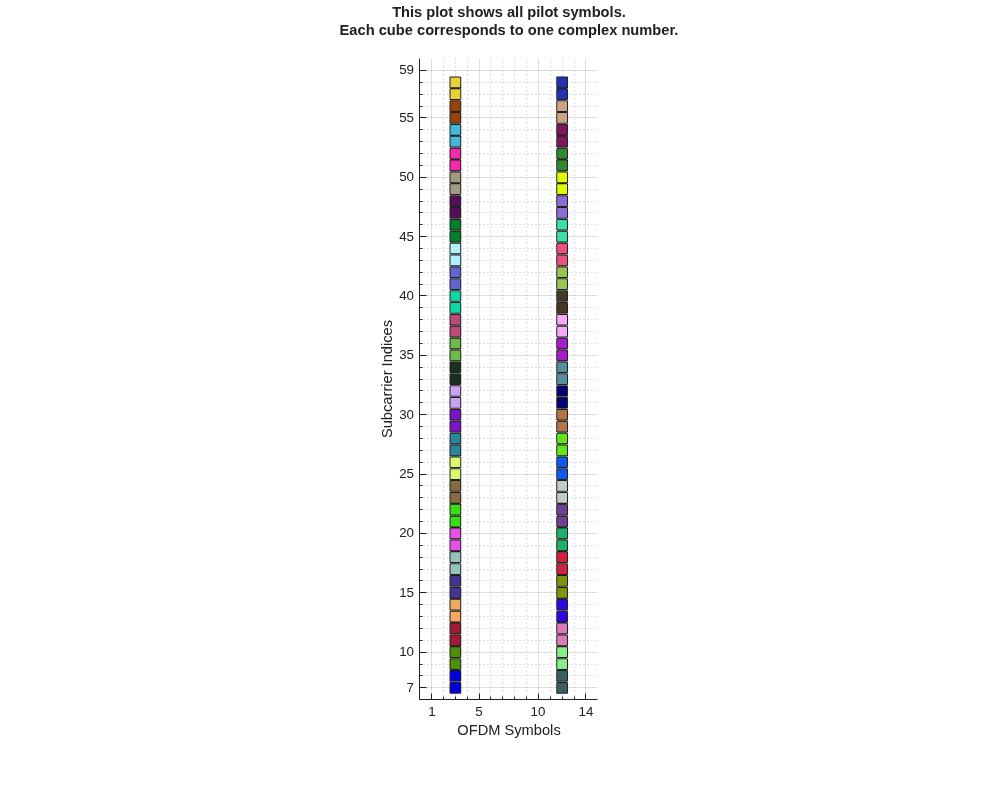
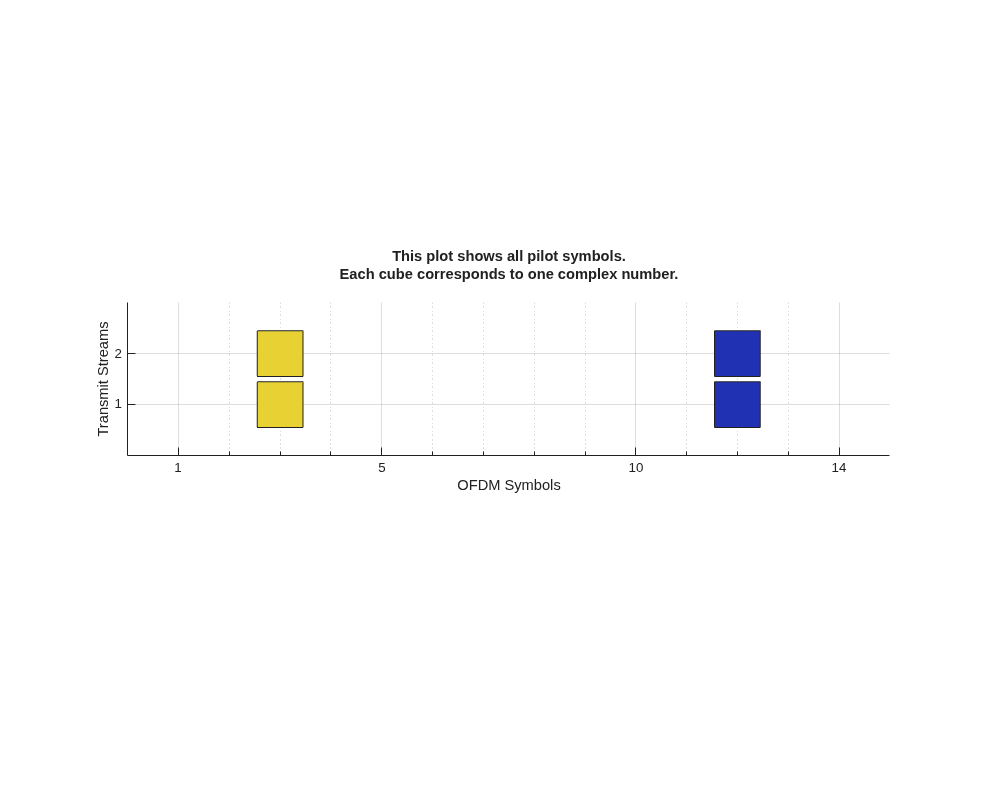
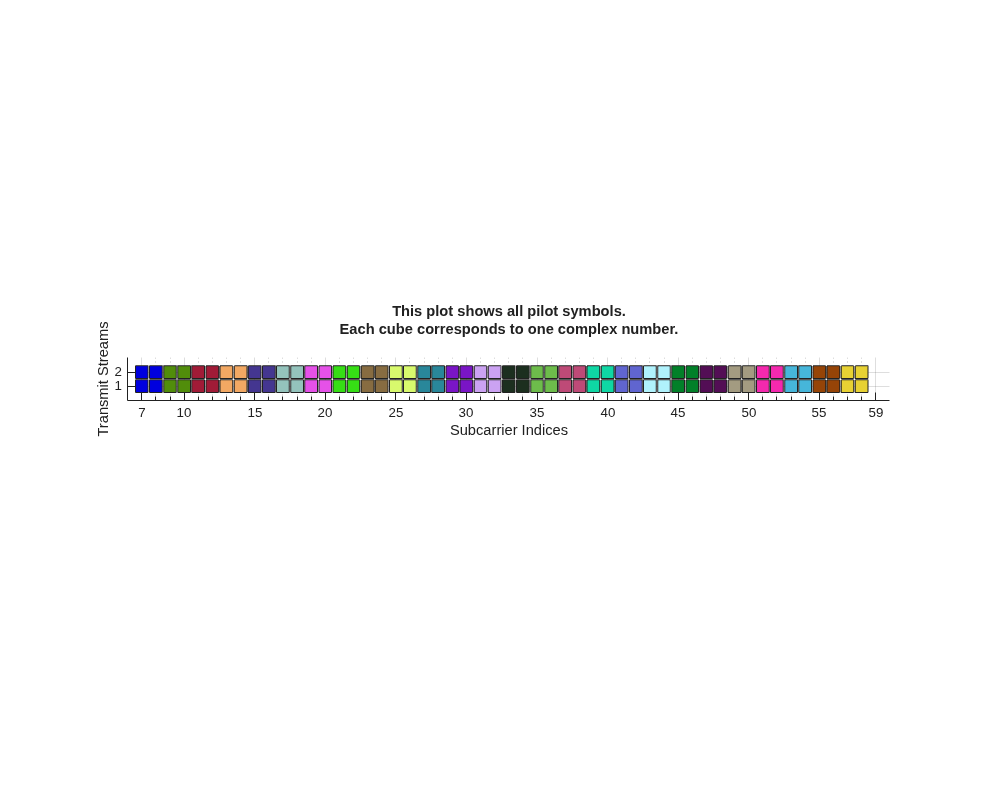
This 3-D plot shows the placement of pilot symbols for the MIMO-OFDM system.
Subcarrier Indices: Represents the frequency bins (subcarriers) used in the MIMO-OFDM system. Each tick is a subcarrier index.
OFDM Symbols: Represents the time dimension where each tick is an OFDM symbol index from 1 to 14.
Transmit Streams: Represents the transmit stream (or antenna). There are two streams, labeled 1 and 2.
Each colored cube represents a single pilot symbol, a known complex value transmitted at a specific subcarrier (frequency), OFDM symbol (time), and transmit stream (spatial layer).
Each color corresponds to a cluster of pilots. All cubes of the same color belong to the same cluster, which means they are used together for channel estimation at the receiver.
The cubes are arranged in a regular, repeating pattern across subcarriers and OFDM symbols. For each transmit stream (1 and 2), the cubes are stacked at the same (subcarrier, symbol) positions, but at different heights (streams).
Create the pilot configuration object.
pilotcfg = ofdmPilotConfig( ... FFTLength = 64, ... NumGuardBandCarriers = [6;5], ... NumSymbols = 14, ... NumTransmitStreams = 4, ... StreamGroups={[1 2],[3 4]} );
Create pilot locations for each stream group.
pilotLocations1 = ofdmPilotGrid([1 2], [1 2], [7 31 57], [1 7 13]); % 2x2 (4) pilots each for 9 clusters pilotLocations2 = ofdmPilotGrid([1 2], 1, [19 44], [4 10]); % 2x1 (2) pilots each for 4 clusters
Check the number of clusters for each group.
numClusters1 = size(pilotLocations1, 3); numClusters2 = size(pilotLocations2, 3);
Create pilot symbols for each group. The number of pilot symbols must match number of clusters).
pilotSymbols1 = randn(size(pilotLocations1,1), numel(pilotcfg.StreamGroups{1}), numClusters1); pilotSymbols2 = randn(size(pilotLocations2,1), numel(pilotcfg.StreamGroups{2}), numClusters2);Assign to the configuration object.
pilotcfg.PilotLocations = {pilotLocations1, pilotLocations2}; pilotcfg.PilotSymbols = {pilotSymbols1, pilotSymbols2};Validate and plot the configuration.
validate(pilotcfg) plot(pilotcfg);

Algorithms
For the following syntax,
pilotcfg = ofdmPilotConfig(fftlen, numGuardCarriers, numSym, numTxStreams)
The number of transmit streams must be a power of two and the
log2(numTxStreams) must be a nonnegative integer. Clusters are
either squares (if the exponent is even) or rectangles made of two squares (if the
exponent is odd).
After the basic properties are set, the function automatically chooses where the pilot symbols are placed in the OFDM grid (PilotLocations) and generates the pilot symbol values that each stream will transmit (PilotSymbols).
Consider an OFDM pilot configuration with FFT length 64, guard
bands at [6;5], 14 OFDM symbols, and
4 transmit streams.
For the shape of the pilot cluster, compute n.
n = log2(number of transmit streams) = log2(4) = 2
Each cluster of pilots is either a square (when n is even), or a rectangle with the longer side along the subcarriers (when n is odd).
In this example, n = 2 is even and the
cluster is a square.
Now compute the width or number of subcarrier indices that one pilot symbol cluster occupies and the height or number of OFDM symbol indices that one pilot symbol cluster occupies.
Cluster width = 2^ceil(n/2) = 2^ceil(2/2) = 2^1 = 2 subcarriers
wide
Cluster height = 2^floor(n/2) = 2^floor(2/2) = 2^1 = 2 symbols
high
Therefore, each pilot symbol cluster is a 2-subcarriers-by-2-symbols block.
The pilot symbol cluster design always places the first pilot symbol cluster starting at OFDM symbol index 3. The first two symbol indices are left free for other types of information. Start the pilot cluster placement at OFDM symbol index 3.
Symbol index for first pilot cluster = (3 + cluster height –
1)
In this OFDM configuration, the cluster height is two OFDM symbol indices. Therefore, the first pilot cluster goes in OFDM symbol indices 3 and 4.
Symbol index for the second pilot cluster = Number of symbols – 1 –
(1:cluster height)
Start the next pilot symbol cluster placement the end of the OFDM frame, just before the last symbol. This pilot configuration has 14 OFDM symbols in total and the cluster height is two OFDM symbols. Place the next pilot cluster in OFDM symbol indices 11 and 12.
The positioning of the pilot symbol cluster in the subcarrier indices is given by the following equations:
Starting of first pilot symbol cluster= Lower guard band +
1
Start placing pilot symbol clusters at the first subcarrier index after the lower guard band. In this system, the lower guard band occupies the first 6 subcarriers, then the first usable subcarrier is 6 + 1 = subcarrier 7. Place the first pilot symbol cluster starting at subcarrier index 7.
Distance between each pilot symbol cluster = cluster
width
Each pilot symbol cluster has a width of 2 subcarrier indices. The first pilot symbol cluster will occupy subcarrier indices 7 and 8. The next pilot symbol cluster will start at subcarrier index 9. Therefore, pilots appear at subcarrier indices 7, 9, 11, 13, and so on.
Ending of the last pilot symbol cluster = Number of subcarriers-upper
guard band + 1 – cluster width
Stop placing the pilot clusters right before the upper guard band. For this configuration, the total number of is 64. The upper guard band occupies 5 subcarriers. However, you must leave room for the entire cluster, which is 2 subcarrier indices wide. Therefore, the last pilot cluster must stop at subcarrier 58, which keeps the entire cluster inside the active range. This gives 26 total starting positions for pilot symbol clusters at subcarriers 7, 9, 11,..,57.
The pilot symbols form a grid of 2-by-2 clusters located at:
(subcarriers 7,9,11,...,57) and (symbols 3–4)
(subcarriers 7,9,11,...,57) and (symbols 11–12)
For each group of pilot locations, the values of the pilot symbols are automatically chosen. The pilot symbols for each cluster are stored in a 3-D array. Each cluster is a full-rank matrix. To construct a full-rank matrix, a pseudo-random sequence generator creates random bits. These bits are mapped to QPSK symbols. For each cluster, a diagonal matrix of these symbols is multiplied by a Hadamard matrix to get the pilot symbols for all streams. The Hadamard matrix makes sure that the pilot symbols from different transmit streams are orthogonal.
References
[1] Van de Beek, J.-J., O. Edfors, M. Sandell, S. K. Wilson, and P. O. Borjesson. “On Channel Estimation in OFDM Systems." Vehicular Technology Conference, IEEE 45th, Volume 2, IEEE, 1995.
Extended Capabilities
Usage notes and limitations:
See System Objects in MATLAB Code Generation (MATLAB Coder).
Version History
Introduced in R2026a
MATLAB Command
You clicked a link that corresponds to this MATLAB command:
Run the command by entering it in the MATLAB Command Window. Web browsers do not support MATLAB commands.
Seleccione un país/idioma
Seleccione un país/idioma para obtener contenido traducido, si está disponible, y ver eventos y ofertas de productos y servicios locales. Según su ubicación geográfica, recomendamos que seleccione: .
También puede seleccionar uno de estos países/idiomas:
Cómo obtener el mejor rendimiento
Seleccione China (en idioma chino o inglés) para obtener el mejor rendimiento. Los sitios web de otros países no están optimizados para ser accedidos desde su ubicación geográfica.
América
- América Latina (Español)
- Canada (English)
- United States (English)
Europa
- Belgium (English)
- Denmark (English)
- Deutschland (Deutsch)
- España (Español)
- Finland (English)
- France (Français)
- Ireland (English)
- Italia (Italiano)
- Luxembourg (English)
- Netherlands (English)
- Norway (English)
- Österreich (Deutsch)
- Portugal (English)
- Sweden (English)
- Switzerland
- United Kingdom (English)