hypercube
R2026bRead hyperspectral data
Description
Add-On Required: This feature requires the Hyperspectral Imaging Library for Image Processing Toolbox add-on.
The hypercube object represents the hyperspectral data cube and
its related properties. Create hypercube objects using the imhypercube or
geohypercube
function. Use the hypercube object functions to assign new pixel values,
crop data, select or remove specific hyperspectral bands, generate a colored image, and write
hyperspectral data to the ENVI (environment for visualizing images) file format.
The hypercube object supports hyperspectral data acquired by these
satellites.
Earth Observing-1 (EO-1) Hyperion
Airborne Visible/Infrared Imaging Spectrometer (AVIRIS)
Note
The Hyperspectral Imaging Library for Image Processing Toolbox™ requires desktop MATLAB®, as MATLAB Online™ and MATLAB Mobile™ do not support the library.
Creation
Read hyperspectral data without geospatial information using the
imhypercubefunction.Read hyperspectral data with geospatial information using the
geohypercubefunction.Note
The
geohypercubefunction requires a Mapping Toolbox™ license.
Properties
Object Functions
gather | Read data cube of spectral image into workspace |
assignData | Assign new data to spectral image data cube |
cropData | Crop regions-of-interest of spectral image |
enviwrite | Write hyperspectral data to ENVI file format |
selectBands | Select bands from spectral image |
removeBands | Remove spectral bands from spectral image |
colorize | Estimate color image of spectral image |
apply | Apply function to each block of spectral image |
Examples
Read hyperspectral data into the workspace.
hcube = imhypercube("EO1H0440342002212110PY_cropped.hdr");Estimate and visualize the RGB image of the hyperspectral data.
rgbImg = colorize(hcube,Method="rgb");
figure
imshow(rgbImg)
Convert the digital numbers to radiance values to perform radiometric calibration of the data.
newhcube = dn2radiance(hcube);
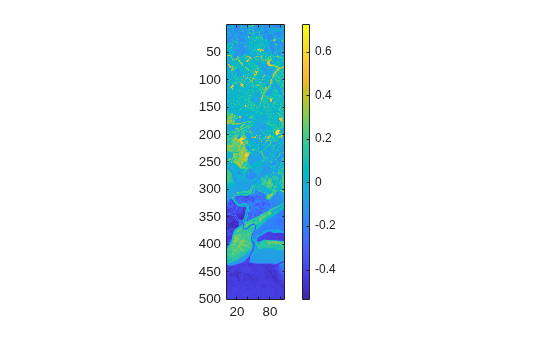
Compute and visualize the NDVI index for the corrected data.
ndviImg = ndvi(newhcube);
figure
imagesc(ndviImg)
axis equal tight
colorbar