immulticube
R2026bSyntax
Description
Add-On Required: This feature requires the Hyperspectral Imaging Library for Image Processing Toolbox add-on.
mcube = immulticube(file,wavelength)Wavelength property of the output multicube
object.
mcube = immulticube(image,wavelength)multicube object from the multispectral data cube
image and the specified center wavelength values
wavelength.
mcube = immulticube(image,wavelength,metadata)multicube object from the multispectral data cube
image, specified center wavelength values
wavelength, and metadata metadata. You can use
this syntax to modify the Metadata property of a
multicube object.
mcube = immulticube(___,BlockSize=blockSize)
Note
The Hyperspectral Imaging Library for Image Processing Toolbox™ requires desktop MATLAB®, as MATLAB Online™ and MATLAB Mobile™ do not support the library.
Examples
Download and unzip ASTER data.
zipFile = matlab.internal.examples.downloadSupportFile("image","data/aster_dataset.zip");
[filepath,folder,~] = fileparts(zipFile);
unzip(zipFile,filepath)
Read multispectral data stored in the ASTER file into the workspace. Create a multicube object by specifying the filename.
filename = fullfile(filepath,"aster_dataset","AST_L1T_00308202024042613_20240821173601_1890485.hdf");
mcube = immulticube(filename);
Display the properties of the multicube object.
mcube
mcube =
  multicube with properties:

        ImageFiles: "C:\Users\Example\supportfiles\image\data\aster_dataset\AST_L1T_00308202024042613_20240821173601_1890485.hdf"
          BandSize: [8×2 double]
        Wavelength: [8×1 double]
          Metadata: [1×1 struct]
    BandResolution: [8×1 double]
         BlockSize: [1024 1024]
Estimate and visualize a three-channel image from the multispectral data by using the colorize function.
img = colorize(mcube,1:3);
figure
imagesc(img)
title("Three-Channel Image of Data Cube")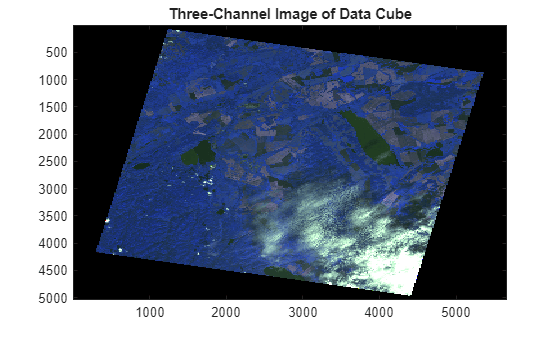
Download and unzip ASTER data.
zipFile = matlab.internal.examples.downloadSupportFile("image","data/aster_dataset.zip");
[filepath,folder,~] = fileparts(zipFile);
unzip(zipFile,filepath)
Read multispectral data stored in the ASTER file into the workspace. Create a multicube object by specifying the filename.
filename = fullfile(filepath,"aster_dataset","AST_L1T_00308202024042613_20240821173601_1890485.hdf");
mcube = immulticube(filename);
Extract the wavelengths of the multispectral data.
mcube.Wavelength
ans = 8×1

      560
      660
      820
     8300
     8650
     9100
    10600
    11300
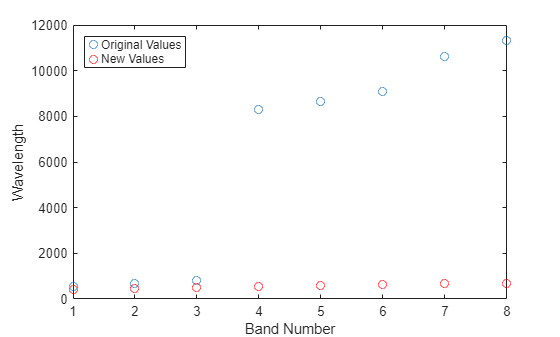
Assign new center wavelength values for the multispectral data to include the entire visible range. The number of wavelength values must be equal to the number of bands in the multispectral data cube. You must specify a unique value for each wavelength.
minWavelength = 400;
maxWavelength = 700;
numBands = numel(mcube.Wavelength);
newWavelength = linspace(minWavelength,maxWavelength,numBands);
Create a new multicube object with the new wavelength values.
newmcube = immulticube(filename,newWavelength);
Plot the old and the new wavelength values. Display the wavelength range.
figure
plot(mcube.Wavelength,"o")
hold on
plot(newmcube.Wavelength,"or")
xlabel("Band Number")
ylabel("Wavelength")
legend("Original Values","New Values",Location="NorthWest")
Resample the spectral bands to a uniform resolution.
maxResolution = max(mcube.BandResolution);
newmcube = resampleBands(newmcube,maxResolution);
Read an RGB image into the workspace. An RGB image contains three spectral channels: red, green, and blue.
image = imread("peppers.png");Specify the center wavelength values for the red, green, and blue channels as 700, 530, and 470 nanometers (nm) respectively.
wavelength = [700 530 470];
Create a multicube object using the image and the wavelength values.
mcube = immulticube(image,wavelength)
mcube =
  multicube with properties:

        ImageFiles: "in memory"
          BandSize: [3×2 double]
        Wavelength: [3×1 double]
          Metadata: [1×1 struct]
    BandResolution: [0×1 double]
         BlockSize: [384 512]
Download Landsat 8 multispectral data.
zipfile = "LC08_L1TP_113082_20211206_20211215_02_T1.zip";
landsat8Data_url = "https://ssd.mathworks.com/supportfiles/image/data/" + zipfile;
hyper.internal.downloadLandsatDataset(landsat8Data_url,zipfile)
filepath = fullfile("LC08_L1TP_113082_20211206_20211215_02_T1","LC08_L1TP_113082_20211206_20211215_02_T1_MTL.txt");
Read the multispectral data into the workspace.
mcube = immulticube(filepath);
Find and remove the empty fields from the metadata.
metadata = mcube.Metadata;
fields = fieldnames(metadata);
indx = find(structfun(@isempty,metadata)==1);
metadata = rmfield(metadata,fields(indx));
Inspect and observe that the acquisition time is added to the metadata.
isfield(metadata,"AcquisitionTime")ans = logical
1
Inspect the acquisition time in the metadata.
metadata.AcquisitionTime
ans =
"2021-12-06"
Set the value for the AcquisitionTime field to the current date.
newMetadata = metadata;
currentDate = string(datetime("now",Format="yyyy-MM-dd"));
newMetadata.AcquisitionTime = currentDate;
Resample the multispectral data to a uniform resolution.
mcube = resampleBands(mcube,30);
Create a multicube object with the new metadata. The image data and wavelengths of the new multicube object are the same as those of the resampled multispectral data.
datacube = gather(mcube);
newmcube = immulticube(datacube,mcube.Wavelength,newMetadata);
Inspect the Metadata property of the new multicube object.
newmcube.Metadata
ans = struct with fields:
              DataType: "uint16"
            SensorType: 'OLI_TIRS'
          SpacecraftID: 'LANDSAT_8'
           ProductType: "L1TP"
       AcquisitionTime: "2025-01-29"
             BandNames: [11×1 string]
                  Gain: [11×1 double]
                Offset: [11×1 double]
       ReflectanceGain: [11×1 double]
     ReflectanceOffset: [11×1 double]
            CloudCover: 0.8400
            SunAzimuth: 78.0024
          SunElevation: 62.1598
       AdditionalFiles: [1×1 struct]
          QualityBands: [1×1 struct]
          ThermalBands: [1×1 struct]
      PanchromaticBand: [1×1 struct]
      EarthSunDistance: 0.9854
        CloudCoverLand: 0.1600
             Rollangle: -1.0000e-03
       ImageAttributes: [1×1 struct]
    CollectionCategory: "T1"
      CollectionNumber: 2
       RasterReference: []
       WavelengthUnits: "Nanometers"

