islocalmin2
R2026bDescription
TF = islocalmin2(A,Name=Value)TF = finds
no more than four of the most prominent local minima.islocalmin2(A,MaxNumExtrema=4)
[
also returns the prominence corresponding to each element of TF,P] = islocalmin2(A,___)A for either
of the previous syntaxes. For more information about the prominence calculation, see Algorithms.
Examples
Create a matrix, and visualize the matrix using a contour plot.
A = -peaks;
contour(A)
colorbar
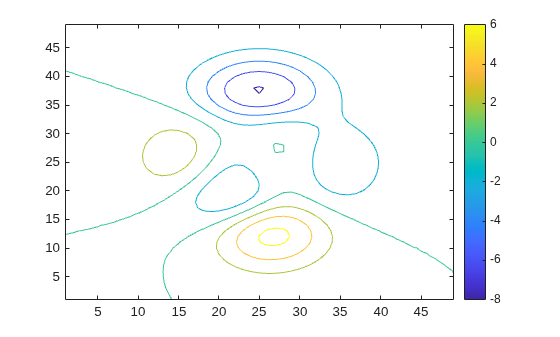
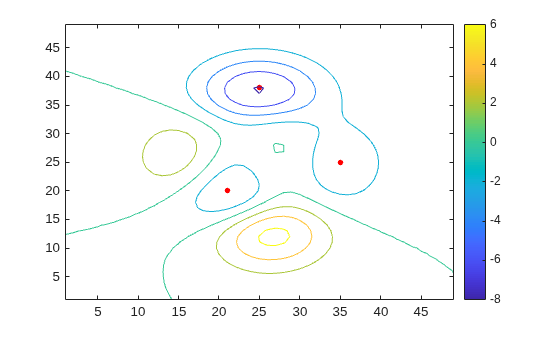
Determine the locations of the local minima.
TF = islocalmin2(A);
Use the local minima indicator to determine the value of each minimum.
minval = A(TF)
minval = 3×1

   -3.7573
   -8.0752
   -3.5823
Plot the local minima on the contour plot.
[X,Y] = meshgrid(1:49,1:49);
hold on
plot3(X(TF),Y(TF),minval,"red.",MarkerSize=12)
Create and visualize a matrix with a flat region.
data = -peaks;
A = clip(data,-5,Inf);
contour(A)
colorbar
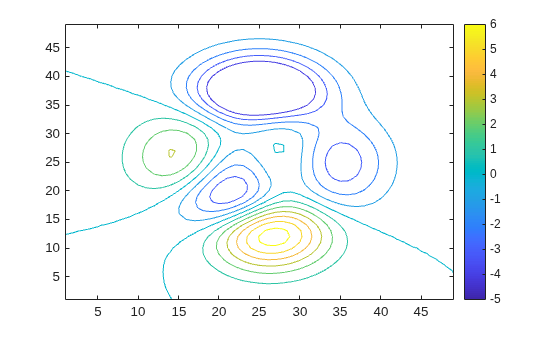
Find the local minima. By default, TF is 1 (true) for only the center point of the flat region and TF is 0 (false) for all other points on the flat region.
[TF,P] = islocalmin2(A);
To select only the point on the flat region with the smallest linear index as the local minimum, specify the FlatSelection name-value argument as "first".
[TF2,P2] = islocalmin2(A,FlatSelection="first");To select all points on the flat region as local minima, specify FlatSelection as "all".
[TF3,P3] = islocalmin2(A,FlatSelection="all");Compare the results of the flat region selections by visualizing the extrema.
[X,Y] = meshgrid(1:49,1:49);
tiledlayout(2,2)

nexttile
contour(A)
colorbar
hold on
plot3(X(TF),Y(TF),A(TF),"red.",MarkerSize=12)
title("Center Point on Flat Region")

nexttile
contour(A)
colorbar
hold on
plot3(X(TF2),Y(TF2),A(TF2),"red.",MarkerSize=12)
title("First Point on Flat Region")

nexttile
contour(A)
colorbar
hold on
plot3(X(TF3),Y(TF3),A(TF3),"red.",MarkerSize=12)
title("All Points on Flat Region")
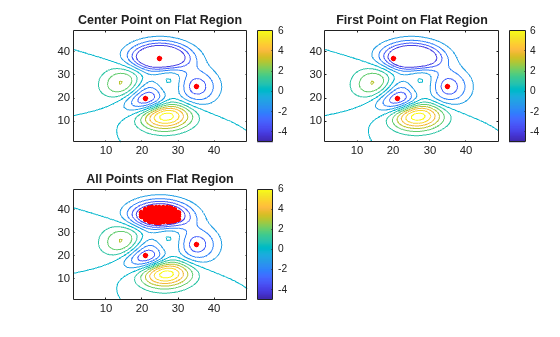
Only the local minima indicator changes when you specify FlatSelection. The prominence of all data points is the same for all values of FlatSelection.
isequal(P,P2,P3)
ans = logical
   1
Create a matrix with some noise, and visualize the matrix using a contour plot.
data = peaks;
data = -data - randn(49)*0.3;
A = clip(data,-5,Inf);

contour(A)
colorbar
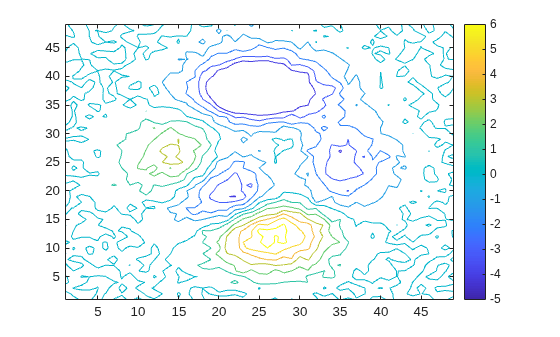
Find the local minima and plot them on the contour plot. By default, islocalmin2 finds all local minima whose prominence is greater than 0.
[TF P] = islocalmin2(A);
To understand the prominence of the local minima, sort the unique prominence values.
maxP = sort(unique(P(:)),"descend")maxP = 143×1
5.7516
3.9830
3.3811
2.6829
1.7200
1.2871
1.2853
1.1382
1.1128
1.0921
1.0353
1.0334
0.9606
0.9426
0.9143
⋮
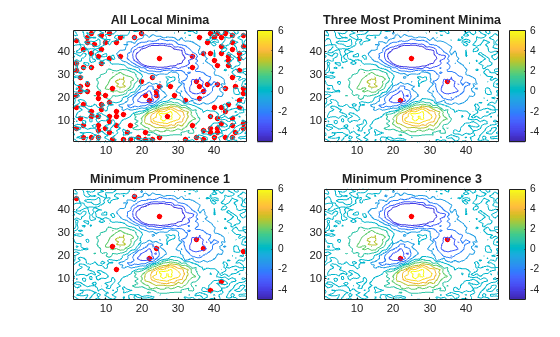
Ignore the local minima that are a result of noise by finding only the three most prominent local minima. When you specify the MaxNumExtrema name-value argument, the points in a flat region are jointly considered a single minimum point.
TF2 = islocalmin2(A,MaxNumExtrema=3);
Find local minima whose prominence is greater than 1.
TF3 = islocalmin2(A,MinProminence=1);
Find local minima whose prominence is greater than 3.
TF4 = islocalmin2(A,MinProminence=3);
Compare the results of the prominence filters by visualizing the extrema.
[X,Y] = meshgrid(1:49,1:49);
figure
tiledlayout(2,2)

nexttile
contour(A)
colorbar
hold on
plot3(X(TF),Y(TF),A(TF),"r.",MarkerSize=12)
title("All Local Minima")

nexttile
contour(A)
colorbar
hold on
plot3(X(TF2),Y(TF2),A(TF2),"r.",MarkerSize=12)
title("Three Most Prominent Minima")

nexttile
contour(A)
colorbar
hold on
plot3(X(TF3),Y(TF3),A(TF3),"r.",MarkerSize=12)
title("Minimum Prominence 1")

nexttile
contour(A)
colorbar
hold on
plot3(X(TF4),Y(TF4),A(TF4),"r.",MarkerSize=12)
title("Minimum Prominence 3")
Alternatively, you can use the smoothdata2 function to remove noise prior to finding the local minima.
Create a matrix of data with one isolated valley and many valleys with high density elsewhere in the data.
rng("default")
data = zeros(100);
data(30,30) = 1000;
data = smoothdata2(data,"gaussian",50);
smallPeakLoc = randi(10000,1,400);
tempData = zeros(100)+1;
tempData(smallPeakLoc) = abs(randn(1,400))*3;
tempData(1:50,1:50) = 0;
A = -data-tempData;
A = smoothdata2(A,"gaussian",5);

contour(A)
colorbar
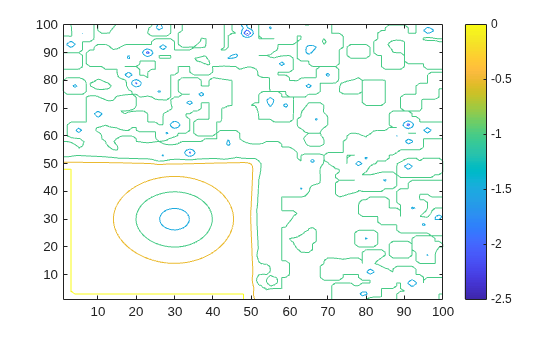
Because of the high density of valleys elsewhere in the data, islocalmin2 underestimates the prominence of the valley at (30,30).
TF = islocalmin2(A,MaxNumExtrema=10);
[X,Y] = meshgrid(1:100,1:100);

contour(A)
colorbar
hold on
plot3(X(TF),Y(TF),A(TF),"r.",MarkerSize=20)
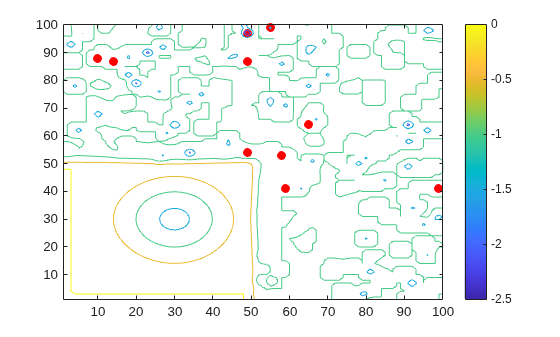
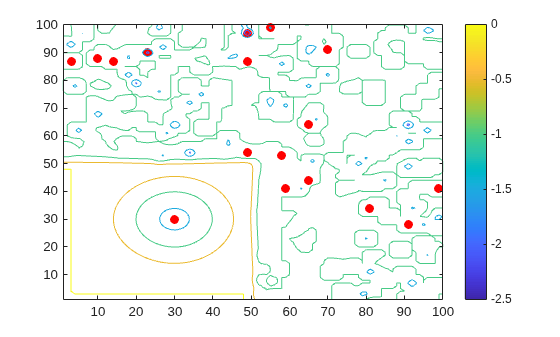
To limit the impact of distant valleys on the prominence calculation, specify a prominence window. The isolated valley at (30,30) is now marked as a local minima.
TF2 = islocalmin2(A,ProminenceWindow=50,MaxNumExtrema=10);
contour(A)
colorbar
hold on
plot3(X(TF2),Y(TF2),A(TF2),"r.",MarkerSize=20)
Input Arguments
Name-Value Arguments
Output Arguments
Algorithms
islocalmin2 identifies all local minima in the input data and follows
these steps to compute the prominence of each local minimum:
Determine the data to use to compute the prominence.
If the
ProminenceWindowname-value argument is specified, use its value to draw a rectangular window of data around the current local minimum. Otherwise, use a rectangular window that includes all of the data.
Determine the prominence box.
Move vertical lines left and right from the current minimum until encountering a lower minimum or the edge of the rectangular window.
Move horizontal lines up and down from the current minimum until encountering a lower minimum or the edge of the rectangular window.
Compute the prominence.
Divide the prominence box into four quadrants centered on the current local minimum.
Identify the highest value within each quadrant.
Use the lowest of these quadrant maximum values as the basis value. The prominence is the absolute difference between the height of the current local minimum and the basis value.

Version History
Introduced in R2024a

