removeMember
R2026bSyntax
Description
Examples
Create a selection group that manages three toggle buttons.
fig = uifigure(Position=[100 100 200 200]);
gl = uigridlayout(fig,[3 1]);
tb1 = uitogglebutton(gl,Text="English");
tb2 = uitogglebutton(gl,Text="French");
tb3 = uitogglebutton(gl,Text="German");
sg = uiselectiongroup([tb1 tb2 tb3]);
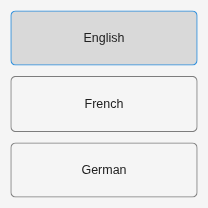
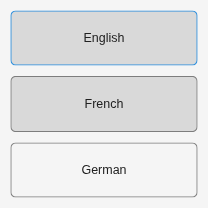
Then remove the first button from the group. The removeMember function removes the button from the group but does not delete the button. By default, the first button in the modified selection group is selected. The original first button remains selected.
removeMember(sg,tb1);
Create a grid layout in a figure with seven radio buttons managed by a selection group and a check box.
fig = uifigure(Position=[100 100 800 100]);
gl = uigridlayout(fig,[2 7]);
rb1 = uiradiobutton(gl,Text="Monday");
rb2 = uiradiobutton(gl,Text="Tuesday");
rb3 = uiradiobutton(gl,Text="Wednesday");
rb4 = uiradiobutton(gl,Text="Thursday");
rb5 = uiradiobutton(gl,Text="Friday");
rb6 = uiradiobutton(gl,Text="Saturday");
rb7 = uiradiobutton(gl,Text="Sunday");
sg = uiselectiongroup([rb1 rb2 rb3 rb4 rb5 rb6 rb7]);
cb = uicheckbox(gl,Text="Exclude Weekend");
cb.Layout.Column = [1 2];

Write a callback function named toggleWeekend that controls whether the Saturday and Sunday buttons are enabled and part of the selection group. This callback executes when a user interacts with the check box. Save the function in a folder that is on the MATLAB path.
function toggleWeekend(src,event,sg,rb6,rb7)
    if src.Value == 1
        sg.removeMember([rb6 rb7])
        rb6.Enable = "off";
        rb7.Enable = "off";
    elseif src.Value == 0
        sg.addMember([rb6 rb7])
        rb6.Enable = "on";
        rb7.Enable = "on";
    end
end
cb.ValueChangedFcn = @(src,event) toggleWeekend(src,event,sg,rb6,rb7);

Input Arguments
Version History
Introduced in R2026b

