Contenido principal

characterizeBattery

Class: mbcrunner

Characterize equivalent circuit battery in CAGE project

Since R2024b

Description

[results,rmse] = characterizeBattery(obj,block,dataFolder) characterizes a battery using the Simulink® or Simscape™ battery block specified by block and data from the folder specified by dataFolder in the CAGE project specified by obj.

example

[results,rmse] = characterizeBattery(obj,block,dataFolder,Name=Value) characterizes a battery using additional options specified by name-value arguments.

Input Arguments

expand all

Handle to the CAGE project, specified as an mbcrunner object.

Simulink or Simscape battery block, specified as a string scalar.

These battery blocks are supported:

Data Types: string

Path to data files, specified as a string scalar. For information on supported file types, see Import the Block and Data Set.

Data Types: string

Name-Value Arguments

expand all

Specify optional pairs of arguments as Name1=Value1,...,NameN=ValueN, where Name is the argument name and Value is the corresponding value. Name-value arguments must appear after other arguments, but the order of the pairs does not matter.

Example: [results,rmse] = characterizeBattery(mbcrunner,"Equivalent Circuit Battery",dataFolder,SampleTime=0.001,UseMeasuredSoC=false)

Sample time, specified as a nonnegative scalar.

Example: SampleTime=0.001

Data Types: double

Reference voltage variable, specified as a string.

Example: ReferenceVariable="voltage"

Data Types: string

Smoothing factor, specified as a scalar. The smoothing factor applies a smoothing penalty to the optimization. The smoothness penalty uses the second derivative to avoid steep jumps between adjacent table values.

Example: SmoothingFactor=1e-4

Data Types: double

Option to use measured state of charge (SOC) data, specified as false or true.

Example: UseMeasuredSOC=true

Data Types: logical

Option to use positive current as charging, specified as true or false.

Example: PositiveCharge=false

Data Types: logical

Option to use parallel computing, specified as true or false. The default value is true if a Parallel Computing Toolbox™ license is available.

Example: UseParallel=false

Data Types: logical

Mapping for current, temperature, time, or SOC, specified as a structure.

Example: alias=struct; alias.current="myCurrentSignal"; alias.Temperature="myTemperatureSignal"; alias.soc="mySOCSignal"; alias.time="myTimeSignal";

Data Types: struct

Option to show the fill progress, specified as true or false. The same fill dialog box used in CAGE is shown when ShowProgress=true.

Example: ShowProgress=true

Data Types: logical

Number of iterations for battery characterization process, specified as a positive scalar.

Example: NumIterations=400

Data Types: double

Bounds for lookup tables specified as a structure. Define the structure's fields using the names of the lookup tables.

Example: Bnds.Tau1 = [1,30] , Bnds.Tau2 = [30,100]

Data Types: structure

Option to set open circuit voltage table to monotonically increase with state of charge specified as true or false.

Data Types: logical

Output Arguments

expand all

Battery characterization results, returned as a structure with the estimated lookup tables.

Root mean squared error (RMSE) of residuals, returned as a vector. Each file in the data folder is an element in the vector.

Data Types: double

Examples

expand all

Using the characterizeBattery method, characterize the Battery Equivalent Circuit (Simscape Battery) block and evaluate a feature using a data set.

Create mbcrunner Object

Create a handle to a CAGE project.

r = mbcrunner;

Open Simulink Model

Open the Simulink model containing the Battery Equivalent Circuit block.

open("Simscape_BEC.slx");

Set the batteryBlock variable to the battery block path.

batteryBlock = "Simscape_BEC/Battery Equivalent Circuit";

Characterize Battery Cell

Characterize the battery using the data files located in the folder HPPC_data/origPreprocessedData. Set the number of iterations for the battery characterization process to 25.

[tbls,sfit] = characterizeBattery( ...
    r,batteryBlock,fullfile(pwd,'HPPC_data','origPreprocessedData'), ...
    NumIterations=25,ShowProgress=false);

Preview the open circuit voltage table.

surf(SOC_vec,Temperature_vec,tbls.OCV');
xlabel('SOC');ylabel('Temperature');zlabel('OCV Table');
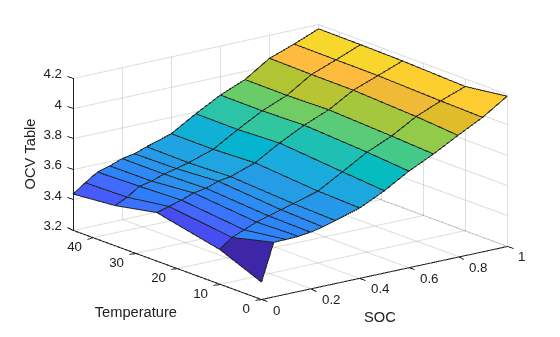
Figure contains an axes object. The axes object with xlabel SOC, ylabel Temperature contains an object of type surface.

Evaluate Feature

Evaluate the Voltage3 feature using the hppcDataBAKcell0degC.mat data file.

[results,s] = evaluateFeature(r,"Voltage3", ...
    fullfile( ...
    pwd,'HPPC_data', 'origPreprocessedData','hppcDataBAKcell0degC.mat'));

Plot the voltage error to inspect the fit.

plot(results.voltage - results.Voltage3, '.');
ylabel('Error');
title(sprintf('Difference Between measured voltage and Voltage3 (RMSE: %.4f)', s));
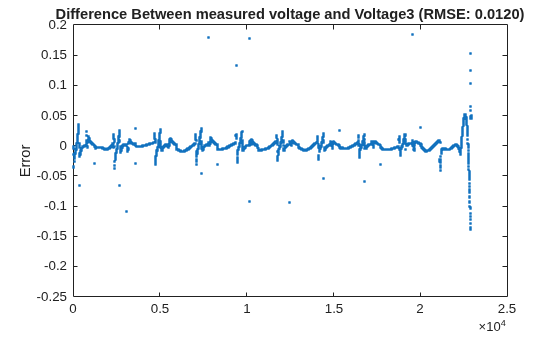
Figure contains an axes object. The axes object with title Difference Between measured voltage and Voltage3 (RMSE: 0.0120), ylabel Error contains a line object which displays its values using only markers.

Version History

Introduced in R2024b