msbOptimizer
R2026bDescription
Use the msbOptimizer class to optimize the device parameters used
in the simulation environment. This class supports Cadence® and Simulink® simulation environments. The class creates an msbOptimizer
object using specified arguments. You can then use the optimizeDesign
method to optimize the circuit parameters.
If you select different corners in the design, the msbOptimizer finds the
best solution that satisfy all metrics under all corners.
To use this functionality, you need a license for Global Optimization Toolbox.
Creation
Syntax
Description
msbOptimizer( creates an
DesignName='pll')msbOptimizer object with DesignName property set
to pll.
msbOptimizer(
creates an SimulationEnvironment='simulink',OutputsSetup=outputTable,VariableSetup=variableTable,DesignName='pll')msbOptimizer object using the specified
DesignName, VariableSetup, and
OutputsSetup arguments in the Simulink environment.
Name-Value Arguments
Object Functions
optimizeDesign | Optimize circuit design in simulation environment |
Examples
Define the performance specifications of a second-order DSM.
outputTable=table();
outputTable.Test=["ACMeas";"ACMeas";"ACMeas";"ACMeas";"ACMeas"];
outputTable.Name={'SNR';'SFDR';'SINAD';'ENOB';'NoiseFloor'};
outputTable.Units={'dB';'dB';'dB';'bits';'dB'};
outputTable.Spec={'> 72';'> 74';'> 72';'maximize 11.5';'< -78'}
outputTable = 5×4 table
      Test           Name          Units            Spec
    ________    ______________    ________    _________________

    "ACMeas"    {'SNR'       }    {'dB'  }    {'> 72'         }
    "ACMeas"    {'SFDR'      }    {'dB'  }    {'> 74'         }
    "ACMeas"    {'SINAD'     }    {'dB'  }    {'> 72'         }
    "ACMeas"    {'ENOB'      }    {'bits'}    {'maximize 11.5'}
    "ACMeas"    {'NoiseFloor'}    {'dB'  }    {'< -78'        }
Define the variables to optimize.
variableTable=table();
variableTable.parameters={'a1';'a2';'b1';'b2'};
variableTable.values=["0.15:0.005:0.16";"0.55:0.005:0.7";"0.15:0.005:0.16";"0.55:0.005:0.7"]
variableTable = 4×2 table
parameters values
__________ _________________
{'a1'} "0.15:0.005:0.16"
{'a2'} "0.55:0.005:0.7"
{'b1'} "0.15:0.005:0.16"
{'b2'} "0.55:0.005:0.7"
Create the msbOptimizer object.
moptimizer = msbOptimizer(SimulationEnvironment='simulink',OutputsSetup=outputTable,VariableSetup=variableTable,DesignName='DSM2ndOrder')
moptimizer =
  msbOptimizer with properties:

               DesignName: 'DSM2ndOrder'
                   Solver: "surrogateopt"
    SimulationEnvironment: 'simulink'
             BestSolution: []
              BestMetrics: []
     FinalOptimizerStatus: []
             OutputsSetup: [5×4 table]
          ParametersSetup: [4×2 table]
           ParameterNames: ["a1"    "a2"    "b1"    "b2"]
          ParameterValues: ["0.15:0.005:0.16"    "0.55:0.005:0.7"    "0.15:0.005:0.16"    "0.55:0.005:0.7"]
                    Eflag: []
                   Trials: []
              Constraints: [5×9 table]
                  Corners: []
Optimize the parameters.
[sol,metric] = moptimizer.optimizeDesign
Maximum number of simulations: 100
Number of parallel simulations: 1
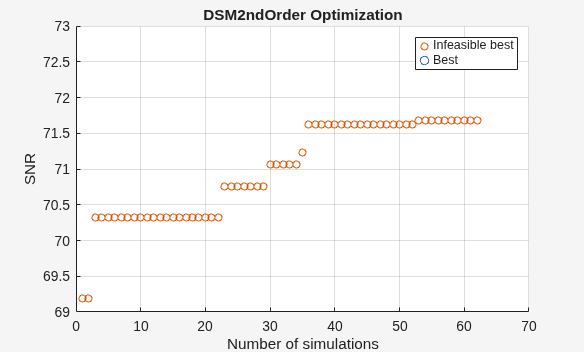
Optimizer was able to meet all the specifications.
sol = 4×2 table
    Name    Value
    ____    _____

    "a1"     0.15
    "a2"    0.575
    "b1"    0.155
    "b2"    0.635
metric = 5×4 table
        Name        FinalMetrics         Specs         Units
    ____________    ____________    _______________    ______

    "SNR"              72.519       "> 72"             "dB"
    "SFDR"             80.869       "> 74"             "dB"
    "SINAD"            72.519       "> 72"             "dB"
    "ENOB"             11.754       "maximize 11.5"    "bits"
    "NoiseFloor"      -80.755       "< -78"            "dB"
As you can see, the function meets the required specifications. You can use the check point file to continue further optimization from the current state.
More About
Tips
Set
Solvertosurrogateoptfor general-purpose optimization problems with short simulation times or quick design verifications. This works best when the number of design variables is fewer than 10 or problems have discontinuous transitions.Set
Solvertoessaboptfor analog IC sizing problems with long simulation times or when accurate final design values are critical. It works best when the number of design variables is between 10 and 40 or problems have multiple constraints with stringent specifications.
Version History
Introduced in R2024b

