Contenido principal

writeall

R2026b

Write datastore to files

    The function has changed. For more information, see Version History.

    Description

    writeall(sds,outputLocation) writes the data from the input datastore sds to output files at the location specified in outputLocation. The number of output files is the same as the number of files referenced by the datastore.

    example

    writeall(sds,outputLocation,Name=Value) writes data with additional options specified by one or more name-value arguments. For example, FilenameSuffix="norm" adds the descriptive text "norm" at the end of all output files.

    example

    Examples

    collapse all

    Create a signal datastore to iterate through the elements of an in-memory cell array of signal data. The array contains:

    • A sinusoidally modulated linear chirp

    • A concave quadratic chirp

    • A voltage controlled oscillator

    • A set of pulses of decreasing duration separated by regions of oscillating amplitude and fluctuating frequency with an increasing trend

    The signals are sampled at 3000 Hz.

    Fs = 3000;
    t = 0:1/Fs:3-1/Fs;
    data = {chirp(t,300,t(end),800).*exp(2j*pi*10*cos(2*pi*2*t)); ...
            2*chirp(t,200,t(end),1000,"quadratic",[],"concave"); ...
            vco(sin(2*pi*t),[0.1 0.4]*Fs,Fs);
            besselj(0,600*(sin(2*pi*(t+1).^3/30).^5));};
    sds = signalDatastore(data,SampleRate=Fs);

    Create a folder called Files in the current folder. Write the contents of the datastore to files. List the contents of the folder. The writeall function uses the MemberNames property of signalDatastore to name the files and the signals in the files.

    fname = "Files";
    mkdir(fname)
    
    writeall(sds,fname)
    
    dir(fname)
    .            ..           Member1.mat  Member2.mat  Member3.mat  Member4.mat  
    

    Create a datastore that points to the files in Files. Read the data one file at a time. Compute and display the short-time Fourier transform of each signal.

    sdfs = signalDatastore(fname,SampleRate=Fs);
    tiledlayout("flow")
    while hasdata(sdfs)
        nexttile
        [sg,nf] = read(sdfs);
        stft(sg,nf.SampleRate)
    end
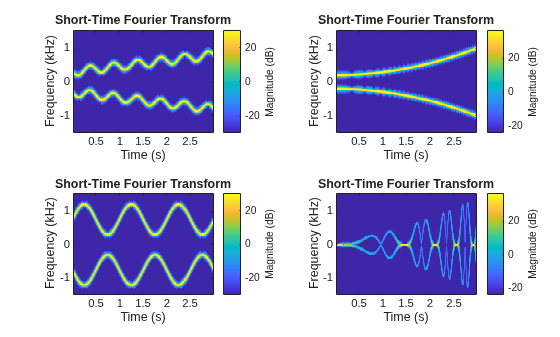
    Figure contains 4 axes objects. Axes object 1 with title Short-Time Fourier Transform, xlabel Time (s), ylabel Frequency (kHz) contains an object of type image. Axes object 2 with title Short-Time Fourier Transform, xlabel Time (s), ylabel Frequency (kHz) contains an object of type image. Axes object 3 with title Short-Time Fourier Transform, xlabel Time (s), ylabel Frequency (kHz) contains an object of type image. Axes object 4 with title Short-Time Fourier Transform, xlabel Time (s), ylabel Frequency (kHz) contains an object of type image.

    Remove the Files directory you created earlier in the example.

    rmdir(fname,"s")

    Specify the path to four signals included with MATLAB®. The signals are recordings of a bird chirping, a train, a splat, and a female voice saying the word "MATLAB." The first three signals are sampled at 8192 Hz and the fourth at 7418 Hz. Create a signal datastore that points to the specified files.

    fls = ["chirp" "train" "splat" "mtlb"];
    folder = fullfile(matlabroot,"toolbox","matlab","audiovideo", ...
        append(fls,".mat"));
    
    sds = signalDatastore(folder,SampleRateVariableName="Fs");

    Write the spectrograms of the signals to text files in the current folder using the writeall and writeSpectrogram functions. writeall uses the MemberNames property of signalDatastore to name the files and the signals in the files. Create a datastore that points to the files in the current folder.

    writeall(sds,".",WriteFcn=@writeSpectrogram,UseParallel="auto")
    
    sdfs = signalDatastore(".");

    Read the data one file at a time. Display the spectrogram of each signal.

    tiledlayout("flow")
    while hasdata(sdfs)
        nexttile
        
        [d,info] = read(sdfs);
        waterfall(d(2:end,1),d(1,2:end),d(2:end,2:end)')
        
        wtf = gca;
        wtf.XDir = "reverse";
        view(30,45)
        xlabel("{\it f} (Hz)")
        ylabel("{\it t} (s)")
        
        [~,k] = fileparts(info.FileName);
        title(k)
    end
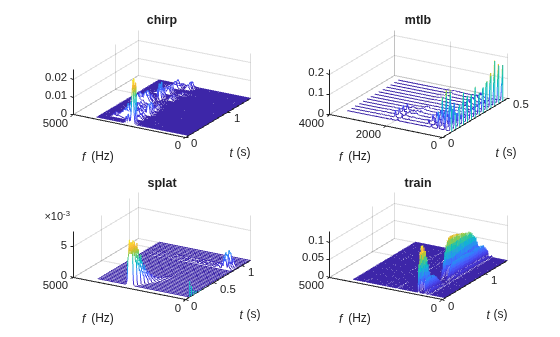
    Figure contains 4 axes objects. Axes object 1 with title chirp, xlabel {\it f} (Hz), ylabel {\it t} (s) contains an object of type patch. Axes object 2 with title mtlb, xlabel {\it f} (Hz), ylabel {\it t} (s) contains an object of type patch. Axes object 3 with title splat, xlabel {\it f} (Hz), ylabel {\it t} (s) contains an object of type patch. Axes object 4 with title train, xlabel {\it f} (Hz), ylabel {\it t} (s) contains an object of type patch.

    The writeSpectrogram function computes the spectrogram of the input signal using pspectrum and writes it to a MAT file in the current folder. The function specifies 80% of overlap between adjoining segments, a time resolution of 0.15 second, and a spectral leakage of 0.8.

    function writeSpectrogram(data,info,~)
    
        [s,f,t] = pspectrum(data,info.ReadInfo.SampleRate,"spectrogram", ...
            TimeResolution=0.15,OverlapPercent=80,Leakage=0.8);
        d = [NaN t'; f s];
        
        [~,q] = fileparts(info.SuggestedOutputName);
        save(q,"d")
    
    end

    Input Arguments

    collapse all

    Signal datastore, specified as a signalDatastore object. By default, when sds contains in-memory data, the writeall function writes the input data to MAT files.

    Example: signalDatastore({randn(100,1)},SampleRate=100) specifies a signal datastore containing one member, a random signal, sampled at 100 Hz.

    Folder location to write data, specified as a character vector or string scalar. outputLocation can specify a full or relative path.

    Example: outputLocation = '../../dir/data'

    Example: outputLocation = "C:\Users\MyName\Desktop"

    Data Types: char | string

    Name-Value Arguments

    collapse all

    Specify optional pairs of arguments as Name1=Value1,...,NameN=ValueN, where Name is the argument name and Value is the corresponding value. Name-value arguments must appear after other arguments, but the order of the pairs does not matter.

    Example: writeall(sds,outputLocation,FolderLayout="flatten")

    Layout of files in the output folder, specified as one of these values:

    • "duplicate" — Replicate the folder structure of the data that the signal datastore points to. Specify this argument as "duplicate" to maintain correspondence between the input and output data sets.

    • "flatten" — Write all the files from the input to the specified output folder without any subfolders.

    This argument does not apply when sds contains in-memory data.

    Data Types: char | string

    Prefix to file name, specified as a character vector or string scalar.

    The writeall function adds the specified prefix to the output file names. For example, this code adds today’s date to the beginning of all output file names from the datastore.

    prefixText = string(datetime("today"))
    writeall(imds,"C:\myFolder",FilenamePrefix=prefixText);
    

    Data Types: char | string

    Suffix to file name, specified as a character vector or string scalar.

    The writeall function adds the specified suffix to the output file names. For example, this code adds the descriptive text "jpeg_70per" at the end of all output file names from the datastore.

    writeall(imds,"C:\myFolder",FilenameSuffix="jpeg_70per");

    Data Types: char | string

    Option to write data in parallel using a pool of workers, specified as one of these values:

    • "off" — Write data serially on the MATLAB® client.

    • "auto" — Write data using a parallel pool if one is open or if MATLAB can automatically create one. If a parallel pool is not available, write data serially on the MATLAB client.

    • "on" — Write data using a parallel pool if one is open or if MATLAB can automatically create one. If a parallel pool is not available, throw an error.

    If you do not have a parallel pool open and automatic pool creation is enabled, MATLAB opens a pool using the default cluster profile. To use a parallel pool to run computations in MATLAB, you must have Parallel Computing Toolbox™. For more information, see Run MATLAB Functions with Automatic Parallel Support (Parallel Computing Toolbox).

    Note

    Parallel writing is not supported for combined datastores using the CombinedDatastore object or combined datastores transformed using the transform function.

    Before R2026b: To run in parallel, set UseParallel to true (1).

    Data Types: char | string

    Custom writing function, specified as a function handle. The specified function is responsible for creating the output files. You can use this name-value argument to transform data or write data to a file format different from the default, even if writeall does not directly support the output format.

    Function Signature

    The custom writing function must accept at least three input arguments, data, writeInfo, and suggestedOutputType.

    function myWriteFcn(data,writeInfo,suggestedOutputType)
    The function can also accept additional inputs, such as name-value arguments, after the first three required inputs.

    • data contains the output of the read method operating on the datastore.

    • writeInfo is an object of type matlab.io.datastore.WriteInfo with fields listed in the table.

      FieldDescriptionType
      ReadInfoThe second output of the read method of the signalDatastorestruct
      SuggestedOutputNameA fully qualified, globally unique file name that meets the location and naming requirementsstring
      LocationThe specified outputLocation passed to writeallstring
    • suggestedOutputType is the suggested output file type.

    Example Function

    A simple write function that computes the spectrogram of the input signal using pspectrum and writes it to a text file in the current folder using the MATLAB function writematrix. The function specifies 80% of overlap between adjoining segments, a time resolution of 0.15 second, and a spectral leakage of 0.8.

    function writeSpectrogram(data,info,~)
    
        [s,f,t] = pspectrum(data,info.ReadInfo.SampleRate,"spectrogram", ...
            TimeResolution=0.15,OverlapPercent=80,Leakage=0.8);
        d = [NaN t'; f s];
        
        [~,q] = fileparts(info.SuggestedOutputName);
        writematrix(d,append(q,".txt"))
    
    end
    To use writeSpectrogram as the writing function for the signalDatastore object sds, use this command.
    writeall(sds,".",WriteFcn=@writeSpectrogram)

    Data Types: function_handle

    Extended Capabilities

    expand all

    Version History

    Introduced in R2021a

    expand all