Contenido principal

resample

Resample simulation data onto new time vector

Description

newSimData = resample(simdata) resamples the simulation data in simdata to a common time vector and returns newSimData.

Note

When you run resample, existing observable expressions are not reevaluated but resampled instead using the default (or specified) interpolation method.

example

newSimData = resample(simdata,timeVector) resamples the simulation data to the specified time vector timeVector.

example

newSimData = resample(simdata,timeVector,method) resamples the simulation data using the specified interpolation method.

example

[t,x,names] = resample(___) returns the interpolation time points t, simulation data x, and corresponding names for the data columns for any of the previous input arguments.

Examples

collapse all

Load the radioactive decay model.

sbioloadproject('radiodecay');

Simulate the model.

sd = sbiosimulate(m1);
sbioplot(sd);
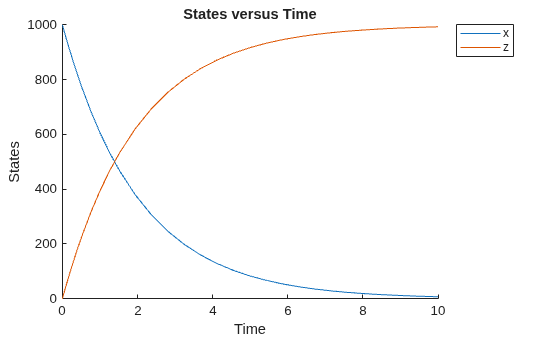
Figure contains an axes object. The axes object with title States versus Time, xlabel Time, ylabel States contains 2 objects of type line. These objects represent x, z.

Resample the simulation data between time points from 1 to 5 with the linear interpolation method.

newsd = resample(sd,[1:5],'linear');
sbioplot(newsd);
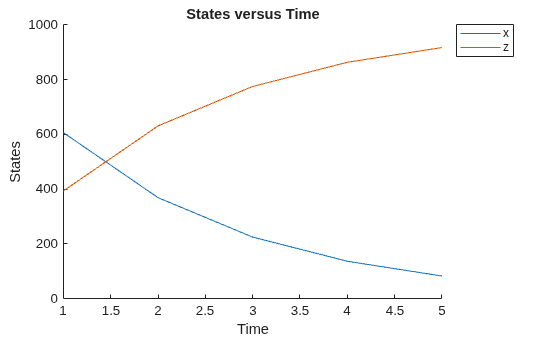
Figure contains an axes object. The axes object with title States versus Time, xlabel Time, ylabel States contains 2 objects of type line. These objects represent x, z.

Change the solver to perform an ensemble run.

cs = getconfigset(m1);
cs.SolverType = 'ssa';

Perform an ensemble run.

sdEnsemble = sbioensemblerun(m1,10);

Resample the ensemble data between time points 1 and 10.

newsdEnsemble = resample(sdEnsemble,[1:10],'linear');

Compare the time steps.

newsdEnsemble(1).Time
ans = 10×1

     1
     2
     3
     4
     5
     6
     7
     8
     9
    10

sdEnsemble(1).Time
ans = 999×1

         0
    0.0004
    0.0006
    0.0047
    0.0049
    0.0058
    0.0105
    0.0131
    0.0143
    0.0144
    0.0145
    0.0182
    0.0183
    0.0184
    0.0198
      ⋮

Input Arguments

collapse all

Simulation data, specified as a SimData object or array of SimData objects. If you specify an array of SimData objects with different time courses, the function selects the time vector from a SimData object with the earliest stop time as the common time vector.

Time vector, specified as a numeric vector. The default value [] means that the function selects the time vector from simdata with the earliest stop time as the common time vector.

If timeVector includes time points outside the time interval of the SimData objects in simdata, resample performs extrapolation if the underlying interpolation method supports it. Otherwise, the function returns NaNs for those time points. See the help for the MATLAB function corresponding to the interpolation method in use for information on how the function performs the extrapolation.

SimData always stores the time points in sorted order. If the input time vector is unsorted and you want to preserve this original order, request the interpolation times (t) and simulation data (x) as output arguments in your resample call.

If SimData contains multiple rows of data with the same time, the function returns only the final data, that is, the data at the last occurrence of such a time point.

Interpolation method for resampling, specified as a character vector or string. The valid choices follow.

  • 'interp1q' — Use the interp1q function.

  • To use the interp1 function, specify one of the following methods:

    • 'nearest'

    • 'linear'

    • 'spline'

    • 'pchip'

    • 'cubic'

    • 'v5cubic' (same as 'cubic')

  • 'zoh' — Specify the zero-order hold.

Note

The 'cubic' method changed in R2020b to perform cubic convolution. In previous releases, 'cubic' was the same as 'pchip'. For details, see interp1.

Output Arguments

collapse all

Resampled simulation data, returned as a SimData object or array of SimData objects. newSimData has the same size as simdata.

Interpolation time points, returned as a numeric vector or cell array. t has the same size as simdata.

Simulation data, returned as a numeric matrix or cell array. x has the same size as simdata.

Names of quantities and sensitivities logged during the simulation, returned as a cell array. names has the size as simdata.

Version History

Introduced in R2007b

expand all