Perform Instance Segmentation Using Mask R-CNN
R2026bThis example shows how to segment individual instances of people and cars using a multiclass mask region-based convolutional neural network (R-CNN).
Instance segmentation is a computer vision technique in which you detect and localize objects while simultaneously generating a segmentation map for each of the detected instances. This example first shows how to perform instance segmentation using a pretrained Mask R-CNN that detects two classes. Then, you can optionally download a data set and train a multiclass Mask R-CNN using transfer learning.
Load Pretrained Network
Specify dataFolder as the desired location of the pretrained network and data.
dataFolder = fullfile(tempdir,"coco");Download the pretrained Mask R-CNN. The network is stored as a maskrcnn object.
trainedMaskRCNN_url = "https://www.mathworks.com/supportfiles/vision/data/maskrcnn_object_person_car_v2.mat";
downloadTrainedMaskRCNN(trainedMaskRCNN_url,dataFolder);
load(fullfile(dataFolder,"maskrcnn_object_person_car_v2.mat"));
Segment People in Image
Read a test image that contains objects of the target classes.
imTest = imread("visionteam.jpg");Segment the objects and their masks using the segmentObjects function. The segmentObjects function performs these preprocessing steps on the input image before performing prediction.
Zero center the images using the COCO data set mean.
Resize the image to the input size of the network, while maintaining the aspect ratio (letter boxing).
[masks,labels,scores,boxes] = segmentObjects(net,imTest,Threshold=0.8);
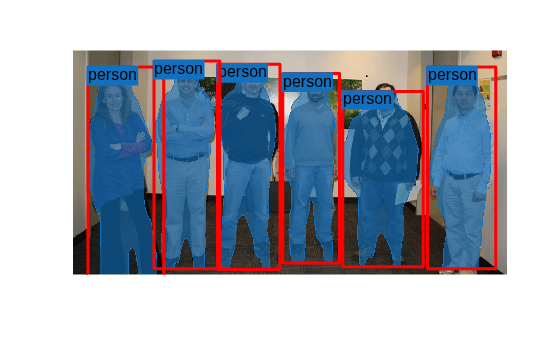
Visualize the predictions by overlaying the detected masks on the image using the insertObjectMask function.
overlayedImage = insertObjectMask(imTest,masks);
imshow(overlayedImage)
Show the bounding boxes and labels on the objects.
showShape("rectangle",gather(boxes),Label=labels,LineColor="r")
Download Training Data
The COCO 2014 training images data set [2] consists of 82,783 images. The annotations data contains at least five captions corresponding to each image. Download the COCO 2014 training images and captions from https://cocodataset.org/#download by clicking the "2014 Train images" and "2014 Train/Val annotations" links, respectively. Extract the image files into the dataFolder created earlier and specify the location of the images and annotation folders.
imageFolder = fullfile(dataFolder,"train2014");
annotationFolder = fullfile(dataFolder,"annotations");
Specify the name of the COCO JSON file that defines the training data ground truth.
annotationFile = fullfile(annotationFolder,"instances_train2014.json");Prepare Data for Training
To train a Mask R-CNN, you need this data.
RGB images that serve as input to the network, specified as H-by-W-by-3 numeric arrays.
Bounding boxes for objects in the RGB images, specified as NumObjects-by-4 matrices, with rows in the format [x y w h]).
Instance labels, specified as NumObjects-by-1 string vectors.
Instance masks. Each mask is the segmentation of one instance in the image. The COCO data set specifies object instances using polygon coordinates formatted as NumObjects-by-2 cell arrays. Each row of the array contains the (x,y) coordinates of a polygon along the boundary of one instance in the image. However, the Mask R-CNN in this example requires binary masks specified as logical arrays of size H-by-W-by-NumObjects.
Initialize Training Data Parameters
trainClassNames = ["person","car"];
numClasses = length(trainClassNames);
imageSizeTrain = [800 800 3];
Load COCO Ground Truth Data
Use groundTruthFromCOCO to load ground truth data stored in the COCO JSON file in a groundTruth object.
gTruthAllClasses = groundTruthFromCOCO(annotationFile,imageFolder);
Select the ground truth data for the "person" and "car" class.
gTruth = selectLabelsByName(gTruthAllClasses,trainClassNames);
To visualize and review the ground truth data, use the Image Labeler App:
imageLabeler(gTruth)
Create Datastore
The Mask R-CNN training function expects input data as a 1-by-4 cell array which includes images with corresponding bounding boxes, instance labels, and instance masks. To produce this training‑ready data, use the instanceSegmentationTrainingData function to convert ground truth polygon labels into axis‑aligned bounding boxes and instance masks for training. To accelerate this conversion, create a background pool, which enables parallel processing of the ground truth data. The function writes the binary mask files to the folder specified by the trainingDataFolder variable.
trainingDataFolder = fullfile(dataFolder,"trainingData");
bp = backgroundPool();
ds = instanceSegmentationTrainingData(gTruth,...
    WriteLocation=trainingDataFolder,...
    UseParallel="on");
preview(ds)
ans = 1×4 cell array
    429×640×3 uint8    [4.8200,2.8900,478.1700,302.7100]    person    429×640 logical
Configure Mask R-CNN Network
The Mask R-CNN builds upon a Faster R-CNN with a ResNet-50 base network. To transfer learn on the pretrained Mask R-CNN network, use the maskrcnn object to load the pretrained network and customize the network for the new set of classes and input size. By default, the maskrcnn object uses the same anchor boxes as used for training with COCO data set.
net = maskrcnn("resnet50-coco",trainClassNames,InputSize=imageSizeTrain)net =
maskrcnn with properties:
ModelName: 'maskrcnn'
ClassNames: {'person' 'car'}
InputSize: [800 800 3]
AnchorBoxes: [15×2 double]
If you want to use custom anchor boxes specific to the training data set, you can estimate the anchor boxes using the estimateAnchorBoxes function. Then, specify the anchor boxes using the AnchorBoxes name-value argument when you create the maskrcnn object.
Train Network
Specify the options for SGDM optimization and train the network for 10 epochs.
Specify the ExecutionEnvironment name-value argument as "gpu" to train on a GPU. It is recommended to train on a GPU with at least 12 GB of available memory. Using a GPU requires Parallel Computing Toolbox™ and a CUDA® enabled NVIDIA® GPU. For more information, see GPU Computing Requirements (Parallel Computing Toolbox).
options = trainingOptions("sgdm", ...
    InitialLearnRate=0.001, ...
    LearnRateSchedule="piecewise", ...
    LearnRateDropPeriod=1, ...
    LearnRateDropFactor=0.95, ...
    Plot="none", ...
    Momentum=0.9, ...
    MaxEpochs=10, ...
    MiniBatchSize=2, ...
    BatchNormalizationStatistics="moving", ...
    ResetInputNormalization=false, ...
    ExecutionEnvironment="gpu", ...
    VerboseFrequency=50);
To train the Mask R-CNN network, set the doTraining variable in the following code to true. Train the network using the trainMaskRCNN function. Because the training data set is similar to the data that the pretrained network is trained on, you can freeze the weights of the feature extraction backbone using the FreezeSubNetwork name-value argument.
doTraining = false;
if doTraining
    [net,info] = trainMaskRCNN(ds,net,options,FreezeSubNetwork="backbone");
    modelDateTime = string(datetime("now",Format="yyyy-MM-dd-HH-mm-ss"));
    save("trainedMaskRCNN-"+modelDateTime+".mat","net");
end
Using the trained network, you can perform instance segmentation on test images, as demonstrated in the "Segment People in Image" section of this example.
References
[1] He, Kaiming, Georgia Gkioxari, Piotr Dollár, and Ross Girshick. “Mask R-CNN.” Preprint, submitted January 24, 2018. https://arxiv.org/abs/1703.06870.
[2] Lin, Tsung-Yi, Michael Maire, Serge Belongie, Lubomir Bourdev, Ross Girshick, James Hays, Pietro Perona, Deva Ramanan, C. Lawrence Zitnick, and Piotr Dollár. “Microsoft COCO: Common Objects in Context,” May 1, 2014. https://arxiv.org/abs/1405.0312v3.`
See Also
maskrcnn | trainMaskRCNN | segmentObjects | transform | insertObjectMask
Topics
- Perform Instance Segmentation Using SOLOv2
- Getting Started with Mask R-CNN for Instance Segmentation
- Deep Learning in MATLAB (Deep Learning Toolbox)
- Datastores for Deep Learning (Deep Learning Toolbox)

