Face Detection and Tracking Using the KLT Algorithm
R2026bThis example shows how to automatically detect and track a face using feature points. The approach in this example keeps track of the face even when the person tilts his or her head, or moves toward or away from the camera.
Introduction
Object detection and tracking are important in many computer vision applications including activity recognition, automotive safety, and surveillance. In this example, you will develop a simple face tracking system by dividing the tracking problem into three parts:
Detect a face
Identify facial features to track
Track the face
This example performs a basic feature-based tracking algorithm that is good for real-time applications, but it can degrade in performance quickly in more complex scenarios where object occlusion becomes a factor. To learn how to implement a higher accuracy and more robust tracking algorithm that can overcome complex scenarios, see the Multi-Object Tracking with DeepSORT (Sensor Fusion and Tracking Toolbox) example.
Detect a Face
First, you must detect the face. Load the video using VideoReader and then use the video frame size to create a faceDetector network object.
To use the pretrained faceDetector detection networks trained on WIDER FACE data set, you must download and install the Computer Vision Toolbox Model for RetinaFace Face Detection support package from Add-On Explorer. For more information about installing add-ons, see Get and Manage Add-Ons. To run this function, you will require the Deep Learning Toolbox™.
v = VideoReader("tilted_face.avi");
frameSize = [v.Height v.Width];
detector = faceDetector("small-network", InputSize=frameSize);
Use faceDetector to detect the location of a face in the first video frame and display the detected face using showShape (Point Cloud Toolbox).
frame = readFrame(v);
bbox = detect(detector, frame);

figure;
imshow(frame);
title("Detected face");
showShape("rectangle",bbox);
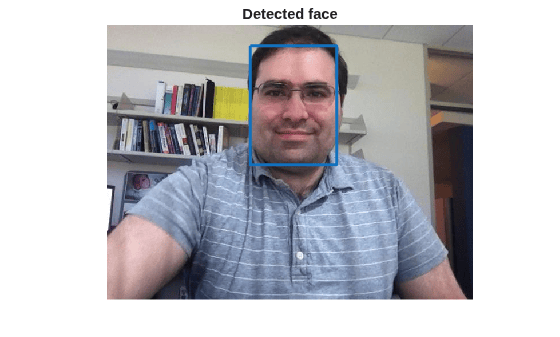
To track the face over time, this example uses the Kanade-Lucas-Tomasi (KLT) algorithm. While it is possible to use the faceDetector object detector on every frame, it is computationally expensive. It may also fail to detect the face, when the subject turns or tilts his head. The example detects the face only once, and then the KLT algorithm tracks the face across the video frames.
Identify Facial Features to Track
Once the faceDetector locates the face, use the detectSIFTFeatures function to identify feature points within the facial region which can be tracked reliably. Then, use the KLT algorithm to track those feature points across the successive video frames.
Detect feature points in the face region and display them using plot.
points = detectSIFTFeatures(im2gray(frame), ROI=bbox);

figure;
imshow(frame);
hold on;
title("Detected features");
plot(points,ShowScale=false);
hold off;
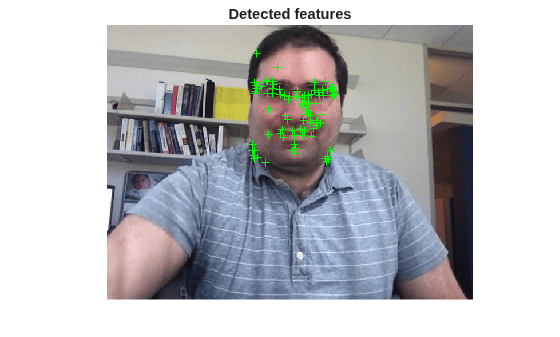
Initialize a Tracker to Track the Points
With the feature points identified, you can now use the vision.PointTracker System object to track them. For each point in the previous frame, the point tracker attempts to find the corresponding point in the current frame. Then the estgeotform2d function is used to estimate the translation, rotation, and scale between the old points and the new points. This transformation is applied to the bounding box around the face.
Create a point tracker and enable the bidirectional error constraint to make it more robust in the presence of noise and clutter. Initialize the tracker with the initial point locations and the initial video frame.
pointTracker = vision.PointTracker(MaxBidirectionalError=2);
points = points.Location;
initialize(pointTracker, points, frame);
Track the Face
Get the four corner points corresponding to the detected bounding box enclosing the face. Use this to visualize the rotation of the bounding box as the KLT algorithm finds the new associated points in successive video frames.
bboxPoints = bbox2points(bbox(1,:));
Track the points from frame to frame, and use estgeotform2d function to estimate the motion of the face.
Make a copy of the points to be used for computing the geometric transformation between the points in the previous and the current frames.
oldPoints = points;

while hasFrame(v)
    % Get the next frame.
    frame = readFrame(v);

    % Track the points. Note that some points may be lost.
    [points, isFound] = step(pointTracker, frame);
    visiblePoints = points(isFound, :);
    oldInliers = oldPoints(isFound, :);

    if size(visiblePoints, 1) >= 2 % At least 2 points are needed.

        % Estimate the geometric transformation between the old points
        % and the new points and eliminate outliers.
        [xform, inlierIdx] = estgeotform2d(oldInliers, visiblePoints, "similarity", MaxDistance=4);
        oldInliers    = oldInliers(inlierIdx, :);
        visiblePoints = visiblePoints(inlierIdx, :);

        % Apply the transformation to the bounding box points
        bboxPoints = transformPointsForward(xform, bboxPoints);

        % Reset the points
        oldPoints = visiblePoints;
        setPoints(pointTracker, oldPoints);
    end

    % Display the annotated video frame using the video player object
    imshow(frame);
    hold on;
    plot(visiblePoints(:,1), visiblePoints(:,2), "+", Color="white");
    bboxPolygon = reshape(bboxPoints', 1, []);
    showShape("polygon",bboxPolygon);
    hold off;
end
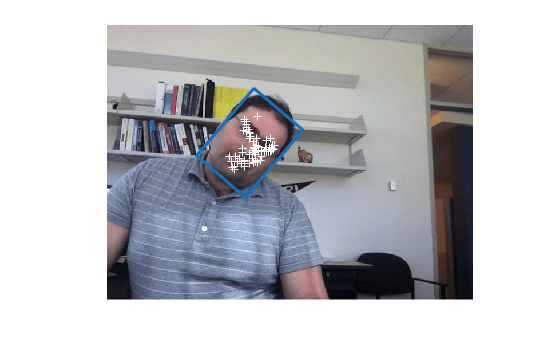
% Clean up the point tracker system object.
release(pointTracker);
Summary
In this example, you build a simple face tracking system that automatically detects and tracks a single face. Try using different input videos to see if the algorithm can still track a face. For best results, ensure the person faces the camera in the initial frame to help with detection.
For straightforward tracking tasks like single-object tracking, the Kanade-Lucas-Tomasi (KLT) algorithm often works well. However, as scenarios become more complex, such as when multiple objects appear, disappear, or cross paths, KLT may struggle to maintain accurate tracks. In these cases, you need to manage multiple object tracks, handle track assignment, and maintain track identities over time.
To address these challenges, MATLAB offers the Multi-Object Trackers (Sensor Fusion and Tracking Toolbox), which provides advanced tools for multi-object tracking and track management. To see how you can track multiple objects using deep learning and handle complex scenarios, explore the Multi-Object Tracking with DeepSORT example.
References
Bruce D. Lucas and Takeo Kanade. An Iterative Image Registration Technique with an Application to Stereo Vision. International Joint Conference on Artificial Intelligence, 1981.
Carlo Tomasi and Takeo Kanade. Detection and Tracking of Point Features. Carnegie Mellon University Technical Report CMU-CS-91-132, 1991.
Lowe, David G.. "Distinctive Image Features from Scale-Invariant Keypoints." Int. J. Comput. Vision 60 , no. 2 (2004): 91--110.
Zdenek Kalal, Krystian Mikolajczyk and Jiri Matas. Forward-Backward Error: Automatic Detection of Tracking Failures. International Conference on Pattern Recognition, 2010

