question about write to serial

Mostrar comentarios más antiguos
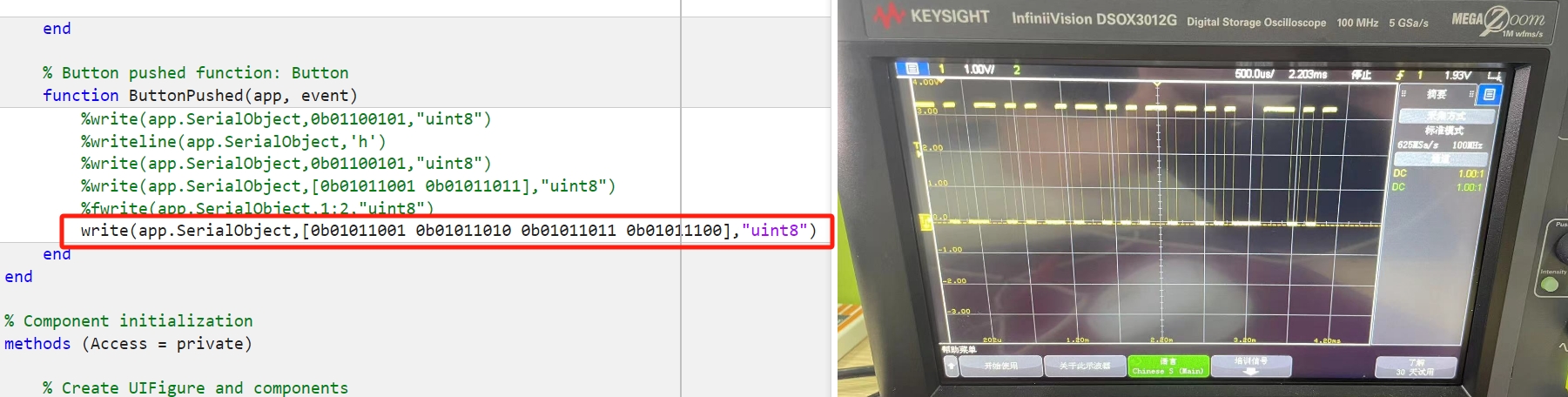
I want to write this string to the serial, but the signal is wrong. How to wirte this code? Thank you!!!
4 comentarios

Taylor
el 4 de Nov. de 2024
It's hard to say what's going wrong without knowing what device you're writing to. Is app.SerialObject defined as a property in the app? If you can share the app code that would be great.

Walter Roberson
el 4 de Nov. de 2024
Did you remember to take into account Start Bit and Stop Bit?
Did you remember to take into account that bits are transmitted "least significant bit" first? (which is "right to left" compared to the usual way of writing bit sequences)
Did you remember to take into account that binary 0 is transmitted as MARK condition ("on") and binary 1 is transmitted as SPACE ("off") condition?
Walter Roberson
el 5 de Nov. de 2024
When you are measuring the wire signal levels of RS232, then the Start and Stop bits are unavoidable.
Side note: the Start bit is a different length than the Stop bit. I seem to recall that the Stop bit is half of the length of other bits.
Respuestas (1)

Supraja
el 11 de Nov. de 2024
Hi,
It seems like sending deimal values inside the function would help in this case.
Please use the code as below:
write(app.SerialObject, [85, 86, 87, 88], "uint8"); % Decimal equivalents of binary numbers
Refer to 'write' function documentation below for further reference:
I hope this helps!
Categorías
Más información sobre Multirate Signal Processing en Centro de ayuda y File Exchange.
el 4 de Nov. de 2024
el 11 de Nov. de 2024
Community Treasure Hunt
Find the treasures in MATLAB Central and discover how the community can help you!
Start Hunting!
Translated by 

