Problem with XYZ points obtained
Mostrar comentarios más antiguos
Hello,
I'm trying to get the XYZ coordenates of the world using the CameraCalibrator app from 200 segmented images obtained from the capture of an object pointed with a laser line and positioned on a platform that rotates 1.8 degrees (by capture) to subsequently generate a 3d model.
To calculate the calibration matrix with the rotation of the object, I used the following lines of code:
%%
angleX = 0;
angleY = stp*(1.8); >> stp is number of step of the platform
angleZ = 0;
Rx = rotx(angleX); Ry = roty(angleY); Rz = rotz(angleZ);
Rb = Rx*Ry*Rz;
tx = 0; ty = 0; tz = 0;
tb = [tx ty tz];
MPb = [Rb zeros(3,1); tb 1];
Rt = [RotationMatrix; TranslationVector];
MC = Rt*IntrinsicMatrix;
P = MPb*MC;
P = P';
%%
after that, with the points (u, v) obtained from the segmented image, I calculate the XYZ points of the world using the following lines of code:
%%
% (u*P31 - P11)X + (u*P32 - P12)Y + (u*P33 - P13)Z + (u*P34 - P14) = 0
% (v*P31 - P21)X + (v*P32 - P22)Y + (v*P33 - P23)Z + (v*P34 - P24) = 0
for i = 1:length([u,v]) >> this is the cycle only for an image
A = [(u(i)*P(3,1) - P(1,1)) (u(i)*P(3,2) - P(1,2)) (u(i)*P(3,3) - P(1,3));
(v(i)*P(3,1) - P(2,1)) (v(i)*P(3,2) - P(2,2)) (v(i)*P(3,3) - P(2,3))];
b = [-(u(i)*P(3,4)) + P(1,4);
-(v(i)*P(3,4)) + P(2,4)];
x = pinv(A)*b;
XYZ(i,:) = x;
end
%%
When I plot the points obtained (plot_points_XYZ.png), it doesn't resemble the real shape of the object (Cap_cam1_step_01.png).
What am I doing wrong?
Thank you for your help
Rod Hid
P.S: Are the distortion values incorporated into the calculations of the intrinsic matrix, rotation matrix and translation vector delivered by the CameraCalibrator app?
17 comentarios

Adam Danz
el 9 de Mayo de 2019
I formatted your code. In the future, please use this button to add formatted code.


Rod Hid
el 9 de Mayo de 2019

darova
el 9 de Mayo de 2019
Can you please attach your data?
Rod Hid
el 10 de Mayo de 2019
darova
el 10 de Mayo de 2019
Can you please attach this data in another .mat . Can't read calibrationSession.mat (maybe i have older MATLAB version). Attach a few images also (not all)
TranslationVector = cameraParams.TranslationVectors(1,:);
RotationMatrix = double(cameraParams.RotationMatrices(:,:,1));
IntrinsicMatrix = cameraParams.IntrinsicMatrix();
I think something is wrong here:
img = imread(imgname); %Cargar imagen esqueletizada
[u,v] = find(img == 1); % u,v - vectors of 1xn length (rows)
for i = 1:length([u,v]) % has to be 1:length(u)
% some operations with u and v
end
Rod Hid
el 10 de Mayo de 2019
darova
el 10 de Mayo de 2019

Can you please attach those matrix in separate files
TranslationVector = cameraParams.TranslationVectors(1,:);
RotationMatrix = double(cameraParams.RotationMatrices(:,:,1));
IntrinsicMatrix = cameraParams.IntrinsicMatrix();
Rod Hid
el 11 de Mayo de 2019
darova
el 11 de Mayo de 2019
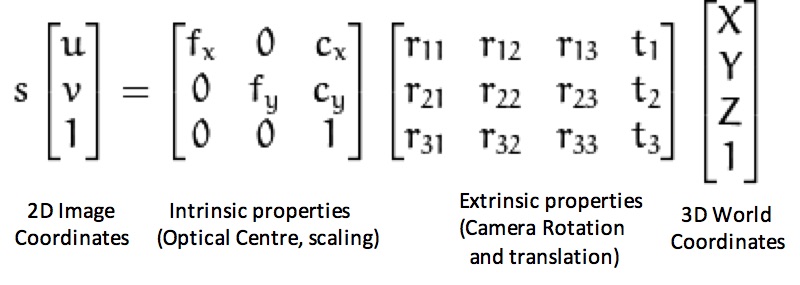
I changed diagonal elements that respons for scale
IntrinsicMatrix(1) = IntrinsicMatrix(1)/0.8;
IntrinsicMatrix(5) = IntrinsicMatrix(5)/2.1;
How did you obtain those matrix?

darova
el 14 de Mayo de 2019
honestly, don't know
Rod Hid
el 15 de Mayo de 2019
darova
el 15 de Mayo de 2019
I didn't, just intuition
Rod Hid
el 17 de Mayo de 2019
darova
el 17 de Mayo de 2019
What do you mean? The answer is in your question
Rod Hid
el 17 de Mayo de 2019
darova
el 17 de Mayo de 2019
I didn't know those are focal length. Just saw that image and tried to change fx, fy
Respuestas (2)
Categorías
Más información sobre MATLAB Support Package for USB Webcams en Centro de ayuda y File Exchange.
Productos
el 9 de Mayo de 2019
Community Treasure Hunt
Find the treasures in MATLAB Central and discover how the community can help you!
Start Hunting!
Translated by 

