Contenido principal

Simulation 3D Agricultural Tractor

R2026b

Agricultural tractor with ground following in 3D simulation environment

Since R2026b

  • Simulation 3D Agricultural Tractor Block Icon

Libraries:
Offroad Autonomy Library / Simulation 3D

Description

The Simulation 3D Agricultural Tractor block provides an interface to implement a ground-following agricultural tractor vehicle in the Simulink® 3D world.
Note

Simulating models with the Simulation 3D Agricultural Tractor block requires Simulink 3D Animation™ and the Robotics System Toolbox™ Offroad Autonomy Library support package. For more information about downloading the support package, see Install Robotics System Toolbox Offroad Autonomy Library Support Package.

The agricultural tractor is part of the Offroad Vehicle Library. For more information about the agricultural tractor model, such as its dimensions, see Agricultural Tractor.

Examples

expand all

Open the SimulateTractorInRollingVineyardScene Simulink model. The model contains a Simulation 3D Scene Configuration block and a Simulation 3D Agricultural Tractor block. Note that the Rolling Vineyard scene must be installed before you can set it in the Simulation 3D Scene Configuration block. See Rolling Vineyard for instructions on installing the scene.

open_system("SimulateTractorInRollingVineyard");
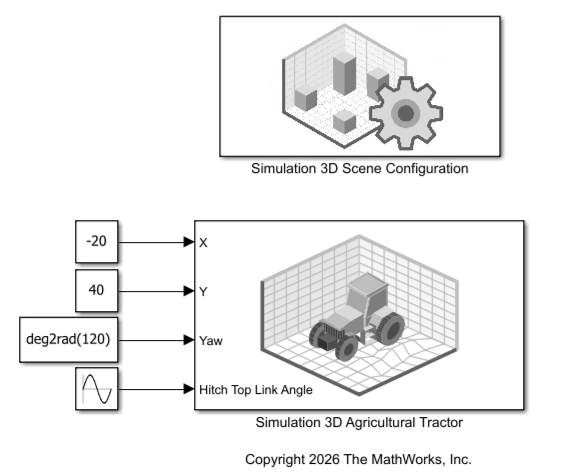
This model places the agricultural tractor at a recommended starting location and oscillates the hitch between its lowest and highest configurations. For more starting locations, see the Recommended Starting Locations section of Rolling Vineyard scene.

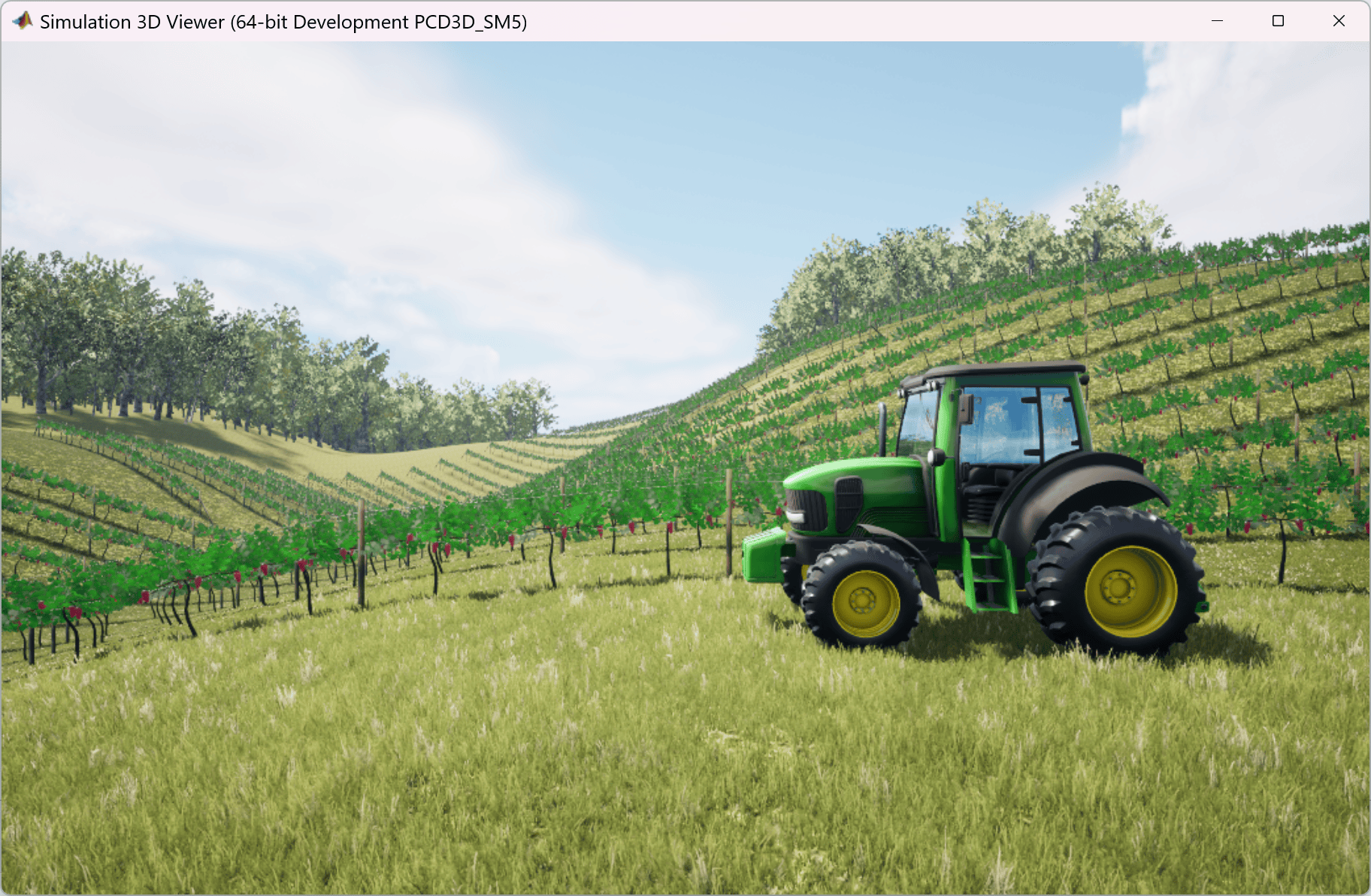
Simulate the model. This figure shows the Simulation 3D Viewer with the view manually set to the left camera view.

sim("SimulateTractorInRollingVineyard.slx");
Warning: Support for GPU devices with compute capability 6.1 will be removed in a future MATLAB release. For more information on GPU support, see <a href="matlab:web('http://www.mathworks.com/help/parallel-computing/gpu-computing-requirements.html','-browser')">GPU Computing Requirements</a>.
Ports

Note

Note that this block processes input and output values using the right-hand rule MATLAB® world coordinate system. For more information, see Coordinate Systems for Unreal Engine Simulation in Robotics System Toolbox.

Input

expand all

The input ports specify the pose of the rear-axle frame on the agricultural tractor. The x- and y-positions of the origin of the rear-axle frame are centered on the rear-axle, and the z‑position of the frame is aligned with the ground‑contact plane where the rear wheels touch the ground.

x-position of the rear-axle frame of the agricultural tractor in the world coordinate system, specified as a numeric scalar. Units are in meters.

Data Types: double

y-position of the rear-axle frame of the agricultural tractor in the world coordinate system, specified as a numeric scalar. Units are in meters.

Data Types: double

Yaw (z-axis) angle of the rear-axle frame of the agricultural tractor in the world coordinate system, specified as a numeric scalar. Units are in radians.

Data Types: double

Hitch top-link angle, specified as a scalar in the range [0, 1]. A value of 0 sets the top link to the most bottom position. A value of 1 sets the top link to the most vertical position.

Dependencies

To enable this port, select the Enable top link angle input signal parameter.

Output

expand all

The Base Translation and Base Rotation output ports return the pose of the origin frame of the agricultural tractor. The x-, y-, and z-position of the origin of the origin frame are centered on the ground‑contact plane where the four wheels touch the ground.

The Hitch Ball Translation and Hitch Ball Rotation output ports return the pose of the agricultural tractor hitch ball frame.

Current ground truth world translation of the origin frame of the agricultural tractor, returned as a three-element row vector of the form [x y z]. The elements of the vector are the translations along the x-, y-, and z-axes, respectively. Units are in meters.

Dependencies

To enable this port, select the Enable ground truth world base translation output signal parameter on the Outputs tab of the block mask.

Data Types: double

Current ground truth world rotation of the origin frame of the agricultural tractor, returned as a 3-by-3 rotation matrix representing the orientation of the origin frame relative to the world frame. The rotation follows the right-hand rule.

Dependencies

To enable this port, select the Enable ground truth world base rotation output signal parameter on the Outputs tab of the block mask.

Data Types: double

Current ground truth world translation of the agricultural tractor hitch ball, returned as a three-element row vector of the form [x y z]. The elements of the vector are the translations along the x-, y-, and z-axes, respectively. Units are in meters.

Dependencies

To enable this port, select the Enable ground truth world hitch ball translation output signal parameter on the Outputs tab of the block mask.

Data Types: double

Current ground truth world rotation of the origin frame of the agricultural tractor hitch ball, returned as a 3-by-3 rotation matrix representing the orientation of the hitch-ball-frame origin relative to the world frame. The rotation follows the right-hand rule.

Dependencies

To enable this port, select the Enable ground truth world hitch ball rotation output signal parameter on the Outputs tab of the block mask

Data Types: double

Parameters

expand all

Parameters

Specifies the name of the vehicle as a string scalar. By default, the block sets the Name parameter to SimulinkVehicle.

The vehicle name appears as an option for the Parent name parameter of any simulation 3D sensor blocks within the same model as the vehicle, enabling you to mount those sensors to the vehicle.

Specifies the color and texture applied to the agricultural tractor as one of these options:

  • GreenClean — Green tractor with a clean texture.

  • GreenDirty — Green tractor with a dirty texture.

  • BlueClean — Blue tractor with a clean texture.

  • BlueDirty — Blue tractor with a dirty texture.

  • RedClean — Red tractor with a clean texture.

  • RedDirty — Red tractor with a dirty texture.

Clean textures show a model without dirt on the wheels or body and without defects on the hitch or other body parts. Dirty textures show dirt on the wheels and other body parts, and dents and scratches on the hitch and other body parts.

Select this parameter to visualize the ray tracing lines emitted at the tractor wheels. These ray tracers detect the ground under the tractor for ground following.

Specifies the sample time, Ts, as a positive scalar in seconds. The graphics frame rate is the inverse of the sample time.

If you set the sample time to -1, the block uses the sample time specified in the Simulation 3D Scene Configuration block.

Initial Values

Specifies the initial translation of the rear-axle frame of the agricultural tractor as a three-element row vector of the form [x, y , z], where x, y , and z are the translations along the x-, y-, and z-axes respectively, using the right-hand rule world coordinate system. Units are in meters.

Specifies the initial rotation of the rear‑axle frame of the agricultural tractor as a 3‑by‑3 rotation matrix. The rotation follows the right‑hand rule in the world coordinate system and represents the orientation of the rear‑axle frame relative to the world frame.

Specifies the initial angle of the agricultural tractor top link as a numeric scalar in the range [0 1]. A value of 0 sets the top link to the most bottom position. A value of 1 sets the top link to the most vertical position.

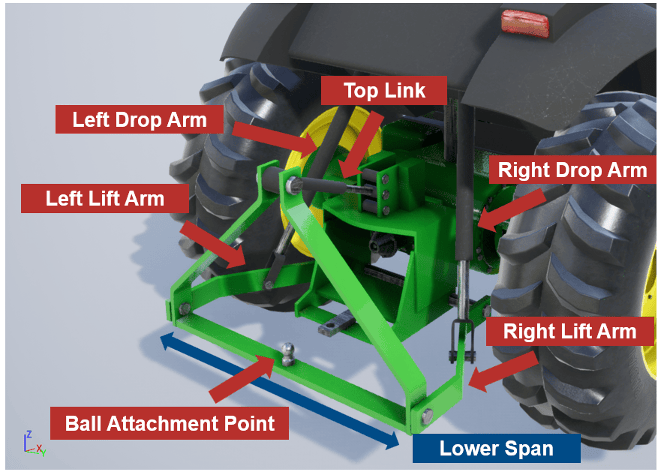
The default value 3/7 corresponds to a horizontal hitch configuration, in which the lower hitch crossbar, which has the ball attachment point, is parallel to the ground. For more details, see Tractor Three-Point Hitch.

Inputs

Select this parameter to enable the Hitch Top Link Angle input port.

Outputs

Select this parameter to output the ground truth world translation of the origin frame of the agricultural tractor at the Base Translation output port.

Select this parameter to output the ground truth world rotation of the origin frame of the agricultural tractor at the Base Rotation output port.

Select this parameter to output the ground truth world translation of agricultural tractor hitch ball at the Hitch Ball Translation output port.

Select this parameter to output the ground truth world rotation of agricultural tractor hitch ball at the Hitch Ball Rotation output port.

More About

expand all

Algorithms

expand all

The block computes a ground-following pose for the vehicle center by fitting a ground plane to four wheel-contact points and projecting the vehicle frame onto that plane.

Version History

Introduced in R2026b