Solver Profiler
R2026bIdentify solver performance bottlenecks
Description
The Solver Profiler logs and analyzes solver activity, such as zero-crossing events and solver resets, in a simulation. These solver events are necessary for accurate simulation but incur computational cost. Profiling the solver activity helps identify configuration and modeling issues that cause solver events to occur more frequently than necessary.
The Solver Profiler provides recommendations for configuration and modeling changes that can speed up simulations by reducing the number of solver events. The profiling results include statistical and graphical information about these solver events:
Zero-crossing events
Solver exceptions
Solver resets
Jacobian computations
To simplify and speed up performance analysis, generate AI explanations of profiling results. The AI explanation summarizes key findings, identifies potential bottlenecks, and provides actionable recommendations to improve simulation performance. To analyze profiling results using AI, you must have a Simulink® Copilot license. (since R2026b)
Local Solver Profiler
Since R2026b
The Local Solver Profiler configures profiling settings and displays profiling results for a local solver. The Local Solver Profiler provides the same configuration and visualization options as the Solver Profiler. However, the Local Solver Profiler toolstrip does not include the simulation controls that the Solver Profiler provides in the Profile section. To profile one or more local solvers, use the Local Solver Analyzer.
For more information, see Local Solver Analyzer.
Open the Solver Profiler
Simulink Toolstrip: On the Debug tab, click the Performance button arrow and select Solver Profiler.

Solver information menu: To open the Solver information menu, click the hyperlink on the right of the status bar at the bottom of the Simulink Editor. Then, click Solver Profiler
 .
.
MATLAB® Command Window:
solverprofiler.profileModel(mdl,OpenSP="on")profiles the solver for the modelmdland opens the Solver Profiler after the simulation completes.
Examples
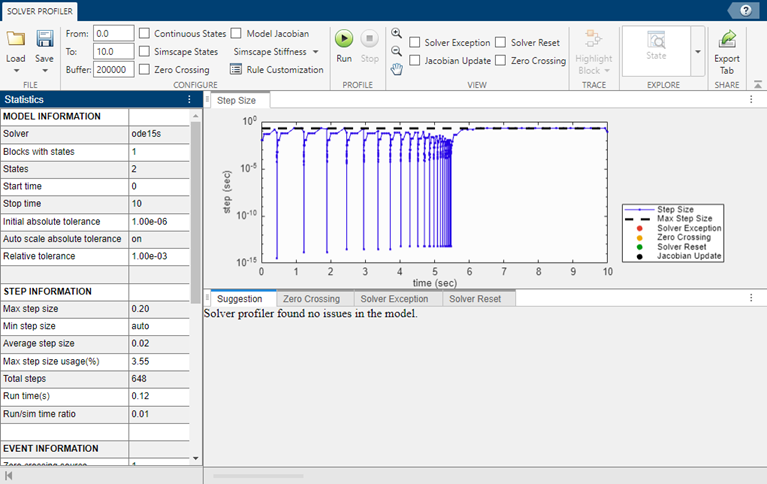
Open the example, which contains a model named BouncingBallWithSwitch.
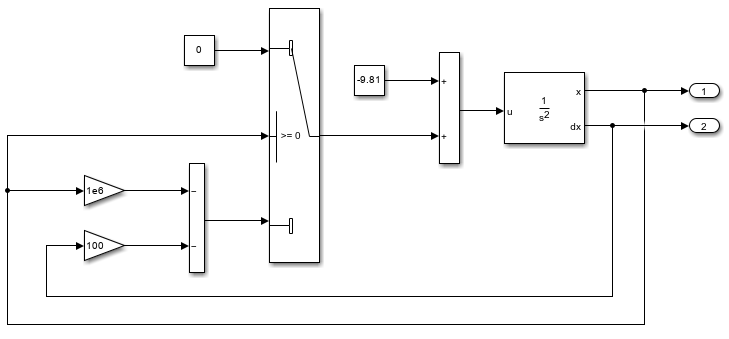
Open the Solver Profiler. In the Simulink® Toolstrip, on the Debug tab, in the Performance section, click the Performance button arrow and select Solver Profiler.
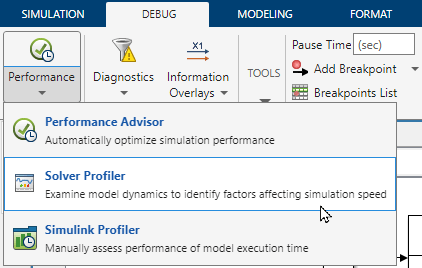
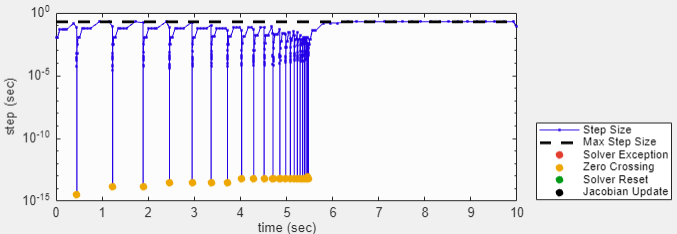
To run a profiling simulation, in the Solver Profiler, click Run. The Solver Profiler collects information about solver events that occur during the profiling simulation. When the simulation completes, the Solver Profiler displays information in the Statistics pane and a plot of the step size calculated for each step of the simulation.
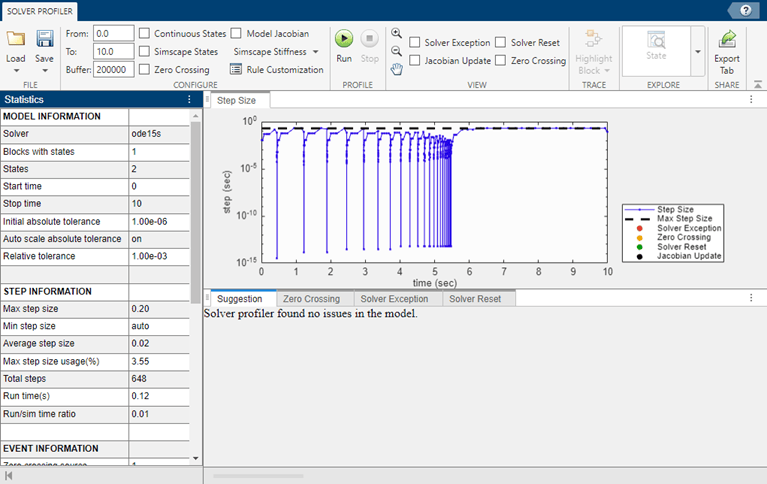
In the Statistics pane, scroll down to view the event information, which shows that 45 zero-crossing events occurred during simulation from one source.
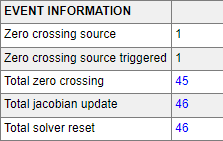
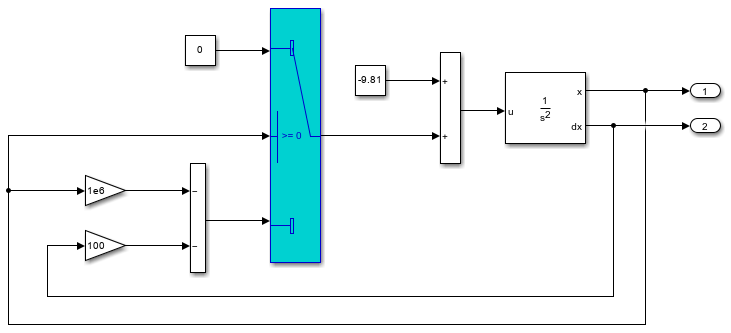
To view information about the source of the zero-crossing events, select the Zero Crossing tab. The zero crossing events come from the Switch block.

To annotate the plot of the step sizes with the zero-crossing events, in the Statistics pane, click the value for the Total Zero Crossings row. The yellow dots indicate when each zero crossing occurred. Where the zero crossings occurred, the step size decreased significantly.
To highlight in the block diagram the Switch block that produced the zero crossings, on the Zero Crossing tab, select the block path. Then, in the Trace section, click Highlight Block.
Since R2026b
Simplify and speed up performance analysis by using AI to explain profiling results. To generate the AI explanation:
Open the Solver Profiler. In the Simulink Toolstrip, on the Debug tab, click the Performance button arrow and select Solver Profiler.
Profile a simulation. In the toolstrip, under Profile, click Run.
After the profiling simulation completes, generate the AI explanation. In the toolstrip, in the Explain section, click Explain with AI.
The Solver Profiler displays the AI explanation in the bottom panel on the Explain with AI tab. The explanation provides an overview of the profiling results, highlights specific insights, and summarizes key details from the results.
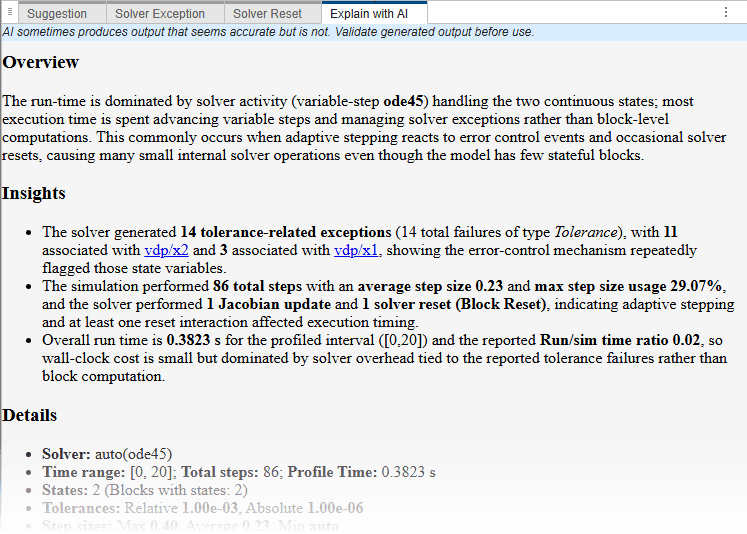
The AI explanation provides insight into the solver activity during simulation even when the Solver Profiler does not identify any issues in the model design or configuration.
By default, the options you specify in the Configure section of the Solver Profiler toolstrip apply to the top solver and the selected local solvers. To specify different profiling options for a local solver, use the Local Solver Profiler.
Open the Local Solver Analyzer. In the Solver Profiler toolstrip, in the Analyze section, click Local Solver.
In the Model Hierarchy pane, select the node of the referenced model that uses the local solver.
Open an instance of the Local Solver Profiler for the selected referenced model. In the right pane, click Open Local Solver Profiler to configure settings for new profiling simulation
 .
.In the Local Solver Profiler, specify the profiling options for the local solver.
The options you specify in the Local Solver Profiler apply to only the selected referenced model. To specify different profiling options for more than one local solver, open an instance of the Local Solver Profiler for each referenced model.
To profile local solvers using the specified settings, in the Local Solver Analyzer, click Run.
Related Examples
Parameters
Configure
The time at which the Solver Profiler starts logging solver data during simulation, specified in seconds. By default, the Solver Profiler logs data from the start of the simulation.
This parameter does not specify the start time of the simulation or modify the Start time configuration parameter in the model.
The time at which the Solver Profiler stops profiling, specified in seconds. By default, the profiling stop time is the same as the simulation stop time specified in the model. The simulation ends when it reaches the profiling stop time or the simulation stop time, whichever occurs first.
This parameter does not modify the Stop time configuration parameter in the model.
Maximum number of events that are logged. If the number of logged events reaches
this value and memory is available, increase BufferSize. If memory
is limited, consider lowering the value.
To save continuous states for analysis in the Solver Profiler and State Explorer, select this parameter. By default, the Solver Profiler does not save continuous states.
Note
To reduce overhead, the Solver Profiler compresses states data. The logged results support solver analysis but the state values might not be exact. To log and analyze precise state values, enable states logging. In the Configuration Parameters dialog box, on the Data Import/Export pane, select States.
To save Simscape states for analysis in the Solver Profiler and Simscape Results Explorer (Simscape), select this parameter. By default, the Solver Profiler does not save Simscape states.
To save zero-crossing data for analysis in the Solver Profiler and Zero Crossing Explorer, select this parameter. By default, the Solver Profiler does not save zero-crossing data.
To save solver Jacobian matrices for analysis in the Solver Profiler, select this parameter. This option is useful for simulations that use implicit solvers. For a comparison of solvers, see Compare Solvers.
For a more detailed explanation of the solver Jacobian, see Choose Jacobian Method for Implicit Solvers.
To save stiffness analysis of Simscape states for analysis in the Solver Profiler, select this parameter and specify an array of time points at which to capture the data.
For more information, see How Simscape Models Represent Physical Systems (Simscape).
To access the rule set, click Rule Customization in the Solver Profiler. You can select which rules you want to apply and specify the thresholds for most of the built-in rules. To modify the threshold for a rule, enable the rule. Then, enter the desired threshold value.

Custom Rule Set
To override or extend the built-in rule, specify a custom rule set.
Define the custom rule set in a MATLAB function.
In the Rule Set dialog box, in the Custom Rule section, select the check box. Then, enter the name of the function that defines the custom rule set.
For example, this code defines a custom rule set using a function named
customRule. The input to the function is a structure that
contains the profiling data. The function implements a rule that checks whether any
zero-crossing events occurred during the profiling simulation.
function diagnosticsString = customRule(profilerData)
    if isempty(profilerData.zcEvents)
        diagnosticsString{1} = "No zero crossing event detected.";
    else
        diagnosticsString{1} = "Zero-crossing events detected.";
    end
end
The table summarizes the fields in the structure of profiling data you can use to implement custom rules.
| Field | Value |
|---|---|
stateInfo — Block state information | Structure that contains these fields:
|
blockInfo — Blocks and state IDs | Structure that contains these fields:
|
zcSrcInfo — Blocks that cause zero
crossings | Structure that contains these fields:
|
zcEvents — Zero-crossing event times and state
IDs | Structure that contains these fields:
|
exceptionEvents — Solver exception event times, state
IDs, and causes | Structure that contains these fields:
|
resetTime — Solver reset times | Array of solver reset times |
tout — Simulation times | Array of simulation time steps |
View
To highlight solver exception events in the step size plot, select this parameter.
To highlight solver reset events in the step size plot, select this parameter.
To highlight Jacobian update events in the step size plot, select this parameter.
To highlight zero-crossing events in the step size plot, select this parameter.
Tips
When you want to analyze and improve simulation performance, consider starting the analysis by analyzing your model and simulation configuration using the Performance Advisor.
After analyzing the model and simulation configuration using the Performance Advisor, you can perform deeper analysis by profiling simulations using the Solver Profiler and the Simulink Profiler.
The Solver Profiler analyzes the performance of the selected solver for the model, which can be particularly helpful for simulations that use variable-step solvers. The profiling results help you identify when and why the step size is limited.
The Simulink Profiler helps you identify bottlenecks for simulation performance by analyzing the distribution of simulation execution time among model components.
Version History
Introduced in R2016aSee Also
Tools
- Local Solver Analyzer | State Explorer | Zero Crossing Explorer | Simscape Results Explorer (Simscape)

