Get Started with Instance Segmentation Using Deep Learning
R2026bInstance segmentation is a computer vision technique that enables you to identify each instance of an object category as a unique entity and delineate its boundaries at the pixel level. For a given image, instance segmentation not only recognizes and classifies objects, but also provides a precise pixel-wise mask for each individual object. This enables you to differentiate between multiple objects of the same class, such as distinguishing two cars parked side by side.
Use instance segmentation to implement the strengths of object detection and semantic segmentation while overcoming some of their limitations:
Object detection combines image classification and object localization. While object detection is effective at recognizing objects, it does not provide a detailed, pixel-level understanding, making it challenging to distinguish objects in close proximity to each other.
Semantic segmentation assigns a class label to each pixel in an image, effectively dividing the image into segments based on the semantic meaning of the objects. Although semantic segmentation provides pixel-level classification, it does not differentiate between instances of the same class, particularly when objects are touching or overlapping.
Instance segmentation predicts pixel-by-pixel segmentation masks of each object, treating individual objects as distinct entities, regardless of the class of the objects. It overcomes the limitations of object detection and semantic segmentation by offering precise object delineation and individual instance identification. However, it can be more computationally demanding than object detection or semantic segmentation, leading to longer inference and training times.

Applications for instance segmentation include autonomous driving, medical imaging, industrial inspection (such as agriculture, retail, and manufacturing), scientific analysis (such as the classification of terrain visible in satellite imagery or structures visible under a microscope), and robotics.
Computer Vision Toolbox™ provides these instance segmentation techniques for segmenting objects in an image:
SOLOv2 — Segmenting Objects by Locations version 2 (SOLOv2) is a single-stage instance segmentation model that directly predicts instance center and size, making it suitable for real-time applications.
Mask R-CNN — Mask R-CNN is a two-stage instance segmentation model that can predict instance masks and achieve good performance across various applications.
You can perform inference on a test image with default network options using a pretrained instance segmentation model, or train an instance segmentation network on a custom data set.
Additionally, the Pose Mask R-CNN model extends the capabilities of Mask R-CNN by combining instance segmentation with 6-DoF (six degrees-of-freedom) pose estimation. This technique is useful for tasks that require detailed pose information within the segmented instances, such as robotics bin-picking tasks. To learn more, see the Perform 6-DoF Pose Estimation for Bin Picking Using Deep Learning example.
Perform Inference Using a Pretrained Instance Segmentation Network
Follow these steps to perform instance segmentation on a test image using a pretrained instance segmentation model.
1. Download a pretrained model. The pretrained models
are Computer Vision Toolbox support packages that you can download and install using either the
visionSupportPackages function or the
Add-On Explorer. For more information about installing add-ons, see Get
and Manage Add-Ons.
The table describes the pretrained models for instance segmentation, lists their corresponding support packages, and indicates which Computer Vision Toolbox instance segmentation model to use with them. Because SOLOv2 predicts instance center and size directly, allowing for a single-stage end-to-end training process, you can use it to achieve faster inference times compared to Mask R-CNN.
| Instance Segmentation Model | Available Pretrained Models | Get Started Topic |
|---|---|---|
solov2 (Computer Vision
Toolbox Model for SOLOv2 Instance
Segmentation) |
| Get Started with SOLOv2 for Instance Segmentation |
maskrcnn (Computer Vision
Toolbox Model for Mask R-CNN Instance
Segmentation) | resnet50-coco — A pretrained Mask R-CNN deep
learning network, trained on the COCO data set, with a ResNet-50
network as the feature extractor. | Getting Started with Mask R-CNN for Instance Segmentation |
2. After you download a pretrained instance
segmentation model, configure the pretrained network using the associated object, and
load the test image into the workspace. For example, configure a pretrained SOLOv2
network using solov2
object.
model = solov2("resnet50-coco");
I = imread("kobi.png");
3. Segment objects in a test image using the
segmentObjects object function. The function returns the segmentation
masks and the confidence scores and labels associated with
them.
[masks,labels,scores] = segmentObjects(model,I);
3. Visualize the instance segmentation results using
the insertObjectMask function.
maskedImage = insertObjectMask(I,masks);
imshow(maskedImage)

Train an Instance Segmentation Network
To perform transfer learning on a custom data set, you must prepare a labeled ground truth data set with annotations for each object instance, configure an instance segmentation network, and train the network.
Create Ground Truth Data for Training
To create the ground truth, define and annotate each object instance within the training images. You can use the Image Labeler or Video Labeler app to interactively label images or video frames with polygon ROI labels.
To get started with interactively labeling ground truth data for instance segmentation, see Label Objects Using Polygons for Instance Segmentation.
Create Training Datastore By Postprocessing Ground Truth
The Image Labeler and Video Labeler apps return the ground
truth-labeled data as a groundTruth object, which you must
preprocess into stacks of binary masks to create a training datastore. Your training
datastore must return training data in the format specified by the training function
of your selected instance segmentation model.
To postprocess polygon labels into binary mask stacks, and create the training
datastore, use the instanceSegmentationTrainingData function.
Instance Segmentation Training Data Requirements
Both Mask R-CNN and SOLOv2 instance segmentation networks require training data in
a four-column format: {images, bounding boxes, labels, masks}.
When you use the instanceSegmentationTrainingData function to create your training
datastore from a groundTruth object, the function
produces a datastore in this format automatically. If you are building a custom
training pipeline from your own data, this table describes the required format for
each entry of the training datastore.
| Data | Description |
|---|---|
| Images | Images that serve as network inputs. SOLOv2 supports RGB (H-by-W-by-3) or grayscale (H-by-W) numeric arrays. Mask R-CNN requires RGB images only.
|
| Ground-truth bounding boxes | Bounding boxes for objects in the images, specified as a NumObjects-by-4 matrix, with rows in the format [x y w h]. For example, the
bboxes = 394 442 36 101 436 457 32 88 619 293 209 281 460 441 210 234 862 375 190 314 816 271 235 305 |
| Instance labels | Label of each instance, specified as a NumObjects-by-1 string vector or NumObjects-by-1 cell array of character vectors. For example, the labels =
6×1 cell array
{'Person' }
{'Person' }
{'Vehicle'}
{'Vehicle'}
{'Vehicle'}
{'Vehicle'} |
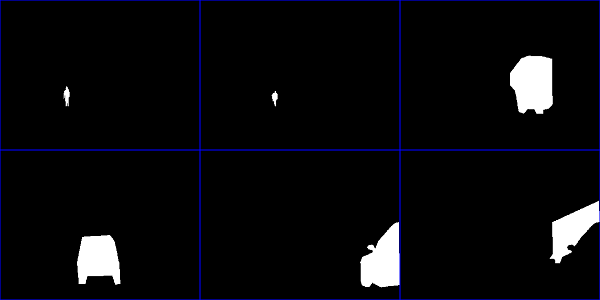
| Instance masks | Binary masks for instances of objects, specified as a logical array of size H-by-W-by-NumObjects. Each mask is the segmentation of one instance in the image. For example, this montage shows the binary masks of six objects in the sample image.
If your source annotations use
polygon coordinates rather than binary masks, you can convert
them using the denseMasks = false([h,w,numObjects]); for i = 1:numObjects denseMasks(:,:,i) = poly2mask(masks_polygon{i}(:,1),masks_polygon{i}(:,2),h,w); end |

Visualize Training Data
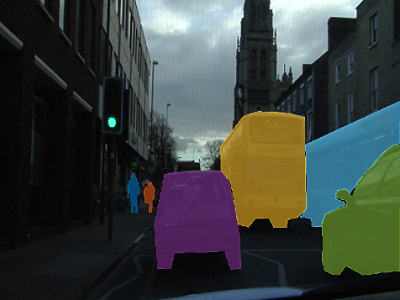
To display the instance masks over the image, use the insertObjectMask function. You can specify a colormap so that each
instance appears in a different color. This sample code shows how to display the
instance masks in the masks variable over the image in the
im variable using the lines colormap.
imOverlay = insertObjectMask(im,masks,Color=lines(numObjects));
imshow(imOverlay);
To show the bounding boxes with labels over the image, use the showShape function.
imshow(imOverlay)
showShape("rectangle",bboxes,Label=labels,Color="red");

Choose Instance Segmentation Model
Once you have prepared your training datastore, choose an instance segmentation
model based on the requirements of your application. Computer Vision Toolbox add-ons enable you to use the SOLOv2 (solov2)
and Mask R-CNN (maskrcnn) models.
This table displays the training capabilities and data requirements of SOLOv2 and Mask R-CNN, including the training process, efficiency, annotation requirements, model complexity, computational cost, and training data size. While SOLOv2 is generally faster and more straightforward to train, and provides greater accuracy with a smaller memory footprint than Mask R-CNN, which model fits your use case depends on your task and data set requirements.
| Aspect | SOLOv2 | Mask R-CNN |
|---|---|---|
| Image Data Type | RGB or grayscale | RGB |
| Backbone Options | ResNet-50, ResNet-18 | ResNet-50 |
| Inference Speed | ~31 FPS (COCO, ResNet-50, 800x1333) [1] | ~13 FPS (COCO, ResNet-50, 800x1333) [2] |
| Memory Usage | ~3.8 GB (batch size 1, 800x1333, ResNet-50) [1] | ~4.2 GB (batch size 1, 800x1333, ResNet-50) [2] |
| Implementation Complexity | Easier (single-stage, no proposal network) | More complex (requires RPN, RoIAlign, multiple heads) |
| Flexibility | Less flexible for custom tasks (grid-based) | More flexible (can handle bounding box, keypoints, etc.) |
| Use Case Suitability | Real-time or near real-time, simpler deployment | Higher flexibility, support for multi-task learning (predicts boxes, masks, keypoints) |
Train Pretrained Instance Segmentation Model
Train the pretrained network using the corresponding training function. To complete the training steps, use the network training and inference functionality for your selected model.
SOLOv2 Model
Create network architecture —
solov2Train the network —
trainSOLOV2Perform inference —
segmentObjects
For an example, see Perform Instance Segmentation Using SOLOv2.
Mask R-CNN Model
Create network architecture —
maskrcnnTrain the network —
trainMaskRCNNPerform inference —
segmentObjects
For an example, see Perform Instance Segmentation Using Mask R-CNN.
Evaluate Instance Segmentation Results
Evaluate the quality of your instance segmentation results against the ground truth by
using the evaluateInstanceSegmentation function. Ensure that your ground truth
datastore is set up so that using the read function on the datastore returns a cell array with at least two
elements in the format {masks labels}.
To calculate the prediction metrics, specify a datastore of the masks, labels, and
scores from your instance segmentation and your ground truth datastore as input to the
evaluateInstanceSegmentation function. The function calculates metrics
such as the confusion matrix and average precision, and stores the metrics in an instanceSegmentationMetrics object.
References
[1] Wang, Xinlong, Rufeng Zhang, Tao Kong, Lei Li, and Chunhua Shen. “SOLOv2: Dynamic and Fast Instance Segmentation.” ArXiv, October 23, 2020. https://doi.org/10.48550/arXiv.2003.10152.
[2] He, Kaiming, Georgia Gkioxari, Piotr Dollár, and Ross Girshick. "Mask R-CNN." ArXiv:1703.06870 [Cs], January 24, 2018. https://arxiv.org/pdf/1703.06870.
See Also
Apps
- Image Labeler | Video Labeler | Multi-Sensor Labeler (Point Cloud Toolbox)
Functions
solov2|trainSOLOV2|segmentObjects|instanceSegmentationTrainingData|evaluateInstanceSegmentation|maskrcnn|trainMaskRCNN|evaluateInstanceSegmentation|instanceSegmentationMetrics|posemaskrcnn
See Also
Topics
- Perform Instance Segmentation Using SOLOv2
- Perform Instance Segmentation Using Mask R-CNN
- Perform 6-DoF Pose Estimation for Bin Picking Using Deep Learning
- Label Objects Using Polygons for Instance Segmentation
- Create Instance Segmentation Training Data from Labeled Ground Truth
- Get Started with SOLOv2 for Instance Segmentation
- Getting Started with Mask R-CNN for Instance Segmentation
- Get Started with the Image Labeler

