Retime Timetable
R2026bResample or aggregate timetable data in the Live Editor
Description
The Retime Timetable task lets you interactively change the row times of a timetable and then resample or aggregate the data in its variables. The task also automatically generates MATLAB® code for your live script.
Using this task, you can:
Interpolate data values at new row times.
Aggregate data into time bins (for example, to create a timetable containing quarterly means from monthly data).
Remove rows that have duplicate row times.
Make an irregular timetable into a regular one by specifying a uniform time step or sample rate.
For more information on Live Editor tasks, see Add Interactive Tasks to Live Scripts.
Related Functions
Retime Timetable generates code that uses the retime function.

Open the Task
To add the Retime Timetable task to a live script in the MATLAB Editor:
On the Live Editor tab, select Task > Retime Timetable.
In a code block in the script, type a relevant keyword, such as
retime,timetable,upsample, ordownsample. Select Retime Timetable from the suggested command completions. For some keywords, the task automatically updates one or more corresponding parameters.
Examples
The example shows how to resample and aggregate data in a timetable by using the Retime Timetable Live Editor task. You also can apply different rules for adjusting timetable variables in different ways.
Resample Data
Create a timetable using column vectors of data. The row times are between 10 and 50 milliseconds.
Intensity = [100 98.7 95.2 101.4 99.1]';
Time = milliseconds([11 20 34 40.3 49.9])';
TT1 = timetable(Time,Intensity)
TT1 = 5×1 timetable
       Time       Intensity
    __________    _________

    0.011 sec         100
    0.02 sec         98.7
    0.034 sec        95.2
    0.0403 sec      101.4
    0.0499 sec       99.1
Add the Retime Timetable task to your live script. Resample the data in TT.
To specify a sample rate of 100 Hz, use the
Selection methodmenus.To adjust the data in the
Intensityvariable by using linear interpolation, use theGeneral rulemenu.
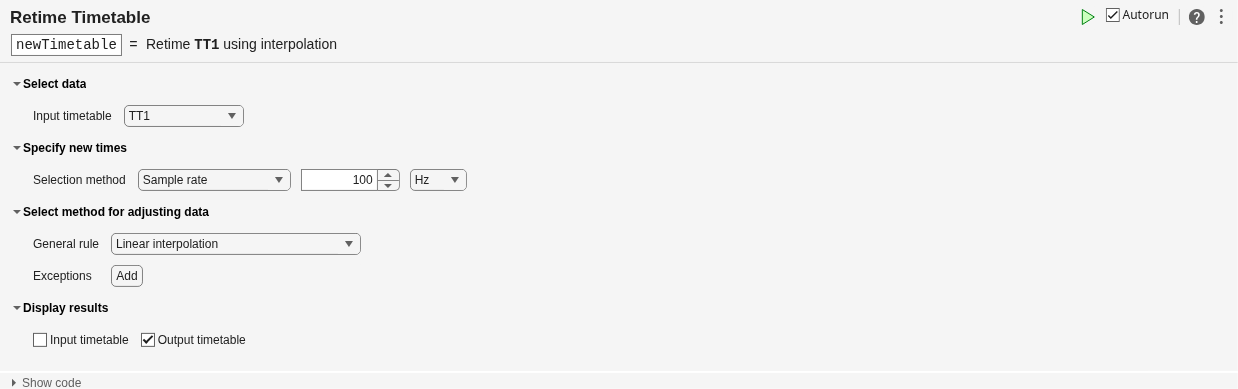
newTimetable = 5×1 timetable
      Time      Intensity
    ________    _________

    0.01 sec     100.14
    0.02 sec       98.7
    0.03 sec       96.2
    0.04 sec      101.1
    0.05 sec     99.076
Aggregate Data
Load a second timetable from the bostonTT MAT-file. This timetable has temperature, wind speed, and rainfall measurements for the city of Boston. The measurements are approximately six hours apart but are irregular.
load bostonTT
Boston
Boston = 6×3 timetable
Time Temp WindSpeed Rain
___________________ ____ _________ ____
2016-06-09 06:03:00 59.5 0.1 0.05
2016-06-09 12:00:23 63 2.3 0.08
2016-06-09 18:02:57 61.7 3.1 0.13
2016-06-10 06:01:47 55.4 5.7 0.15
2016-06-10 12:06:00 62.3 2.6 0.87
2016-06-10 18:02:57 58.8 6.2 0.33
Add a second instance of the Retime Timetable task to your live script. Aggregate the data into daily time bins.
To specify a time step of one day, use the
Selection methodmenus.To calculate means of the timetable variables, use the
General rulemenu.To specify a different rule for the
Rainvariable, use theExceptionsmenus. Add an exception to interpolate rainfall measurements at the beginning of each day.
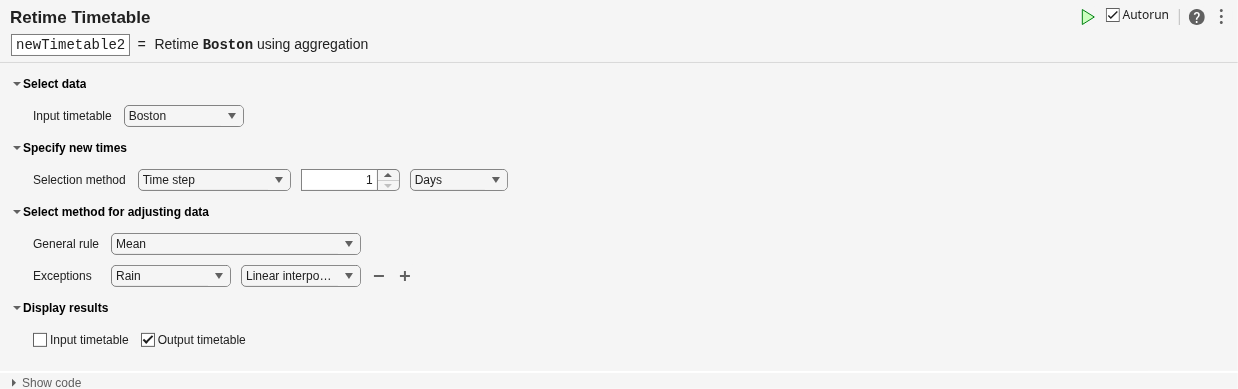
newTimetable2 = 2×3 timetable
           Time             Temp     WindSpeed      Rain
    ___________________    ______    _________    ________

    2016-06-09 00:00:00      61.4     1.8333      0.019529
    2016-06-10 00:00:00    58.833     4.8333       0.13993

