Contenido principal

pzplot

Plot pole-zero map of dynamic system

    Description

    The pzplot function plots the pole-zero map of a dynamic system model. To customize the plot, you can return a PZPlot object and modify it using dot notation. For more information, see Customize Linear Analysis Plots at Command Line.

    The figure shows pole-zero maps for a continuous-time (left) and discrete-time (right) linear time-variant model. The maps use x and o represent poles and zeros, respectively.

    • In continuous-time systems, all the poles on the complex s-plane must be in the left-half plane (blue region) to ensure stability. The system is marginally stable if distinct poles lie on the imaginary axis, that is, the real parts of the poles are zero.

    • In discrete-time systems, all the poles in the complex z-plane must lie inside the unit circle (blue region). The system is marginally stable if it has one or more poles lying on the unit circle.

    To obtain pole and zero locations, use the pzmap function.

    pzplot(sys) plots the poles and transmission zeros of the dynamic system model sys. In the plot, x and o represent poles and zeros, respectively.

    example

    pzplot(sys1,sys2,...,sysN) displays the poles and transmission zeros of multiple models on a single plot.

    example

    pzplot(sys1,ColorSpec1,...,sysN,ColorSpecN) sets the color for the plot of each system.

    example

    pzplot(___,plotoptions) plots the poles and transmission zeros with the plotting options specified in plotoptions. Settings you specify in plotoptions override the plotting preferences for the current MATLAB® session. You can use plotoptions with any of the input argument combinations in previous syntaxes.

    example

    pzplot(___,Name=Value) specifies response properties using one or more name-value arguments. For example, pzplot(sys,MarkerSize=10) sets the pole and zero marker sizes to 10. (since R2026a)

    When plotting responses for multiple systems, the specified name-value arguments apply to all responses.

    The Color name-value argument overrides specified using the ColorSpec argument.

    pzplot(parent,___) plots the poles and zeros in the specified parent graphics container, such as a Figure or TiledChartLayout, and sets the Parent property. Use this syntax when you want to create a plot in a specified open figure or when creating apps in App Designer.

    pzp = pzplot(___) plots the poles and zeros and returns the corresponding chart object. To customize the appearance and behavior of the response plot, modify the chart object properties using dot notation.

    Examples

    collapse all

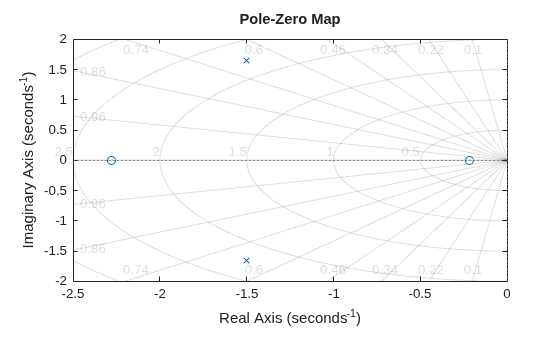
    Plot the poles and zeros of the continuous-time system represented by the following transfer function:

    sys(s)=2s2+5s+1s2+3s+5.

    sys = tf([2 5 1],[1 3 5]);
    pzp = pzplot(sys);
    grid on
    MATLAB figure

    Turning on the grid displays lines of constant damping ratio (zeta) and lines of constant natural frequency (wn). This system has two real zeros, marked by o on the plot. The system also has a pair of complex poles, marked by x.

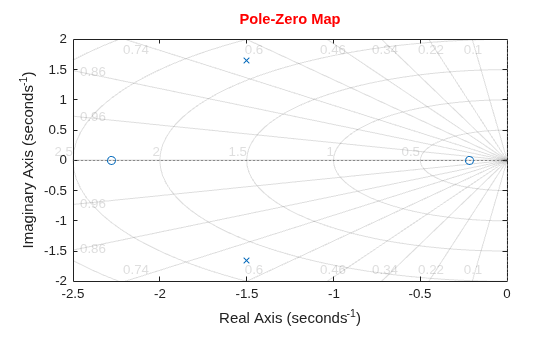
    Change the color of the plot title.

    pzp.Title.Color = [1 0 0];
    MATLAB figure

    For this example, load a 3-by-1 array of transfer function models.

    load('tfArrayMargin.mat','sys');
    size(sys)
    3x1 array of transfer functions.
    Each model has 1 outputs and 1 inputs.
    

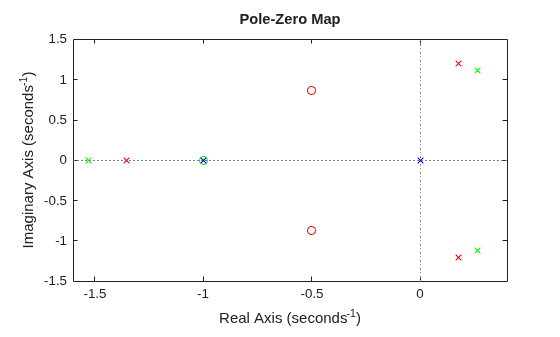
    Plot the poles and zeros of the model array. Define the colors for each model. For this example, use red for the first model, green for the second, and blue for the third model in the array.

    pzplot(sys(:,:,1),'r',sys(:,:,2),'g',sys(:,:,3),'b');
    MATLAB figure

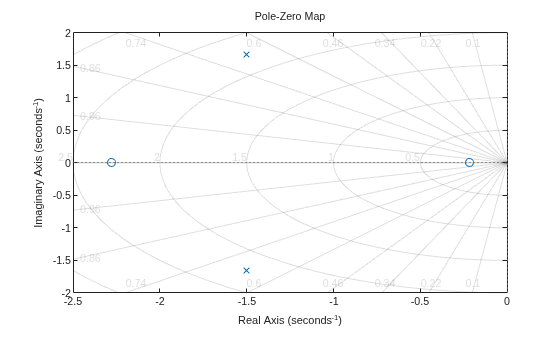
    Plot the poles and zeros of the continuous-time system represented by the following transfer function with a custom option set:

    sys(s)=2s2+5s+1s2+3s+5.

    Create the custom option set using pzoptions.

    plotoptions = pzoptions;

    For this example, specify the grid to be visible.

    plotoptions.Grid = 'on';

    Use the specified options to create a pole-zero map of the transfer function.

    h = pzplot(tf([2 5 1],[1 3 5]),plotoptions);
    MATLAB figure

    Turning on the grid displays lines of constant damping ratio (zeta) and lines of constant natural frequency (wn). This system has two real zeros, marked by o on the plot. The system also has a pair of complex poles, marked by x.

    Input Arguments

    collapse all

    Dynamic system, specified as a SISO or MIMO dynamic system model or array of dynamic system models. You can use these types of dynamic systems:

    • Continuous-time or discrete-time numeric LTI models, such as tf, zpk, or ss models.

    • Sparse state-space models, such as sparss or mechss models.

    • Generalized or uncertain LTI models such as genss or uss (Robust Control Toolbox) models. Using uncertain models requires Robust Control Toolbox™ software.

      • For tunable control design blocks, the function evaluates the model at its current value to plot the response.

      • For uncertain control design blocks, the function plots the nominal value and random samples of the model.

    • Identified LTI models, such as idtf (System Identification Toolbox), idss (System Identification Toolbox), or idproc (System Identification Toolbox) models. Using identified models requires System Identification Toolbox™ software.

    If sys is an array of models, the plot shows responses of all models in the array on the same axes.

    Color, specified as one of these values.

    ColorDescription
    "r"red
    "g"green
    "b"blue
    "c"cyan
    "m"magenta
    "y"yellow
    "k"black
    "w"white

    Pole-zero plot options, specified as a pzoptions object. You can use these options to customize the PZ plot appearance. Settings you specify in plotoptions override the preference settings for the current MATLAB session.

    Parent graphics container, specified as one of these objects:

    • Figure

    • TiledChartLayout

    • UIFigure

    • UIGridLayout

    • UIPanel

    • UITab

    Name-Value Arguments

    collapse all

    Specify optional pairs of arguments as Name1=Value1,...,NameN=ValueN, where Name is the argument name and Value is the corresponding value. Name-value arguments must appear after other arguments, but the order of the pairs does not matter.

    Example: pzplot(sys,LegendDisplay="off") hides the response of sys from the plot legend.

    Response name, specified as a string or character vector and stored as a string.

    Response visibility, specified as one of these logical on/off values:

    • "on", 1, or true — Display the response in the plot.

    • "off", 0, or false — Do not display the response in the plot.

    The value is stored as an on/off logical value of type matlab.lang.OnOffSwitchState.

    Option to list the response in the legend, specified as one of these logical on/off values:

    • "on", 1, or true — List the response in the legend.

    • "off", 0, or false — Do not list the response in the legend.

    The value is stored as an on/off logical value of type matlab.lang.OnOffSwitchState.

    Plot color, specified as an RGB triplet or a hexadecimal color code and stored as an RGB triplet. Specifying a color using a name-value argument overrides any color that you specify using LineSpec.

    You can also specify some common colors by name. This table lists these colors and their corresponding RGB triplets and hexadecimal color codes.

    Color NameRGB TripletHexadecimal Color Code

    "red" or "r"

    [1 0 0]#FF0000

    "green" or "g"

    [0 1 0]#00FF00

    "blue" or "b"

    [0 0 1]#0000FF

    "cyan" or "c"

    [0 1 1]#00FFFF

    "magenta" or "m"

    [1 0 1]#FF00FF

    "yellow" or "y"

    [1 1 0]#FFFF00

    "black" or "k"

    [0 0 0]#000000

    "white" or "w"

    [1 1 1]#FFFFFF

    Marker size, specified as a positive scalar.

    Line width, specified as a positive scalar.

    Series index, specified as a positive integer or "none".

    By default, the SeriesIndex property is a number that corresponds to the order in which the response was added to the chart, starting at 1. MATLAB uses the number to calculate indices for automatically assigning color, line style, or markers for responses. Any responses in the chart that have the same SeriesIndex number also have the same color, line style, and markers.

    A SeriesIndex value of "none" indicates that a response does not participate in the indexing scheme.

    Output Arguments

    collapse all

    Chart object, returned as a PZPlot object. To customize your plot appearance and behavior, modify the properties of this object using dot notation. For more information, see PZPlot Properties.

    More About

    collapse all

    Version History

    Introduced before R2006a

    expand all