Contenido principal

generateRobotWorkspace

R2026b

Generate reachable workspace of robot in environment

Since R2024b

    Description

    [workspace,configs] = generateRobotWorkspace(robot,environment) generates the reachable workspace, as end-effector coordinates and their corresponding joint configurations, for a specified robot in the specified environment. This syntax uses the last rigid body in the robot model as the end effector.

    example

    [workspace,configs] = generateRobotWorkspace(robot,environment,eeName) specifies the rigid body to use as the end effector.

    example

    [___] = generateRobotWorkspace(___,Name=Value) specifies options using one or more name-value arguments in addition to any combination of arguments from previous syntaxes. For example, MaxNumSamples=1500 sets the maximum number of configurations to sample to 1500.

    Examples

    collapse all

    Load the robot model for the Universal Robots UR5e manipulator, and create a collision environment consisting of a workbench, a barrier, floor, and mount for the robot.

    robot = loadrobot("universalUR5e",DataFormat="row");
    env = exampleHelperCreateWorkbench(0.4,1.5,0.05,[0.5 0.0 0.1]);

    Show the collision environment and then plot the robot manipulator in a configuration over the workbench.

    showCollisionArray(env);
    hold on
    show(robot,[0 -pi/3 pi/3 2*pi pi/2 0]);

    Generate the workspace for the robot in the collision environment.

    rng default
    [ws,configs] = generateRobotWorkspace(robot,env);

    Plot the workspace as an alpha shape.

    wsAlpha = alphaShape(ws(:,1),ws(:,2),ws(:,3));
    a = plot(wsAlpha,FaceAlpha=0.45,EdgeColor="none");
    title("Robot Workspace in Specified Environment")
    hold off
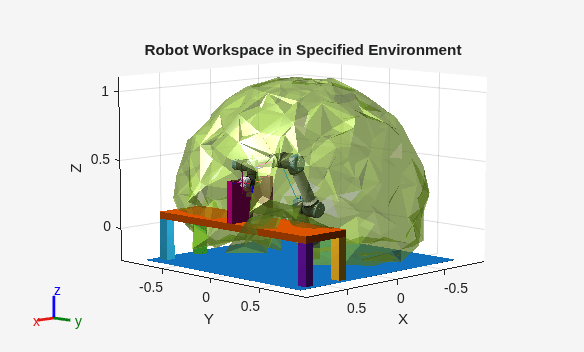
    Figure contains an axes object. The axes object with title Robot Workspace in Specified Environment, xlabel X, ylabel Y contains 61 objects of type patch, line.

    Load the robot model for the Universal Robots UR5e manipulator, and specify the last body in the robot model "tool0" as the end effector.

    robot = loadrobot("universalUR5e",DataFormat="row");
    show(robot);
    ee = "tool0";

    Generate the workspace for the robot in an obstacle-free environment, using "tool0" as the end effector of the robot model, and ignoring self-collisions in the robot model during collision checking.

    rng default
    [workspace,configs] = generateRobotWorkspace(robot,{},ee,IgnoreSelfCollision="on");

    Calculate the manipulability, using Yoshikawa index, for each configuration in the workspace.

    mIdx = manipulabilityIndex(robot,configs,ee);

    Show the robot, and then plot the workspace analysis. Voxelize the workspace to make it easier to see the high-manipulability areas.

    hold on
    showWorkspaceAnalysis(workspace,mIdx,Voxelize=true)
    axis auto
    title("Voxelized Manipulability-Encoded Workspace")
    hold off
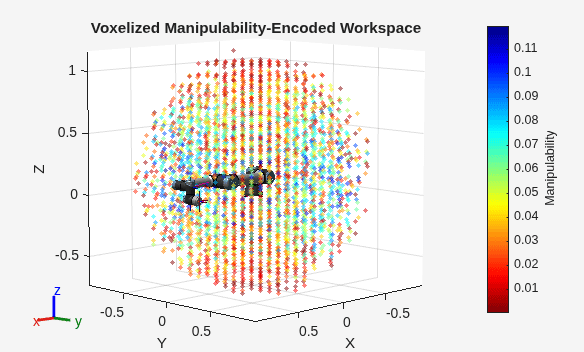
    Figure contains an axes object. The axes object with title Voxelized Manipulability-Encoded Workspace, xlabel X, ylabel Y contains 53 objects of type patch, line, scatter.

    Get the configurations with a manipulability index greater than 0.1.

    highMIdxConfigs = configs(mIdx>0.1,:)
    highMIdxConfigs = 77×6
    
        1.2381   -0.3654    1.2312    2.5119    1.7408   -5.8609
        2.1514    2.7044    0.8926   -1.0173   -1.3727    3.9727
        2.6441   -2.3642   -1.3103    4.4027    5.1729    1.7502
        0.9078    2.5236    1.5235    3.2407   -1.3932   -0.8884
        5.9528    5.9352    0.9029    4.5251   -1.2330    1.6579
        5.3554   -2.5321   -1.0173    4.5174   -2.0046   -4.5475
        3.4207   -0.3097    1.1366   -1.0438   -1.5061   -3.6032
        3.4980   -5.4115   -1.3899   -1.5159    4.5826   -1.0058
        1.2195   -0.8722    1.4496   -3.0011   -5.0918   -0.6162
       -6.2565    5.6688    1.6732    3.1580   -4.5382   -1.8935
       -2.8497    5.5629    0.8680    4.6814   -1.6704   -3.3150
        0.5826   -0.7207    1.2033    3.2602   -1.2639    0.8471
        1.4725   -2.8297   -1.0281    4.2188   -1.4340   -5.2735
       -0.3967    2.3542    1.1503   -0.9873    2.0024    1.6767
       -1.5137   -5.1116   -1.5133   -2.0629   -1.5694   -4.4452
          ⋮


    Input Arguments

    collapse all

    Robot model, specified as a rigidBodyTree object.

    Collision environment, specified as a P-element cell array of collision objects. A collision object is any of these objects:

    P is the total number of obstacles in the environment.

    Name of the end effector, specified as a string scalar or character vector. The robot model specified by robot must contain a body with this name.

    By default, the last body of robot is the end effector.

    Data Types: char | string

    Name-Value Arguments

    collapse all

    Specify optional pairs of arguments as Name1=Value1,...,NameN=ValueN, where Name is the argument name and Value is the corresponding value. Name-value arguments must appear after other arguments, but the order of the pairs does not matter.

    Example: generateRobotWorkspace(robot,env,MaxNumSamples=1500,SkippedSelfCollisions="adjacent") sets the maximum number of configurations to sample to 1500, and does not check body pairs with adjacent indices for self-collisions.

    Maximum number of joint configurations to sample in the state space of the robot, specified as a positive integer.

    Note

    The MaxNumSamples argument does not directly correspond to the actual count of generated configurations and workspace points in the configs and workspace output arguments. The actual count is less than MaxNumSamples, as it excludes configurations that generateRobotWorkspace determines would put the robot in collision with itself or the environment.

    Example: generateRobotWorkspace(robot,env,MaxNumSamples=1500)

    Body pairs skipped for checking self-collisions, specified as "parent", "adjacent", or a p-by-2 cell array of character vectors:

    • "parent" — Skip collision checking between child and parent bodies. See Skip Self-Collision Checking Between Parent and Adjacent Bodies for more information.

    • "adjacent" — Skip collision checking between bodies on adjacent indices. See Skip Self-Collision Checking Between Parent and Adjacent Bodies for more information.

    • p-by-2 cell array of character vectors — Skip collision checking between specific body pairs. Each row specifies a pair of body names between which to skip self-collision checking. p is the number of body pairs to skip for self-collision checking. For more information, see Skip Self-Collision Checking Between Specific Body Pairs.

      Body names in the cell array must exactly match the names in the BodyNames property of the robot model (case-sensitive matching). You can specify names as character vectors or string scalars. The order of bodies within each pair does not matter — {'body1','body2'} is equivalent to {'body2','body1'}.

      For code generation, you must specify the cell array form of SkippedSelfCollisions at construction time.

    Tip

    To identify which body pairs are always in self-collision, call checkCollision with Exhaustive="on" across multiple configurations and find pairs that return NaN in every configuration. These pairs indicate permanent geometry overlaps that you can add to a SkippedSelfCollisions cell array.

    Data Types: char | string

    Skip checking for robot self-collisions, specified as either "on" or "off". When this argument is enabled, the function ignores collisions between the collision objects of the rigid body tree robot model bodies and other collision objects of the same model or its base.

    Data Types: char | string

    Output Arguments

    collapse all

    Workspace as end-effector coordinates, returned as an M-by-3 matrix. M is the total number of end-effector coordinates, and calculated as the value of MaxNumSamples minus the number of sampled configurations that result in collisions.

    Joint configurations of the corresponding end-effector coordinates, returned as an M-by-N matrix. M is the total number of joint configurations corresponding to the workspace end-effector coordinates, and calculated as the value of MaxNumSamples minus the number of sampled configurations that result in collisions. N is the total number of nonfixed joints in the robot model.

    Extended Capabilities

    expand all

    C/C++ Code Generation
    Generate C and C++ code using MATLAB® Coder™.

    Version History

    Introduced in R2024b