Get Started with Object Detection Using Deep Learning
R2026bObject detection using deep learning provides a fast and accurate means to predict the location of an object in an image. Deep learning is a powerful machine learning technique in which the object detector automatically learns image features required for detection tasks. Computer Vision Toolbox™ offers several techniques for object detection using deep learning, such as you only look once (YOLO) v2, YOLO v3, YOLO v4, YOLOX, RTMDet, and single shot detection (SSD).

Applications that use object detection include:
Scene understanding
Multi-object tracking
Visual inspection
Self-driving vehicles
Surveillance
Computer Vision Toolbox and its support packages enable you to configure a pretrained object detector or design a custom object detection network, perform inference using a pretrained or trained network, perform transfer learning, and visualize and evaluate detection results in the Object Detector Analyzer app.
To get started with using a pretrained network to detect objects in an image, see the Detect Objects Using Pretrained Object Detection Network section.
To get started with training an untrained or pretrained object detection network for transfer learning, and evaluating the results, see the Train Object Detection Network and Perform Transfer Learning section.
You can also design a custom network layer-by-layer using the Deep Network Designer (Deep Learning Toolbox) app. For an example using the YOLO v2 object detection network, see Perform Transfer Learning Using Pretrained YOLO v2 Detector.
Detect Objects Using Pretrained Object Detection Network
Computer Vision Toolbox provides pretrained object detection models that you can use to perform out-of-the-box inference or transfer learning on a custom data set.
Configure Pretrained Model
To use a pretrained object detection model, you must first download and install the pretrained object detection model. You can download and install a pretrained model support package using the Add-On Explorer. For more information about installing add-ons, see Get and Manage Add-Ons.
This table lists the names of the object detector objects, the corresponding available pretrained models, and the names of the corresponding add-on support packages to download.
| Object Detection Model | Available Pretrained Models | Required Add-On or Product |
|---|---|---|
yolov2ObjectDetector |
| Computer Vision Toolbox Model for YOLO v2 Object Detection |
yolov3ObjectDetector |
| Computer Vision Toolbox Model for YOLO v3 Object Detection |
yolov4ObjectDetector |
| Computer Vision Toolbox Model for YOLO v4 Object Detection |
yoloxObjectDetector (Visual Inspection Toolbox) |
| Visual Inspection Toolbox™ |
| Computer Vision Toolbox Model for RTMDet Object Detection | |
|
| Visual Inspection Toolbox |
Perform Inference Using Pretrained Model
Perform inference and detect objects in a test image using a pretrained detector model.
For help selecting a pretrained object detection network for your application, see Choose an Object Detector. To return bounding
boxes, confidence scores, and corresponding class labels, pass the pretrained detector
object to the corresponding detect object function.
For example, to use the pretrained YOLO v4 tiny-yolov4-coco network
listed in the Configure Pretrained Model section, load the model
by creating a yolov4ObjectDetector object.
detector = yolov4ObjectDetector("tiny-yolov4-coco");
Read a test image into the workspace, and display the image. To run the detector on this image, save the image to your workspace.
I = imread("carsonroad.png");
imshow(I)
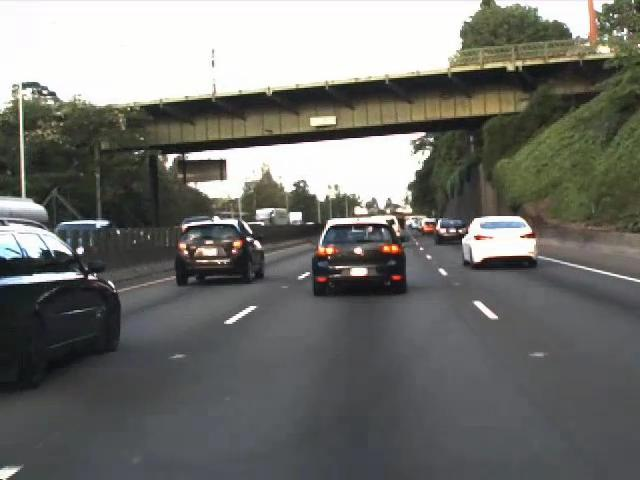
Detect objects in the test image by using the detect object
function of the yolov4ObjectDetector object.
[bboxes,scores,labels] = detect(detector,I);
Display the results overlaid on the input image by using the insertObjectAnnotation function.
detectedImg = insertObjectAnnotation(I,"Rectangle",bboxes,labels);
figure
imshow(detectedImg)

To perform inference on a test image using a trained object detection network, use the
same process but specify the trained network to the detect function as
the detector argument.
MathWorks GitHub Pretrained Networks
The MathWorks® GitHub repository provides implementations of the latest pretrained object detection deep learning networks to download and use to perform out-of-the-box inference. The pretrained object detection networks have already been trained on standard data sets, such as the COCO and Pascal VOC data sets. You can use these pretrained models directly to detect different objects in a test image.
For a list of all the latest MathWorks pretrained object detectors, see MATLAB Deep Learning (GitHub).
Train Object Detection Network and Perform Transfer Learning
To modify a network to detect additional classes, or to customize other network parameters, you can perform transfer learning. This section shows how to prepare your training data, configure the pretrained object detection network, train the network, and evaluate the detection results.
Create Training Data
Use a labeling app, such as the Image Labeler or Video Labeler, to interactively label ground truth data in a video, image sequence, image collection, or custom data source. You can interactively label ground truth using rectangle ROI labels, which define the position and size of the object in the image.

To learn more about labeling images for object detection, see these topics:
Augment and Preprocess Data
Use data augmentation to train the object detector on a limited data set. By altering
the data set images in minor ways, such as translating, cropping, or transforming, you can
create distinct and unique training data, creating a more robust detector. Use datastores to
conveniently read and augment collections of data. Use imageDatastore and the boxLabelDatastore
to create datastores for images and labeled bounding box data, respectively.
To learn more about augmenting and pre-processing data for training, see these topics:
For more information about datastores, see Datastores for Deep Learning (Deep Learning Toolbox).
Train Object Detector
To train the object detection network, use a training function that corresponds to your
object detection model. For example, use the trainYOLOv4ObjectDetector function if you are using the yolov4ObjectDetector object to configure the detector.
Specify the network training options using the trainingOptions (Deep Learning Toolbox) function. You can determine training options parameters using
the Experiment Manager (Deep Learning Toolbox) app. For more information
on using Experiment Manager for hyperparameter tuning, see Train Object Detectors in Experiment Manager.
To learn more about training, inference, and evaluating your results, see these examples:
Detect Small Objects Using Tiled Training of YOLOX Network (Visual Inspection Toolbox)
Detect Defects on Printed Circuit Boards Using YOLOX Network (Visual Inspection Toolbox)
Object Detection in Large Satellite Imagery Using Deep Learning
Evaluate and Fine-tune Object Detector Performance
Interactively visualize detection results using the Object Detector Analyzer app. To evaluate the detection results against the ground truth with a comprehensive set of metrics, you can:
Compute, evaluate, and export performance metrics using the Object Detector Analyzer app. To get started with visualizing and evaluating detection results in the app, see Get Started with Object Detector Analyzer. For a training example that uses the app to evaluate performance metrics, see Multiclass Object Detection Using YOLO v2 Deep Learning.
Compute and evaluate performance metrics using the
evaluateObjectDetectionfunction.
The evaluateObjectDetection function returns the object detection
metrics as an objectDetectionMetrics object. You can also use the Object Detector
Analyzer app to export metrics as an objectDetectionMetrics
object for further analysis. Use these objectDetectionMetrics object
functions to compute metrics across classes, images, and overlap thresholds, and create
custom visualizations.
objectDetectionMetrics Object Function | Usage | Sample Output |
|---|---|---|
Compute average precision (AP) for all or selected classes and overlap (intersection-over-union) thresholds in your data set |
| |
Compute precision, recall, and confidence scores for all classes in the data set, or for specified classes and overlap thresholds |
| |
confusionMatrix | Compute the confusion matrix and normalized confusion matrix at specified confidence score threshold or overlap threshold values |
|
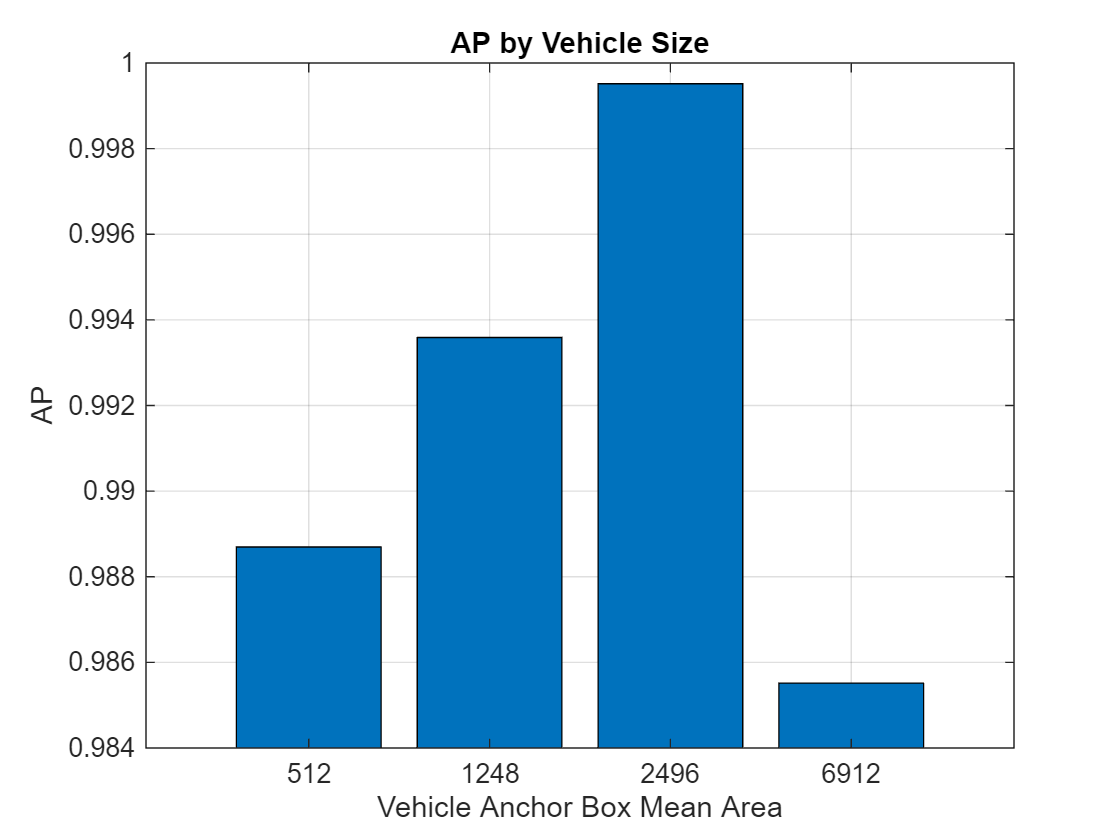
metricsByArea | Compute object size-based detection metrics such as average precision (AP), recall, and precision by grouping detected objects into bins based on their area |
|
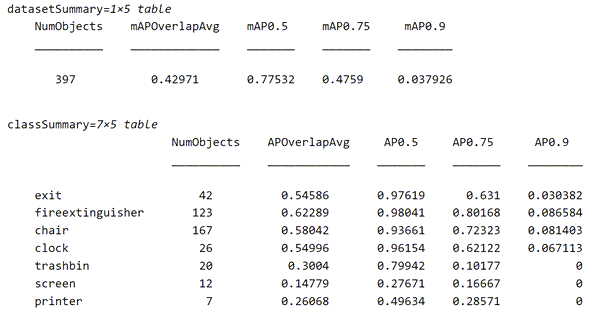
summarize | Compute the summary of the object detection metrics over the entire data set, or over each class |
|
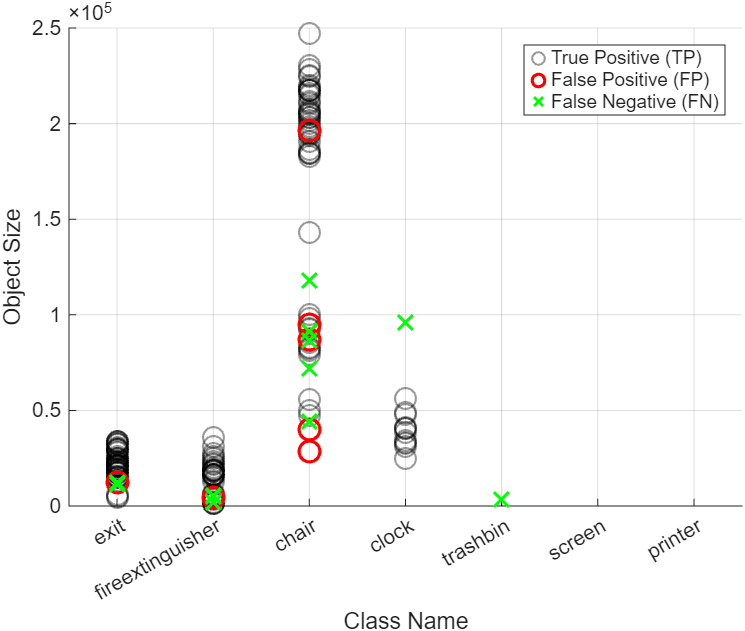
| Compute per-image performance metrics, including precision, recall, and number of TPs, FPs, FNs |
|
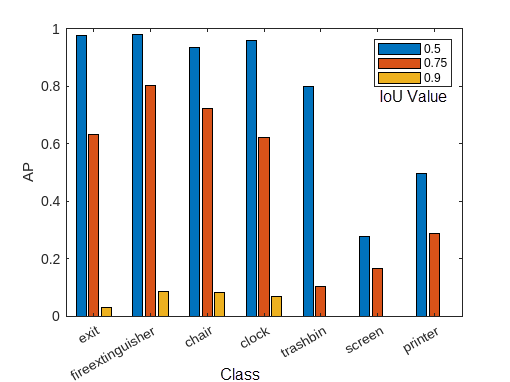
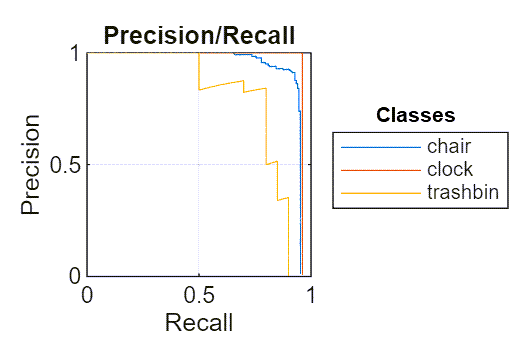
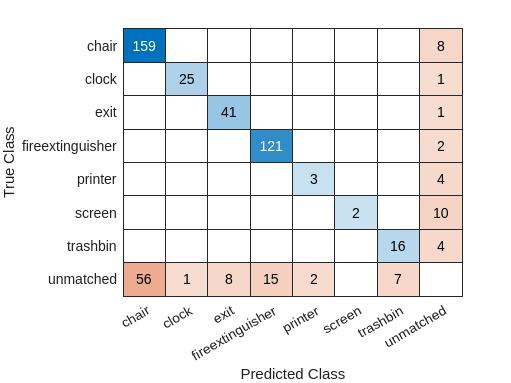
To learn more about performance metrics, see Evaluate Object Detector Performance.
See Also
Apps
Topics
- Get Started with Object Detector Analyzer
- Evaluate Object Detector Performance
- Choose an Object Detector
- Detect Objects Using YOLOX Deep Learning Network (Visual Inspection Toolbox)
- Getting Started with YOLO v4
- Getting Started with YOLO v3
- Getting Started with YOLO v2
- Getting Started with SSD Multibox Detection
- Anchor Boxes for Object Detection

